What should you look for when buying?
For colour-critical work, start with the monitor and colour workflow, then match the desktop to your software, files and available space. Adobe explains the distinct roles of document and monitor profiles, while EIZO identifies a colour sensor as a tool for monitor calibration.
| What to consider |
What should you check? |
Who is this important for? |
| Colour reproduction |
Check that your chosen desktop connects to the monitor you plan to use, and consider how you’ll profile or calibrate the screen. |
If I need to assess product colours before publication or printing, I want to be able to check how they look on screen. Consumers who put colour accuracy first make up around 40% of the group. |
| Memory and storage |
Compare the specific configuration with your software requirements, project size and storage needs. |
If I work with lots of files, I look for memory and storage that suit my editing software and projects. Consumers who prioritise processing power make up around 30% of the group. |
| Space and connections |
Check the dimensions and whether the version you choose has the connections you need for your monitor and other equipment. |
With a small desk, I want to pair a compact computer with a screen of my choice. Consumers who prioritise desk space make up around 20% of the group. |
| Expandability |
Check the specific version on offer and see which upgrade options are available for it. |
If I may want to change my configuration later, expandability matters more to me than a small case. Consumers who prioritise future upgrades make up around 10% of the group. |
Desktops at Joybuy
This selection includes compact desktops and an all-in-one for a home workspace. Compare the screen setup, connections and configuration with your software and colour workflow.
 No image available
Apple Mac mini M6, 24 GB, 512 GB SSD
A compact desktop option for a workspace with a separately selected monitor.
Apple M6 chip with 12-core CPU and 12-core GPU; 24 GB memory; 512 GB SSD.
The product description lists HDMI and Thunderbolt 4, with support for up to three external displays. Check that your chosen monitor works with the connection you want to use.
View at Joybuy
 No image available
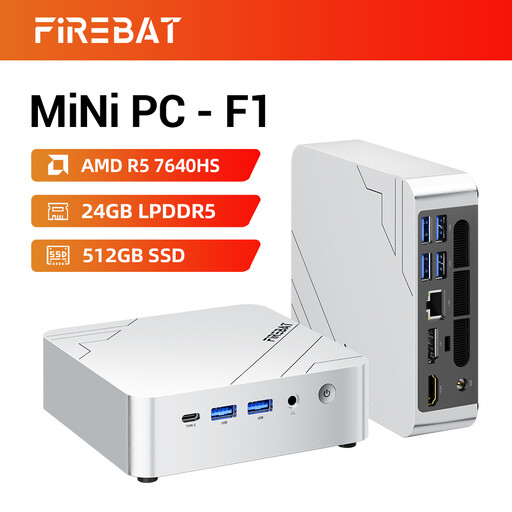
FIREBAT F1 Mini PC, AMD Ryzen 5 7640HS, 24 GB, 512 GB SSD
A mini desktop option for a compact home workspace with a separately selected screen.
AMD Ryzen 5 7640HS with 6 cores and 12 threads; 24 GB LPDDR5 RAM; 512 GB PCIe 4.0 SSD.
The title lists support for 4K output to three screens, plus USB 4.0 and HDMI 2.1 connections. Check that this suits your monitor setup.
View at Joybuy
 No image available
MSI CUBI NUC AI 1UMG-005EU, Intel Core Ultra 7 155H, 16 GB, 1 TB SSD
A compact mini PC for anyone who wants to keep their computer small and use a separate screen.
Intel Core Ultra 7 155H; 16 GB DDR5 memory; 1 TB SSD; Windows 11 Pro.
The product description lists support for up to four displays. Check the connections for your monitor.
View at Joybuy
 No image available
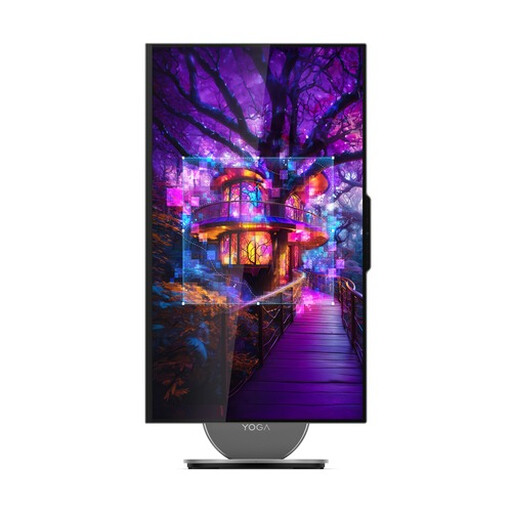
Lenovo Yoga AIO 27IAH10 F0J2001DNY, 27-inch QHD
An all-in-one for anyone who wants to combine the computer and screen in a single setup.
27-inch QHD screen; 16 GB LPDDR5X memory; 1 TB SSD; Intel Core Ultra 7 255H.
The stated screen coverage is 99% sRGB. This figure alone doesn’t confirm calibrated colour accuracy, so include monitor profiling in your workflow.
View at Joybuy
 No image available
Lenovo ThinkCentre M70q Gen 5, Intel Core i7-14700T, 16 GB, 512 GB SSD
A compact desktop option for a workspace with a separate screen.
Intel Core i7-14700T; 16 GB DDR5 memory; 512 GB SSD; Windows 11 Pro.
The description lists DisplayPort output. According to the product information, the power adapter must be purchased separately; check this before ordering.
View at Joybuy
Frequently asked questions
Will a faster desktop automatically make my product colours accurate?
No. A faster desktop alone won’t give you accurate colour reproduction. Monitor and document profiles also play a part, so choose your computer alongside a suitable monitor and set up your colour workflow carefully.
What should I do after connecting the computer and monitor?
Check the monitor profile and calibrate or profile the screen using a method suited to your monitor. Use the right document profiles in your editing software; Adobe explains that document and monitor profiles have different roles.
Should I allow for anything else besides the computer?
You may need a separate monitor and calibration equipment for a complete setup. Lenovo notes that the screen for the ThinkStation P3 Tiny is sold separately, while EIZO describes using a sensor to calibrate a monitor.
What warranty rights do I have in the Netherlands?
If you’re buying as a consumer, the Dutch government states that you’re entitled to a product that meets the terms of the agreement; there is no fixed statutory warranty period. If a fault occurs, you should generally contact the seller. This consumer guidance does not necessarily apply to business purchases.
Can I return a desktop bought online within 14 days?
For an applicable consumer purchase made at a distance, the Dutch government states that in many cases you have a 14-day cooling-off period, subject to exceptions. Before ordering, check whether you’re buying as a consumer and which terms apply; don’t assume the same right applies to a business order.


