If reducing reflections beside a bright window is your main concern, a desktop with a separately chosen screen gives you more freedom to adapt your workspace. An all-in-one may suit you if you want your computer and screen as a single setup, but check the exact screen specification and how it will work in your space. Then choose memory, storage and connections to suit your design software and files. For print work, your colour-management workflow matters too.
Who is this buying guide for?
Designer dealing with window reflections
You work beside a bright window and want to assess text and images without distracting reflections. Screen position, blinds and the screen surface are therefore important considerations. Arboportaal and Apple Netherlands describe requirements for a non-reflective screen and an optional screen finish that Apple says reduces reflections, respectively.
Print designer
You create posters for print and want to assess colour and detail carefully. The right screen and a colour-management workflow are important, as well as the computer itself. EIZO Netherlands describes hardware calibration for the ColorEdge CS2400S.
Designer who multitasks
You use design software and store your work files on the same desktop. You’re mainly looking for the right combination of memory, storage and screen connections. Adobe recommends 16 GB RAM for InDesign; check the requirements for the software version you use too.
What should you look for when choosing?
Desktop with a separate screen
A good fit if: you want to position the screen independently of the computer or choose one separately based on its finish and colour reproduction.
Bear in mind: the screen and any peripherals need to work with the overall setup; check the connections too.
All-in-one with a built-in screen
A good fit if: you want to use your computer and screen as a single setup.
Bear in mind: you have less freedom to replace just the screen or position it differently. Apple says the optional nanotexture on the iMac reduces reflections, but this doesn’t establish how the screen will perform beside your window.
When setting up a desktop for poster design beside a bright window, reflections, colour assessment, your work configuration and the complete setup may each be your main priority.
| Consideration |
What to look for when buying |
Who is this most important for? |
| Reflections beside the window |
Check the finish of the exact screen and whether you can move or adjust it. Assess the light in the space where you plan to use it. |
If daylight from the window gets in the way while you’re designing, you’ll want to focus on reflections and readability. Around 33% of consumers say managing reflections is their main buying priority. |
| Colour assessment for print |
Compare the screen’s calibration options and agree colour profiles and proofing arrangements with your printer. |
If you create posters for print, you’ll want to assess colours as part of a suitable workflow. Around 27% of consumers put colour assessment first. |
| Memory, storage and software |
Check the requirements for your software version, the memory and SSD in the exact configuration, and the screen connection. |
If you use design software with files stored locally, you’ll want a configuration that suits your apps and files. Around 20% of consumers prioritise this work configuration. |
| Complete setup |
Consider the computer, screen, input devices, required connections and service terms as one practical setup. |
If you want to know what you need to get started, the complete workspace matters. Around 20% of consumers put the overall setup first. |
Common buying mistakes
-
Focusing only on the computer and forgetting about the window
A faster processor won’t reduce reflections on your screen.
First decide where the screen will go and how the light falls. Then compare the computer and screen as one setup.
-
Assuming a wide colour gamut guarantees accurate print colours
A screen specification alone doesn’t tell you how a poster will look when produced using a particular print workflow.
Check the calibration options and agree proofing and output profiles with your printer.
-
Comparing a desktop without a screen to a complete all-in-one
A mini PC and an all-in-one don’t include the same parts of a workspace.
Check what’s included with each configuration and factor in the screen and required connections when making your choice.
Relevant brands to consider
Apple
Apple offers both an all-in-one with a built-in screen and a Mac mini to use with a screen you choose separately.
- Apple specifies a built-in 24-inch 4.5K screen for the iMac M4. Apple says the optional nanotexture reduces reflections.
- The claim about reflections doesn’t establish how the screen will perform in a particular spot beside a window. With the Mac mini, you’ll need to choose a suitable external screen.
Lenovo
The ThinkCentre M90q Gen 5 is a compact Windows desktop for anyone who wants to choose a separate screen.
- Lenovo offers various configurations, with options including different processors, memory and SSDs.
- Compare the exact configuration and don’t assume a suitable design screen is included without checking.
HP
The Z1 Tower G1i is a configurable Windows workstation desktop to consider when comparing desktop setups.
- HP lists options for memory, storage and graphics cards.
- HP also mentions applications such as CAD and 3D, but that doesn’t automatically mean you need a more powerful configuration for 2D poster design. Assess the screen separately.
Dell
Dell offers desktop workstations, while UltraSharp is a separate monitor range to consider alongside a computer.
- According to its Dutch product information, Dell also targets its workstation range at creative applications.
- Dell lists an anti-glare coating and colour coverage for the U2723QE, but marks this specific monitor model as unavailable. These features don’t automatically apply to all UltraSharp screens.
EIZO
ColorEdge is a range of separate screens for anyone considering colour assessment when choosing a desktop.
- EIZO specifies hardware calibration via ColorNavigator for the CS2400S and lists connections including HDMI and DisplayPort.
- A ColorEdge screen isn’t a complete desktop computer. A calibratable screen alone can’t guarantee a match with the printed result.
Joybuy desktops for a separate screen
These desktops suit a setup where you choose the screen separately and position it beside the window.
 No image available
Apple Mac mini M6, 16 GB, 256 GB SSD
Suited to a workspace where you want to choose the screen separately; Apple specifies support for up to three external screens.
12-core CPU and 12-core GPU.
16 GB memory and 256 GB SSD.
Joybuy
No image available
Apple Mac mini M6, 16 GB, 512 GB SSD
Suited to a workspace where you want to choose the screen separately; Apple specifies support for up to three external screens.
12-core CPU and 12-core GPU.
16 GB memory and 512 GB SSD.
Joybuy
No image available
Apple Mac mini M6, 24 GB, 512 GB SSD
Suited to a workspace where you want to choose the screen separately; Apple specifies support for up to three external screens.
12-core CPU and 12-core GPU.
24 GB memory and 512 GB SSD.
Joybuy
 No image available
Shark Bloodlust R700 Gaming PC RX9070/R7/16G/1TB
This desktop PC suits a setup where you choose the screen separately; check that the connections on the exact configuration match the monitor you want to use.
The product name lists 16 GB memory and 1 TB storage.
Joybuy
 No image available
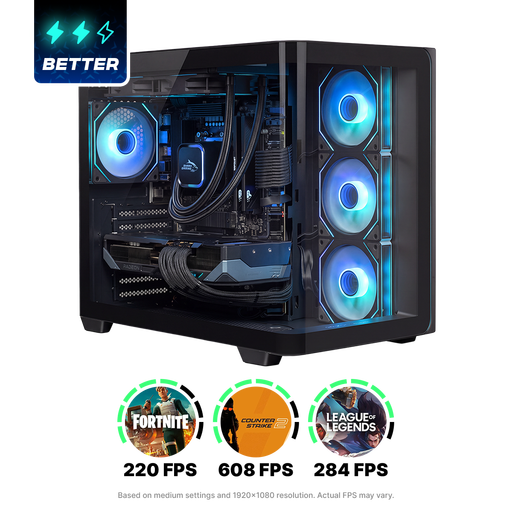
Shak RGBeast R700 Gaming PC RX9070XT/R7/16G/1TB
This desktop PC suits a setup where you choose the screen separately; check that the connections on the exact configuration match the monitor you want to use.
The product name lists 16 GB memory and 1 TB storage.
Joybuy
Frequently asked questions
Does turning up screen brightness alone help with reflections beside a window?
No. Start by checking where the window is reflected on the screen and see whether you can adjust the screen position or blinds. Apple offers optional nanotexture for the iMac, which Apple says reduces reflections; this doesn’t establish what effect it will have in your workspace.
What should I check when connecting a separate monitor to a mini PC?
Compare the output on the exact computer with the input on the monitor, and work out which cable you’ll need. Apple specifies support for external screens on the Mac mini M6; EIZO lists HDMI and DisplayPort among the connections on the CS2400S.
How do I match a screen to posters that will be printed?
Check the screen’s calibration options and agree colour profiles and proof assessment with your printer, based on the intended print output. EIZO describes hardware calibration for the CS2400S, but this screen feature doesn’t guarantee that every print will match.
How much memory do I need for InDesign?
Adobe recommends 16 GB RAM for InDesign. Check the requirements for the version you use, and consider your files and any other programmes you have open at the same time.


