What should you look for in a shared workstation?
Start with your software and working methods, then work out what screen and connectivity equipment you need. Finally, plan for shared use and support.
Mini PC
Choose this when: you already have a suitable monitor and mainly work in a browser or with compatible office software.
Bear in mind: a mini PC is a computer without an integrated screen. Also check the ports and upgrade options available on the specific configuration.
All-in-one
Choose this when: the shared workstation needs both a computer and a screen.
Bear in mind: the screen and computer are combined in one device, so consider the screen, viewing position and configuration together.
Tower or larger desktop
Choose this when: your chosen local software or planned upgrades justify a larger case and you have room for one.
Bear in mind: this setup takes up more space. Don’t buy one just because it has an AI label or in the hope of better identification.
| What to consider |
What to look for when buying |
Who is this important for? |
| Software and photo workflow |
Note the application you use, the operating system and whether photos are processed on a website or locally. Check the requirements for the specific application. |
If I want to know in advance how the photos and identification software will be used, I can choose a system that suits those needs. Around 36% of consumers say their photo workflow and software are their main buying concern. |
| Shared use |
Check whether you can set up separate user accounts, access rights, updates and backups. |
If colleagues use the same PC, I want to be able to separate their access and files appropriately. Around 29% of consumers say shared use and management are their main buying concern. |
| Workstation setup |
Before choosing a configuration, check what monitor, video cables and input devices are available, along with any spare ports. |
If I’m setting up a permanent workstation, I want to know whether a screen is already available or comes with the computer. Around 21% of consumers say their screen and desk setup are their main buying concern. |
| Purchase and support |
Check which components are included, who the legal purchaser is and what support arrangements are confirmed in writing. |
If I’m buying for the office, I want to assess the complete workstation and support before placing an order. Around 14% of consumers say the purchase and support are their main buying concern. |
Joybuy products for this workstation
This selection includes all-in-ones with an integrated screen, as well as mini PCs and towers for workstations with a separate monitor. Check the operating system you need for your chosen application and which peripherals are already available.
 No image available
Acer Aspire C24-A WI5418 NL all-in-one PC
A good fit if you want to combine a computer and screen in one permanent setup.
23.8-inch FHD IPS screen, Intel Core 5 120U, 16 GB DDR5, 1 TB SSD and Windows 11 Home.
Joybuy
 No image available
ASUS Ascent GX10 GX10-GG0003BN GB10-128 mini PC
A good fit for a workstation that already has a separate monitor. Check in advance that your chosen software works on the system.
128 GB LPDDR5x memory and a 1 TB SSD. The user guide explains how to connect a separate monitor.
Joybuy
 No image available
FIREBAT F1 mini PC with AMD Ryzen 5 7640HS
A good fit for a separate-screen setup. Check that the ports work with the monitor and equipment you want to use.
24 GB LPDDR5 memory, 512 GB PCIe 4.0 SSD and support for output to three screens according to the product title. The computer sits separately from the screen.
Joybuy
 No image available
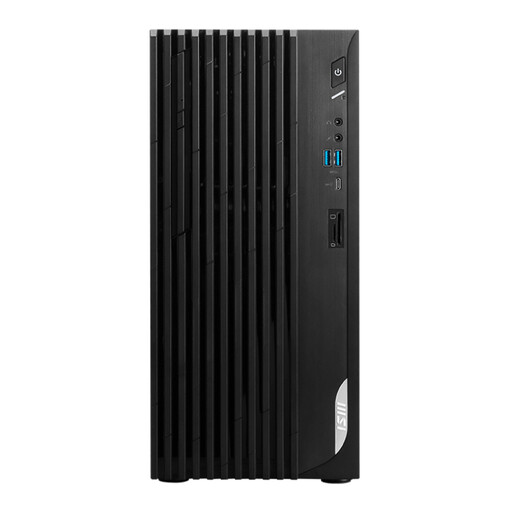
MSI PRO DP180 14A-824EU tower desktop
A good fit if you have room for a tower and use a separate monitor. This configuration therefore needs a suitable screen setup.
Intel Core i5-14400, 8 GB DDR4 memory, 512 GB SSD, Windows 11 Home and HDMI, DisplayPort and VGA outputs.
Joybuy
 No image available
MSI Modern AM273QP AI 1UM-061EU all-in-one PC
A good fit if you want to combine a computer and screen at a permanent workstation. Check that your chosen application works with Windows.
27-inch IPS screen with 2560 × 1440 pixels, Intel Core Ultra 5 125H, 16 GB DDR5, 1 TB SSD and Windows 11 Pro.
Joybuy
Frequently asked questions
Does the desktop need to carry out AI species identification itself?
Not if you use Waarneming.nl’s image recognition through its website. However, check the system requirements if your team chooses a different application that runs locally. ObsIdentify is designed for wild animals and plants, not houseplants or garden plants.
How can you take plant photos that are useful for identification?
Waarneming.nl recommends including the flower, leaves and stem in the photo. An identification suggestion isn’t a definitive identification: check the features yourself, especially if you’re unsure about the result.
Can colleagues have their own files and settings on a shared Windows PC?
Yes. Microsoft Support explains how to set up separate user accounts on one Windows device. Make sure access rights and maintenance are also set up appropriately. If your organisation processes personal data, it must protect that data properly.
What warranty and cooling-off period apply if the office buys the computer?
That depends on who the legal purchaser is. Ondernemersplein distinguishes between consumer and business purchases: statutory consumer guarantees and the cooling-off period don’t automatically apply to purchases between businesses. Agree the service and warranty arrangements when buying for a business.
Can you store photos containing personal data on a shared computer without taking any precautions?
No. You need to assess how the data is processed and protected. The Dutch Data Protection Authority states that organisations must protect personal data properly. Decide which access restrictions and other measures are appropriate for the specific processing involved.


