The best desktop for you depends on your screen, photo files and desk space. Choose a mini PC if you already have a suitable monitor, an all-in-one if you want to choose your computer and screen together, or a tower if you want to be able to upgrade components separately. Then check the exact configuration and available storage. Adobe recommends 16 GB RAM or more for Photoshop 27.x, but this isn’t a universal minimum requirement for every photo-editing app.
Who is this guide for?
Editor of large photo batches
You regularly work with lots of product photos or larger files, and want a smooth editing and export workflow above all. Adobe and Lenovo Netherlands explain why memory and the demands of batch editing are worth considering.
Colour-critical product photographer
You assess product colours for publication or print and want to choose your computer, screen and colour profiles together. Adobe explains how a monitor profile helps with colour management.
Photo editor with limited desk space
You want a permanent photo-editing workspace without a large computer case, and are comparing a mini PC with an all-in-one. Apple Netherlands and ASUS Netherlands describe models where the choice of screen and included components differ.
What should you consider when choosing?
Mini PC with a separate screen
Choose this if: you have limited desk space or already own a suitable monitor.
Trade-off: you’ll need a separate screen; an ASUS NUC 14 Pro kit may also be supplied without memory, storage or an operating system.
All-in-one
Choose this if: you want to choose your computer and screen at the same time, and the screen specifications suit your colour workflow.
Trade-off: the screen choice is fixed on the 24-inch iMac we looked at; Apple Netherlands lists a 4.5K display with P3 colour support.
Tower with a separate screen
Choose this if: you have enough space and want to be able to choose the memory, storage and screen separately.
Trade-off: the case takes up more space; the base configuration of the Lenovo ThinkCentre Neo 50t Gen 5 we looked at has 8 GB RAM and a 256 GB SSD.
| Consideration |
What to look for |
Who considers this more important? |
| Smooth editing and exporting |
Check your software requirements and the exact processor, RAM and SSD configuration. Adobe recommends 16 GB RAM or more for Photoshop 27.x. |
When working with large photo batches, I want editing and exporting to fit smoothly into my workflow. Around 36% of consumers say speed is their top priority. |
| Assessing colour |
Check the screen, connections and how you use colour profiles in your software. |
If product colours need to be accurate for publication, I want to assess the screen and colour management together; around 27% of consumers put colour accuracy at the top of their list. |
| Files and temporary storage |
Check the SSD capacity and available space after installation, as well as options for additional storage. |
When I’m storing and editing large photo files, I want enough room for files and temporary storage. Around 19% of consumers say storage space is their main buying concern. |
| Desk space |
Compare the space required, included components and screen ports for the exact model. |
At a small desk, I want to know whether the screen is included and whether the computer will fit; around 18% of consumers put space requirements first. |
Common buying mistakes
-
Assuming a mini PC kit is a ready-to-use desktop
The ASUS NUC 14 Pro is available in fully equipped models as well as kits that may not include memory, storage or an operating system. This means your chosen kit may not be ready to use straight away.
Check what’s included with the exact model and which components you’ll still need.
A kit may require additional components and a separate screen.
-
Choosing based on processor power alone
A powerful computer on its own won’t make colours look the same on different screens. Adobe explains how a monitor profile helps convert image colours to the screen’s colour space.
Consider the screen, connection and colour management alongside the computer.
A mini PC may need a suitable separate screen for your colour workflow.
-
Not allowing for enough free SSD space
Photo files and temporary editing files take up storage space. Adobe recommends 100 GB of available disk space for Photoshop and explains how to use a scratch disk for temporary files.
Check how much space will be left after installation, and allow for your photo archive and temporary files.
As your photo files grow, you may need additional storage.
Brands to compare
Apple
Worth considering if you’re looking for a compact computer with a screen you choose yourself, or an all-in-one with a built-in screen.
- For the Mac mini M6 base model we looked at, Apple Netherlands lists 16 GB unified memory and a 256 GB SSD; the 24-inch iMac M4 has a 4.5K P3 display.
- The Mac mini requires a separate screen. Check the exact iMac model and whether its fixed screen choice suits your workflow.
HP
The OmniDesk Slim model we looked at is a compact desktop option.
- HP lists 16 GB RAM and a 512 GB SSD for the OmniDesk Slim S03-0606nd.
- These specifications apply to that model and don’t, on their own, demonstrate photo-editing performance.
ASUS
The NUC 14 Pro range is worth considering if you want a small Windows mini PC or want to build your own kit.
- The range includes several models for a compact desktop setup.
- ASUS distinguishes between models with memory and storage pre-installed and kits that may not include components or an operating system. Check the full model name and what’s included.
Lenovo
The ThinkCentre Neo 50t Gen 5 is a configurable tower option if you have room for a larger case and a separate screen.
- The product range includes a tower configuration to compare with mini PCs and all-in-ones.
- The Dutch base configuration we looked at has 8 GB RAM and a 256 GB SSD. Don’t assume it has more memory or storage without checking the model you’ve chosen.
Joybuy products for photo editing
This selection includes compact Mac minis for use with a separate screen and tower desktops for a permanent workspace.
 No image available
Apple Mac mini M6, 16 GB, 256 GB SSD
A compact desktop option if you have a small workspace and can use a suitable separate screen.
Apple M6 chip with 12-core CPU and 12-core GPU; 16 GB unified memory; 256 GB SSD. A separate monitor is required.
View at Joybuy
No image available
Apple Mac mini M6, 16 GB, 512 GB SSD
Suited to a compact workspace where you can choose a suitable monitor yourself.
Apple M6 chip with 12-core CPU and 12-core GPU; 16 GB memory; 512 GB SSD. A separate monitor is required.
View at Joybuy
No image available
Apple Mac mini M6, 24 GB, 512 GB SSD
A compact option if you use a separate screen and the listed memory and storage configuration suits your workflow.
Apple M6 chip with 12-core CPU and 12-core GPU; 24 GB memory; 512 GB SSD. A separate monitor is required.
View at Joybuy
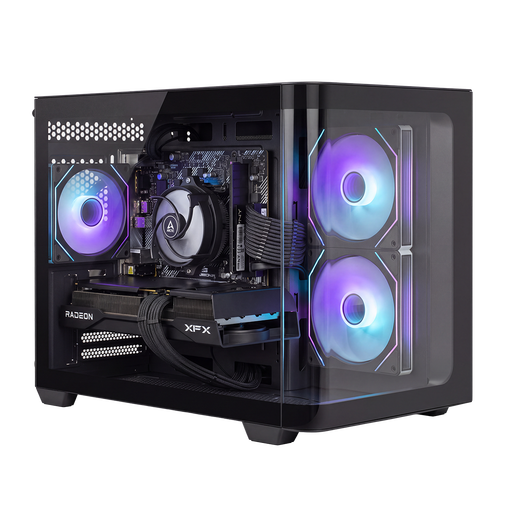 No image available
Shark Bloodlust R700 Gaming PC RX9070/R7/16G/1TB
A tower desktop to compare if you have room for a larger case and want the option to upgrade components later.
Ryzen 7 processor; Radeon RX 9070 GPU; 16 GB memory; 1 TB NVMe SSD. Memory and storage are upgradeable, according to the product description.
View at Joybuy
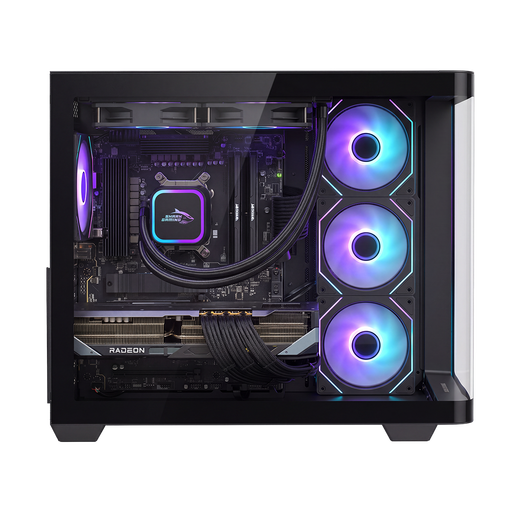 No image available
Shak RGBeast Gaming PC R700 RX9070XT/R7/16G/1TB
A tower desktop for a permanent workspace, if the case fits and the listed configuration is suitable for your editing software.
Ryzen 7 9800X3D processor; Radeon RX 9070 XT with 16 GB graphics memory; 16 GB memory; 1 TB NVMe SSD.
View at Joybuy
Frequently asked questions
Is 16 GB RAM essential for editing product photos?
No, not as a general requirement. Adobe lists 8 GB as the minimum for Photoshop 27.x and recommends 16 GB or more. Also check the requirements for the software and version you use.
How do I set up colour display after installation?
Use a suitable screen and set up colour management and a monitor profile for your software. Adobe explains that a monitor profile shows how image colours are converted to the screen’s colour space.
Which components might still be missing from a mini PC?
It depends on the model. A mini PC may require a separate screen; an ASUS NUC 14 Pro kit may also be missing memory, storage or an operating system. Before buying, check what’s included with the exact model.
Does the statutory right to cancel also apply to business purchases?
If you’re buying for business, don’t assume the same cancellation rules apply as for a private online purchase. Business.gov.nl distinguishes between business and private customers, so check the terms and conditions of your purchase before buying.


