
Vandaag of morgen in huis

Kwaliteit gegarandeerd

Welkomstaanbiedingen ontgrendelen: GRATIS bezorging | Tot 80% korting | Gratis 30 dagen JoyPlus-proefperiode
Download de app
Buying a desktop PC seems straightforward until you start comparing specifications. Many models boast a fast processor, AI features or a powerful graphics card, but that doesn’t automatically mean the computer is right for your workspace, games or software.
Most disappointing purchases come down to three common pitfalls:
Below, we compare the key choices to help you decide.
A multi-core processor is useful for multitasking, video editing and demanding software. For a PC for working from home, a modern Core 5, Core Ultra 5 or Ryzen 5 processor with 16 GB RAM is often a practical starting point. If you stream, edit or work with large files at the same time, you may benefit from a Core Ultra 7 or Ryzen 7 with 32 GB of memory.
Also consider the generation and type of memory. DDR5 is a newer standard than DDR4, but total capacity and upgrade options are just as important. Some compact models have memory that’s built in and cannot be replaced. That could be limiting if you need more memory later.
Integrated graphics are suitable for office work, videos and light creative tasks. For modern games, 3D software and video editing, you’ll usually need a dedicated graphics card.
The model name alone doesn’t tell you everything. Check the amount of video memory, the ports and the recommended power supply too. An RTX 5090 PC, for example, needs a roomy case, effective cooling and a suitable power supply.
An NVMe SSD will generally start Windows and programmes faster than a traditional hard drive. For everyday use, 512 GB is a useful starting point; gamers and content creators will often be better off with 1 TB or 2 TB.
Also check:
An all-in-one PC combines the screen and computer in a single case. This saves space and reduces cable clutter, but it’s often harder to upgrade than a tower. A mini PC is even more compact and suits a small workspace, while a gaming desktop PC usually offers better cooling and upgrade options.
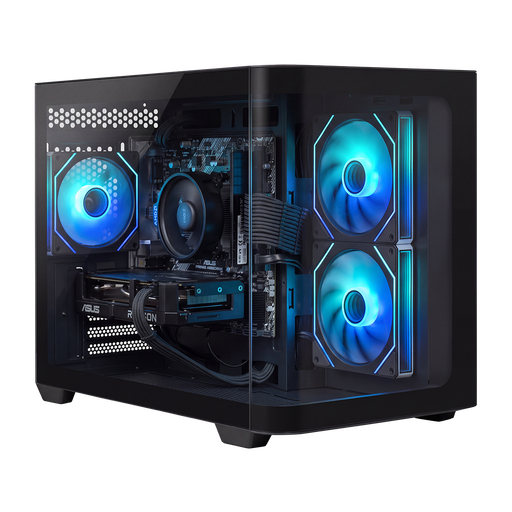
Why it suits this user: The Ryzen 5 5500, 16 GB DDR4 and Radeon RX 9060 are geared towards Full HD gaming, everyday use and streaming. Windows 11 Home is pre-installed, according to the product specifications.
The specifications clearly list the processor, graphics card, storage and power supply. Do check whether 500 GB of storage is enough for your games and programmes.
16 GB DDR4, 500 GB NVMe SSD, Radeon RX 9060 with 8 GB of video memory and a compact case.

Why it suits this user: This RTX 5090 PC pairs a Ryzen 9 9900X3D with 32 GB DDR5, 2 TB of NVMe storage and a 1200W 80+ Gold power supply. It’s well suited to 4K gaming, rendering and demanding multitasking.
The power supply and 360mm liquid cooling are suited to the powerful components. Before buying, check that you have enough room for this tower on your desk.
RTX 5090 with 24 GB GDDR7, Ryzen 9 9900X3D, 32 GB DDR5 and 2 TB of storage.
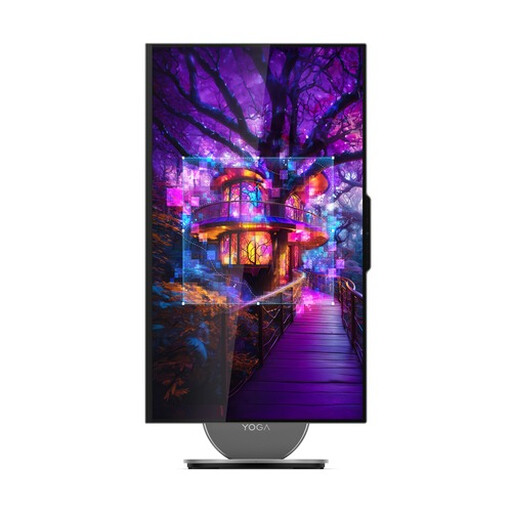
Why it suits this user: This all-in-one PC combines a 27-inch QHD screen with a 120Hz refresh rate, 16 GB LPDDR5X, a 1 TB SSD, a webcam, JBL audio and Windows 11 Home.
The screen, computer, camera and speakers are all integrated. That means fewer separate devices and cables in your home office.
27-inch QHD IPS screen, 1 TB PCIe 4.0 SSD, Wi-Fi 7 and HDMI 2.1 input.
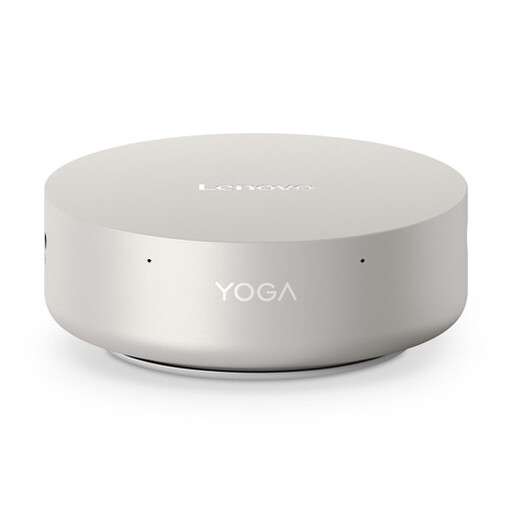
Why it suits this user: This mini PC has a 0.65-litre chassis, 16 GB LPDDR5X, a 512 GB SSD, Wi-Fi 7 and support for up to four screens.
The compact size is clearly specified. Bear in mind that the memory is built in, which can limit your upgrade options.
0.65-litre capacity, two Thunderbolt 4 ports, 2.5Gb Ethernet and support for four screens.
We’ve put together a complete, up-to-date list of products that meet these strict selection criteria and current European safety requirements.
Its lifespan depends on how you use it, how well you maintain it and whether you can upgrade it. An office PC can remain useful for several years. With gaming PCs, the graphics card and storage can become outdated more quickly as software requirements change. Choose a model with enough RAM, spare storage capacity and a case that allows good airflow.
Power consumption is mainly determined by the processor, graphics card and how long you use the PC. A mini PC generally uses less power than a powerful gaming desktop PC, while an RTX 5090 PC can draw considerably more under heavy load. Check the power supply’s wattage and switch the computer off when you’re not using it.
Usually, yes. Connect the monitor to the right port, plug in the keyboard and mouse, connect an Ethernet cable or set up Wi-Fi, then follow the Windows installation steps. With a gaming PC that has a dedicated graphics card, you’ll usually need to connect the monitor to the ports on the graphics card, not those on the motherboard.
