
Vandaag of morgen in huis

Kwaliteit gegarandeerd

Welkomstaanbiedingen ontgrendelen: GRATIS bezorging | Tot 80% korting | Gratis 30 dagen JoyPlus-proefperiode
Download de app
Buying a desktop PC seems straightforward until you start comparing specifications. A powerful graphics card doesn’t tell you everything about performance, lots of ports aren’t always practical, and a low price can come with limited upgrade options. Whether you’re a gamer, work from home, study or create content, choosing the right PC is all about balancing the processor, graphics card, storage, size and warranty.
It’s also worth checking exactly what you’ll receive. Does it come with Windows 11 Home, or an evaluation version? Is Wi-Fi built in? How much storage will be left after installation? And will the computer fit on or under your desk? These checks can help you avoid paying for features you won’t use.
With a gaming PC, the GPU often gets the most attention. An RTX or Radeon card plays a big part in image quality, but the processor, RAM and cooling matter too. Even a powerful RTX gaming PC may not be as enjoyable to use if it has little RAM or a small SSD.
So, look at how the components work together:
Some models come with Windows 11 Trial or Evaluation Version. This isn’t the same as a permanent, fully activated Windows licence. Check the product page before you order. For a desktop PC with Windows 11 Home, the software version is usually described more clearly, but always check the latest product information.
A tower usually has more room for extra storage, memory or a different graphics card. A mini PC takes up very little space, but its components are often harder to replace. An all-in-one PC saves on cables, but the screen and computer are combined in a single unit.
Also check:
A Ryzen gaming PC with a Ryzen 7 processor is designed for high frame rates and multitasking. An Intel Core Ultra configuration may suit users who want to use office software, make video calls or run creative applications as well as play games. Processors can vary considerably, even within the same range, so compare the exact model rather than just the brand name.
For working or studying at home, 16 GB of RAM and a 512 GB SSD are often enough. If you use lots of browser tabs, video-editing software or virtual machines, 32 GB of RAM will serve you better.
A mid-range graphics card may be suitable for Full HD gaming. For 1440p or 4K, you’ll need more graphics power. RTX 5070, RTX 5080 and RTX 5090 cards are listed in the specifications of various models, but your actual experience will also depend on the game, settings and monitor.
Check the amount of video memory. 8 GB, 12 GB, 16 GB and 24 GB aren’t interchangeable, particularly at high resolutions or with large textures. Look at ray tracing and DLSS as features supported by the manufacturer; the actual benefits vary by game and configuration.
A gaming desktop PC with liquid cooling or multiple fans may be suited to long periods of heavy use, but that doesn’t automatically make it quiet. Check the radiator size, air intake and recommended clearance around the case.
The power supply needs to match the components. Product information lists power supplies of 650 W, 750 W, 850 W and 1200 W, among others. Don’t just look at the wattage: check the 80 Plus rating, connectors and power supply model too.
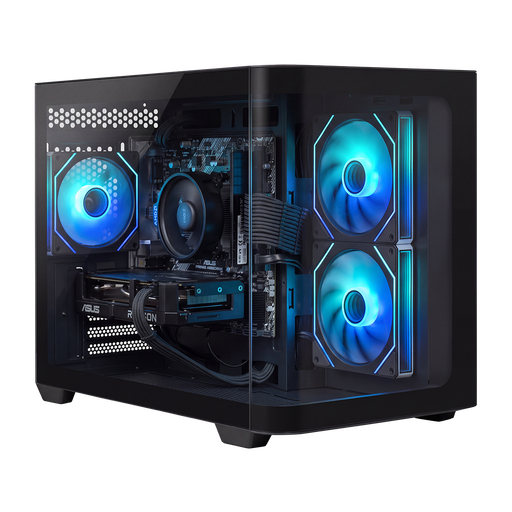
Why it suits this type of user: The combination of a Ryzen 5 5500, Radeon RX 9060, 16 GB DDR4 and 500 GB NVMe SSD is geared towards Full HD gaming and everyday use.
The specifications clearly list the processor, GPU, RAM, storage and Windows 11 Home, making it easy to check the basic configuration.
16 GB DDR4, 500 GB NVMe SSD, 650W 80+ Bronze power supply and a compact case.
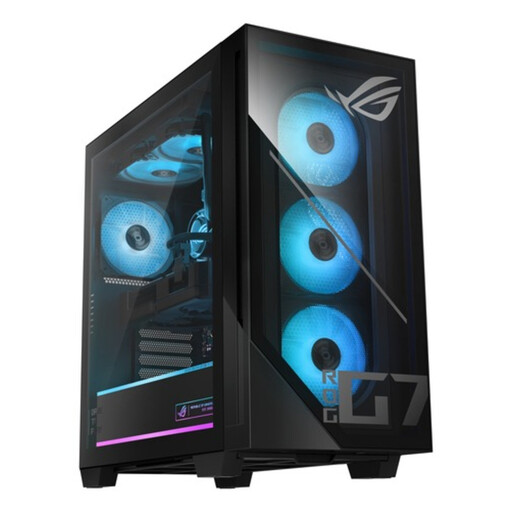
Why it suits this type of user: This ASUS gaming PC pairs an Intel Core Ultra 7 265F with an RTX 5070 12GB, 32 GB DDR5 and a 1TB PCIe 4.0 NVMe SSD.
The key components are specified, including the 850W 80+ Gold power supply, liquid cooling and Windows 11 Home.
32 GB DDR5, RTX 5070 with 12 GB GDDR7 and liquid cooling.

Why it suits this type of user: According to the product information, the Ryzen 9 9900X3D, RTX 5090 with 24 GB of video memory, 32 GB DDR5 and 2TB NVMe SSD are designed for gaming, content creation and demanding multitasking.
The configuration lists more than just the GPU: it also specifies the power supply, storage, processor and 360mm cooling. Make sure you really need this level of performance.
2TB NVMe SSD, RTX 5090 with 24 GB GDDR7 and 1200W 80+ Gold power supply.
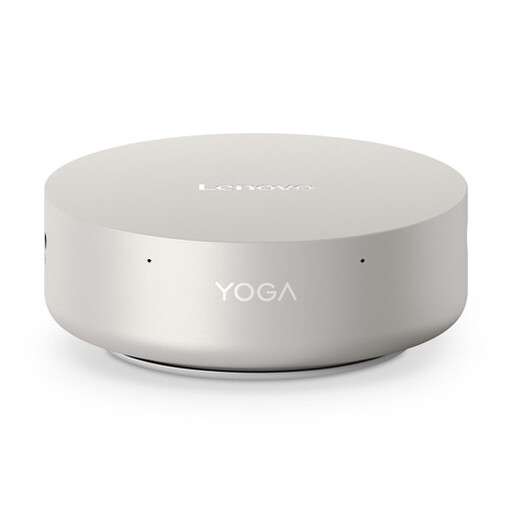
Why it suits this type of user: Its approximately 0.65-litre case, 16 GB LPDDR5X, 512GB SSD and support for up to four displays make it a good fit for a small home office.
The compact size and ports are clearly specified. Bear in mind that the product information says the memory is soldered in.
Wi-Fi 7, 2.5GbE, two Thunderbolt 4 ports and Windows 11 Home.
We’ve put together a complete, up-to-date list of products that meet these strict selection criteria and the applicable European safety requirements.
The price depends on what you’ll use it for. A basic PC for working from home needs less graphics power than a PC for 4K gaming or demanding content creation. Compare the processor, graphics card, RAM and SSD first, rather than focusing only on the total price.
A desktop can remain useful for several years, depending on how heavily you use it, how well you maintain it and whether it can be upgraded. A tower with spare memory slots and extra M.2 slots will usually give you more options for adding storage or RAM later. Keep the ventilation openings free of dust, and don’t place the system directly against a wall.
A mini PC with integrated graphics is best suited to office work, streaming, studying and light use. For modern games at high settings, a dedicated graphics card is usually a better choice. Before choosing a mini PC for gaming, always check the GPU, cooling system and resolution you want to play at.
