
Vandaag of morgen in huis

Kwaliteit gegarandeerd

Welkomstaanbiedingen ontgrendelen: GRATIS bezorging | Tot 80% korting | Gratis 30 dagen JoyPlus-proefperiode
Download de app
Buying a desktop PC may seem straightforward, until you discover that many models are sold without clear explanations. A low price, for example, may mean that you still need to buy additional RAM, storage or an operating system later. A powerful processor also does not automatically mean that a computer is suitable for gaming or professional software.
With this practical buying guide, you can compare desktops based on verifiable specifications. This helps you avoid surprises when installing, upgrading and using your new computer every day.
A barebone PC does not always include RAM, storage or an installed operating system. This offers flexibility, but you need to check which components are required yourself. For example, the MSI PRO DP180 supports up to 64 GB of DDR4 memory, and its case supports M.2 and SATA storage, but the operating system is not installed.
Include the cost of RAM, an SSD and Windows before comparing the price with that of a complete Windows 11 PC.
An Intel Core i7 or AMD Ryzen 7 may sound appealing, but performance also depends on the processor type, graphics chip, RAM and cooling. A compact mini PC with integrated graphics is suitable for office work and streaming, but not automatically for demanding 3D games.
Always check the full configuration. Look at RAM, the type of storage, the graphics card and the available connections.
A compact desktop PC saves space, but may offer fewer upgrade options. With an all-in-one PC, the screen and computer are integrated. This keeps your desk tidy, but replacing or upgrading the screen later is less flexible.
Also pay attention to the power supply. For some all-in-one models, the product information states that the charger is not included as standard and must be purchased separately. Check this before placing your order.
For browsing the internet, word processing, video calls and studying, an entry-level processor is often sufficient. For running many programmes at once, photo editing or business software, a processor from a higher series is a more sensible choice.
Do not just look at the number of GHz. Also check the number of cores, threads and whether a dedicated GPU is included.
For basic use, 8 GB is usable, but 16 GB RAM gives you more room for browser tabs, video calls and office programmes running at the same time. For creative software, virtual machines or more demanding games, 32 GB or more may be the better choice.
Also check whether the memory can be upgraded. The MSI Cubi N ADL S-078EU has 4 GB of DDR4 and supports up to 16 GB. The ASUS ExpertCenter P400 AiO has 16 GB of DDR5 and supports up to 32 GB. With some all-in-one models, replacing all or part of the memory is less straightforward.
A desktop PC with an SSD starts up faster than a system with only a traditional hard drive. For documents and programmes, 256 GB is a practical minimum, while 512 GB or 1 TB gives you more room for photos, videos and games.
Pay attention to the difference between an M.2 NVMe SSD and SATA storage. NVMe uses PCIe and is generally designed to provide higher transfer speeds. Also check whether a spare slot is available if you want to upgrade later.
An all-in-one PC is suitable if you want a tidy desk and need a screen, webcam and speakers straight away. A mini PC is a good fit for a small student room, home office or meeting room. For gaming and demanding graphics work, a gaming PC with a dedicated graphics card is the more logical starting point.
For business use, connections, network connectivity, warranty terms and manageability are often more important than lighting or appearance. A business desktop PC with Windows 11 Pro may therefore be better suited to business software than a consumer model with Windows 11 Home.
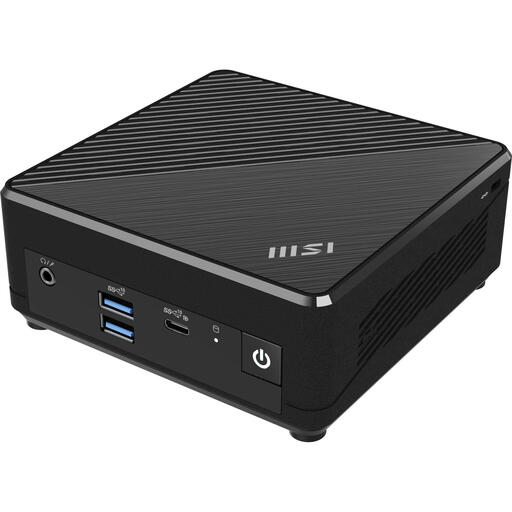
Why it suits this profile: This mini PC takes up very little space and comes with Windows 11 Pro, a 128 GB SSD and Wi-Fi 5. It is well suited to basic work, studying and simple home-office tasks.
The configuration clearly lists the processor, 4 GB of RAM, SSD capacity and operating system. Do check whether 4 GB is sufficient for your programmes.
Compact dimensions of 124 × 124 × 53,7 mm, VESA mounting and two LAN ports.
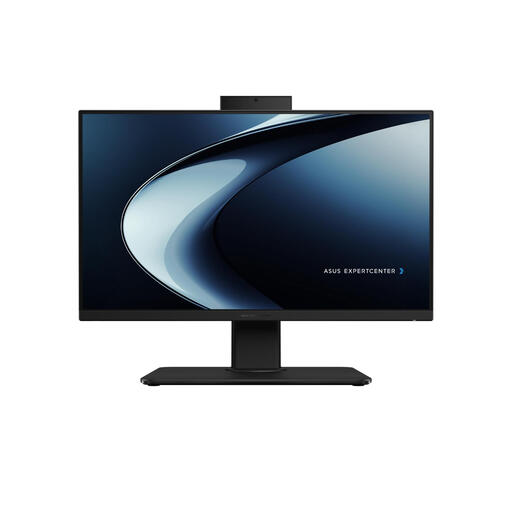
Why it suits this profile: The combination of a Full HD screen, Intel Core i7-13620H, 16 GB DDR5 and a 1 TB SSD is suitable for working from home, video calls and multitasking.
The key components are listed together. Before buying, check the information about the charger, which must be purchased separately.
23.8-inch matt screen, built-in webcam and Wi-Fi 6.
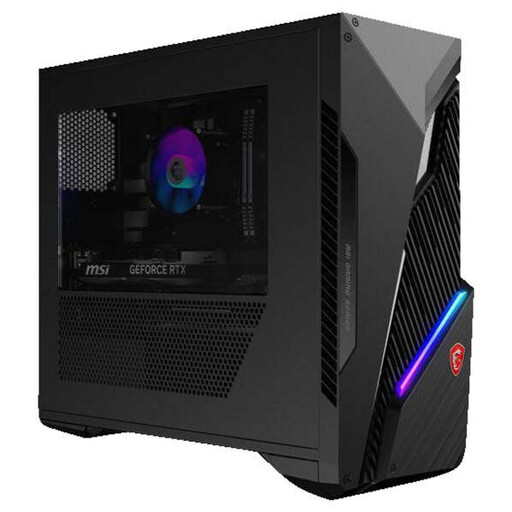
Why it suits this profile: This gaming PC combines an Intel Core i5-14400F, 16 GB of RAM, a 1 TB SSD and an NVIDIA GeForce RTX 5060 Ti 8G for more demanding graphics work and gaming.
The dedicated graphics card is clearly specified. This shows the difference compared with mini PCs that use integrated graphics only.
RTX 5060 Ti 8G, upgradeable 16 GB U-DIMM memory and Wi-Fi 6E.
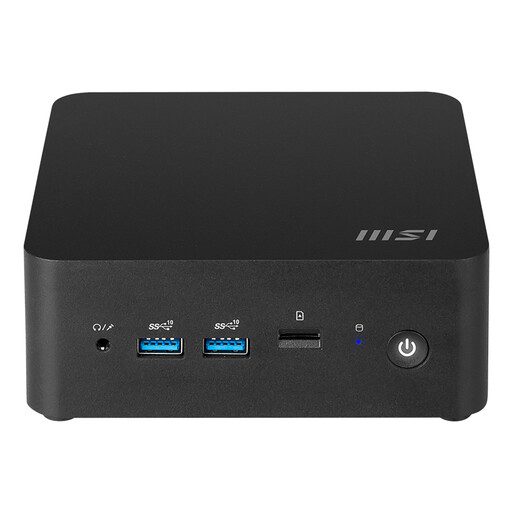
Why it suits this profile: With a volume of 0.52 litres, Windows 11 Home, two HDMI ports and VESA mounting, this mini PC is well suited to flexible office and home-working spaces.
The storage options, memory limit and connections are specified. However, the barebone label means you still need to check the complete configuration.
Intel Core Ultra 7 155H, support for up to 64 GB of DDR5 and Wi-Fi 6E.
We have put together a complete, up-to-date list of products that fully meet these strict selection criteria and the applicable European safety regulations.
Its lifespan depends on the components, workload, cooling and upgrade options. An office PC can remain suitable for web browsing and documents for several years. Requirements change more quickly for gaming. A model with upgradeable RAM, additional storage space and a replaceable graphics card generally offers greater flexibility.
This depends on the wattage and the number of hours it is used. A mini PC generally uses less electricity than a gaming PC with a dedicated GPU. Check the power rating of the power supply and consider how you use the computer each day. A desktop running for eight hours a day clearly uses more electricity than a system used for just a few hours a week.
Usually, yes, with a standard desktop PC. An all-in-one PC already has a built-in screen. With a barebone PC, also check whether RAM, storage, the operating system, keyboard, mouse and monitor are included. This lets you compare the total cost rather than just the price of the computer case.
