
Vandaag of morgen in huis

Kwaliteit gegarandeerd

Welkomstaanbiedingen ontgrendelen: GRATIS bezorging | Tot 80% korting | Gratis 30 dagen JoyPlus-proefperiode
Download de app
Buying a desktop PC may seem straightforward—until you compare specifications, ports, storage and intended use side by side. An affordable office PC may be perfectly adequate for email and word processing, yet fall short when editing photos. A compact PC fits on almost any desk, but may offer less room for upgrades. And with a gaming PC, an eye-catching case says nothing about its actual performance.
This buying guide helps you compare desktops based on verifiable specifications. That way, you avoid paying for features you do not need or choosing a system that does not match your everyday work, studies or entertainment.
A high boost clock may sound appealing, but it does not tell you everything about a computer. Also consider the number of cores and threads, RAM, graphics solution and cooling. Even a processor with a high clock speed may be less suitable for demanding multitasking when only a limited amount of RAM is available.
For general use, 8 GB of RAM is a practical entry point, but 16 GB provides more headroom for numerous browser tabs, video calls and office software. With a powerful desktop computer for gaming, video editing or 3D applications, the graphics card and power supply are also important.
A PC with an SSD will generally boot quickly and open programs faster than a system equipped only with a traditional hard drive. However, a 256 GB SSD can fill up quickly with photos, games and large software packages. Always check both the type of storage and its capacity.
For a PC used for working from home and studying, 512 GB is often a practical starting point. If you store a lot of video files, games or project data, you may need 1 TB. Also check whether an additional M.2 or SATA slot is available if you plan to expand the system later.
With a barebone PC, certain components may not be installed. For example, the MSI PRO DP180 14A-059BEU supports up to 64 GB of internal memory as well as HDD and SSD storage, but the product information does not mention an installed operating system. To use it, you may need to install the RAM, storage and Windows yourself.
Check the following before buying:
For office work, online classes, administration and streaming, a modern Intel Core i3, Intel Core 5 or AMD Ryzen 3/5 is usually sufficient. For more demanding tasks, a higher number of cores and threads can make a difference. Also check the maximum supported memory and memory type, such as DDR4 or DDR5.
An office PC with 8 GB of RAM may be suitable for basic tasks. For running several programs at once, 16 GB is a more comfortable choice. According to its product specifications, a mini PC such as the MSI CUBI NUC 1MG-237BEU supports up to 64 GB of DDR5 memory through two SODIMM slots.
An integrated graphics chip is suitable for word processing, video streaming and basic photo editing. For modern games, CAD, 3D rendering and certain video-editing applications, a dedicated graphics card is the more appropriate choice.
According to the product details, the Acer Nitro 20 N20-101 features an NVIDIA GeForce RTX 5050 with 8 GB of video memory. The Shark Max Bite R500 uses a GeForce RTX 5060 8G VENTUS 2X OC. These specifications provide more useful information than broad claims such as “gaming-ready”. Also check your preferred resolution, available ports and the power supply’s capacity.
A compact PC or mini PC is useful when desk space is limited. However, pay attention to the location of the ventilation openings and the ports you require. If you want to connect two monitors, HDMI, DisplayPort or USB-C with video output may be important.
For wireless internet, a PC with Wi-Fi 6 or Wi-Fi 6E is a current choice, provided your router supports the relevant standard. A wired connection via Gigabit Ethernet or 2.5G Ethernet may be more practical for large downloads and a consistently stable connection.
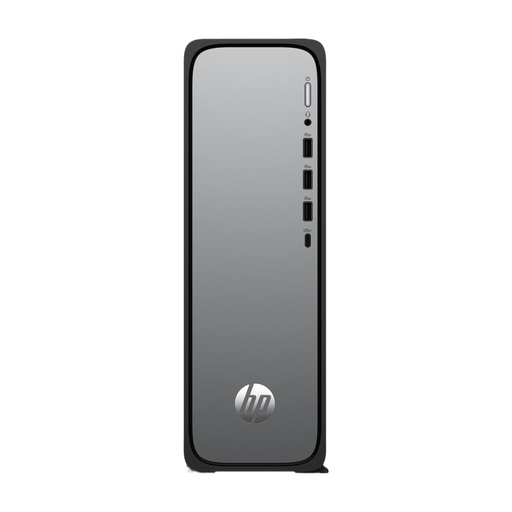
Why it suits this profile: This slim desktop is designed for everyday use, studying, administration and working from home. According to the product specifications, the chassis is 10 cm deep.
The product information clearly specifies 8 GB of DDR5, a 512 GB PCIe Gen4 NVMe SSD and Windows 11 Home. Still, check whether this configuration suits the software you use.
According to the product specifications, Wi-Fi 6, Gigabit Ethernet, HDMI and USB-C are included.
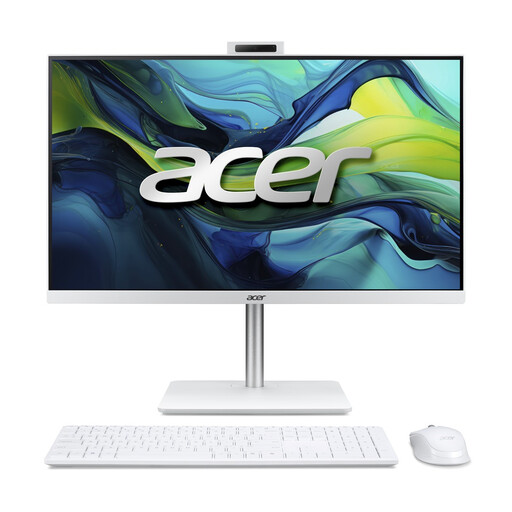
Why it suits this profile: The 23.8-inch display, built-in webcam and speakers, plus the included wireless keyboard and mouse, reduce the number of separate devices on your desk.
The essential components are clearly listed: 16 GB of DDR5, a 1 TB NVMe SSD and integrated Intel Graphics. There is no need for a separate monitor.
The product specifications list Full HD IPS, Wi-Fi 6, Bluetooth 5.2 and Windows 11 Home.
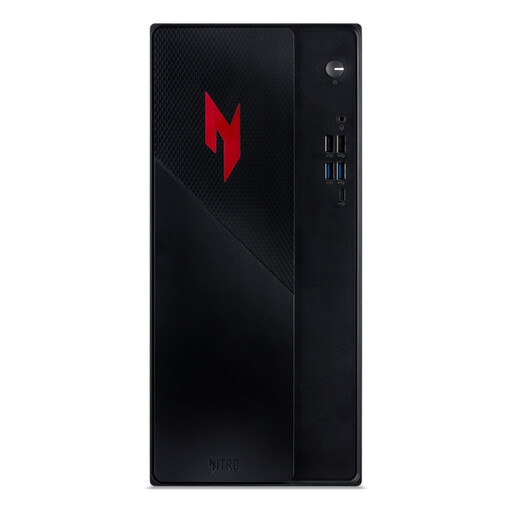
Why it suits this profile: This gaming PC combines an Intel Core 5 210H, 16 GB of RAM, a 1 TB SSD and a dedicated RTX 5050 graphics card.
The graphics card, video memory, storage and 400 W power supply are listed separately. This makes comparisons easier than relying on generic gaming claims.
Wi-Fi 6E, Bluetooth, HDMI and DisplayPort offer multiple options for networking and displays.
A Windows 11 PC is usually ready to use straight away: connect a monitor, keyboard and mouse, then complete the setup process. A barebone PC, by contrast, gives you greater freedom to choose your own RAM and storage. This can be appealing to business users or anyone planning to upgrade the system later.
According to its product specifications, the MSI CUBI NUC AI 1UMG-018BEU is a mini PC with an Intel Core Ultra 7 155H, support for up to 64 GB of DDR5, two M.2 slots, Wi-Fi 6E and Windows 11 Home. Always check the current configuration before buying, as barebone models may be supplied without installed storage or memory.
Browse a current selection of desktops, mini PCs, all-in-one computers and gaming PCs with specifications for a range of use cases.
That depends on the configuration. A desktop often offers more ports and better upgrade potential. A laptop, on the other hand, already includes a display, keyboard and battery. Compare the complete setup carefully: with a desktop, you may still need to purchase a monitor, webcam and other peripherals separately.
Its lifespan depends on the components, software and workload. A system with upgradeable RAM, an additional storage slot and a dedicated graphics card can be adapted more easily over time. Keep the ventilation openings clear and install security and driver updates according to the manufacturer’s instructions.
A mini PC often features more compact hardware and a smaller external power adapter, but actual power consumption varies depending on the processor, workload and configuration. For business or long-term use, check the stated power requirements and choose a system that is not more powerful than necessary for your needs.
