
Creator of large panoramas
You combine lots of photos or edit a panorama using layers. Adobe explains that Photomerge can create an image with multiple layers and masks, so memory and space for temporary files are factors to consider.


Choose based on your image files, panorama software and available desk space. For large, layered projects, memory and storage matter, while a compact case can free up space on a shared desk. Also check the exact configuration, display connections and user accounts. A dedicated graphics card is mainly relevant if your software and workflow can make use of it.
You combine lots of photos or edit a panorama using layers. Adobe explains that Photomerge can create an image with multiple layers and masks, so memory and space for temporary files are factors to consider.
You share the computer or physical workspace and consider the case, display connections and separate user accounts. Microsoft Support explains that Windows users can have their own settings and files.
You want to match the configuration to your own files and software, rather than automatically opting for extra processing power. Adobe explains that extra CPU cores don't benefit every Photoshop feature to the same extent.
Start with your software and the size of your panoramas, then consider the available space, display setup and how people will use the shared computer. Adobe explains that Photoshop uses disk space as a scratch disk when it doesn't have enough memory.
| What to consider | What should you look for? | Who is this most relevant to? |
|---|---|---|
| Memory and working space | Compare the RAM and SSD in the exact configuration, and leave room for source files, output and temporary files. | If I'm creating large, layered panoramas, I want enough memory and working space for my files. That's why around 33% of consumers put memory and working space at the top of their buying priorities. |
| Space and shared use | Check the dimensions, the ports you need and how users will sign in and out. | If I share the computer with others, I want a suitable setup and to keep my files and settings separate. Around 27% of consumers name space and shared use as their main priority. |
| Display and image assessment | Check that the desktop's connections are compatible with the display available at your workspace. | If I'm checking seams and the finished image, I want the desktop to work with the shared display. Around 20% of consumers name the display setup and image assessment as their top priority. |
| Configuration and overall needs | Compare complete configurations and take into account the software, displays and input devices you already have. | If I only create panoramas occasionally, I don't want to choose components without checking whether my software can use them. Around 20% of consumers prioritise a suitable configuration without unnecessary extras. |
Configurations within the same product range can differ in memory and storage. Comparing products by range name alone can give you the wrong idea of what you're buying.
For each option, note the full model name and exact memory and storage configuration.
Adobe describes diminishing returns from extra cores in Photoshop. More cores don't automatically mean a proportionate benefit for the features you use.
Compare the CPU, memory and storage against your own software and project files.
You could end up paying for processing power that offers limited benefit for the Photoshop features you use.
Separate accounts can keep users' settings and files apart. Microsoft Support warns that signing out closes open applications and any unsaved work may be lost.
Set up individual accounts and agree how projects will be saved and handed over.
Compare the specific configuration, not just the brand or product range name: memory, storage, size and connections can vary between configurations.
The HP Z2 Mini G1i is a compact workstation that may be worth considering if the configuration with 32 GB RAM, 1 TB SSD and a dedicated graphics card suits your software and files.
The ThinkStation P3 Tiny Gen 2 is a compact Windows workstation range for anyone who needs to factor in the space available on their desk.
The Mac mini is a compact macOS desktop for anyone whose existing software and workflow are suited to macOS.
The Dell Pro Max Slim FCS1250 is a configurable Windows desktop in a case that Dell specifies as 8.5 litres.
These Joybuy models offer different desktop formats for a shared workspace. For each model, check that the configuration, connections and software suit your panorama work.
 Image unavailable
The compact desktop design may suit a shared desk with a separate display.
Apple M6 chip with 12-core CPU and 12-core GPU; 24 GB memory; 512 GB SSD.
The product description mentions Thunderbolt and HDMI connections, among others.
 Image unavailable
This configuration may be worth considering if your panorama software and workflow can benefit from the listed components.
GeForce RTX 5080; 32 GB DDR5; 1 TB NVMe SSD; Windows 11 Trial.
 Image unavailable
Check that the complete configuration suits your software, panoramas and available workspace.
Intel Core Ultra 7 265F; 32 GB DDR5; 1 TB SSD; NVIDIA GeForce RTX 5070 12 GB; Windows 11 Home.
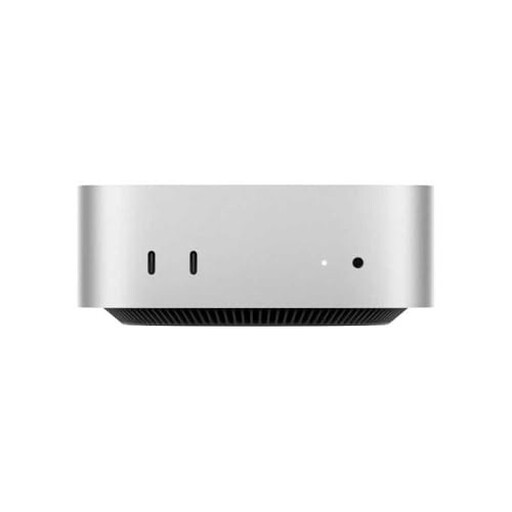 Image unavailable
The product description highlights its small case, which suits a compact setup with a separate display.
M4 chip with 10-core CPU and 10-core GPU; 16 GB RAM; 512 GB SSD.
The description mentions Thunderbolt, HDMI and USB-C connections.
 Image unavailable
The integrated display may suit a shared workspace where you don't want a separate monitor taking up space.
23.8-inch Full HD display; Intel Core 5 120U; 8 GB DDR5; 512 GB SSD; Windows 11 Pro; Wi-Fi 6E.
According to the product information, the charger must be purchased separately.
Not necessarily; it depends on your software and workflow. PTGui only lists GPU-accelerated stitching for supported hardware, so check whether your software supports that combination.
Create separate user accounts and save your work before signing out. Microsoft Support explains that this lets users have their own settings and files. Signing out closes open applications, and unsaved work may be lost.
Check which software and version you want to use before choosing a configuration. PTGui has Standard and Pro editions; according to PTGui, Pro includes features such as HDR stitching, masking and viewpoint correction.
Not in every situation. ACM ConsuWijzer generally states a 14-day cancellation period after delivery for distance purchases by consumers; exceptions may apply. The statutory guarantee doesn't necessarily have a fixed term of exactly two years: the product must meet the expectations you were entitled to have of it under normal use. For business purchases, check the applicable terms separately.