
Editor working with several reviewers
You want to review suggested changes and comments before finalising the exam guide. Microsoft Support explains how Word identifies changes made by different authors.


Don’t start with the processor. First choose your document software and agree how reviewers will track changes; this is a decision about software and workflow. If you don’t yet have a monitor and input devices, an all-in-one could suit your needs. If you already have a suitable monitor, you could choose a compact desktop. For either option, check the exact configuration, connections, software and backup arrangements.
You want to review suggested changes and comments before finalising the exam guide. Microsoft Support explains how Word identifies changes made by different authors.
You’re looking for a dedicated place to read and edit longer documents, but don’t yet have a suitable monitor and input devices. An all-in-one could be an option.
You want to keep your monitor and choose the computer and peripherals separately. Compare the connections and exact configuration of compact desktops.
Microsoft Support explains that Word for the web has more limited Track Changes features than the desktop version. So choose your document workflow first, then decide whether you need a complete workspace or a computer to use with your existing monitor.
Choose this if: you don’t yet have a monitor and want a dedicated workspace. The HP OmniStudio 24cu0611nd we looked at combines a 23.8-inch Full HD screen with a keyboard and mouse.
Trade-off: you’re choosing the screen and computer together, so check that the screen size and connections suit your setup. These features apply to that specific HP configuration.
Choose this if: you want to reuse a suitable monitor and choose the computer separately. Lenovo lists HDMI and DisplayPort connections for the ThinkCentre neo 50q Gen 5, while Dell offers the Pro Micro QCM1250 as a compact Windows configuration.
Trade-off: check the exact configuration and operating system. Lenovo also lists models in this product range that don’t come with a pre-installed operating system.
Choose this if: you want to use macOS and your document software is available for it. For the Mac mini M6 configuration mentioned, Apple Netherlands lists 16 GB of memory and a 256 GB SSD.
Trade-off: factor the monitor and input devices into your decision, and check that the files are compatible with the other reviewers’ workflow.
| What to consider | What should you check? | Who is this important for? |
|---|---|---|
| Managing revisions | Check which programme and version the reviewers use, and agree who will track the changes. | If I’m working with several reviewers, I want to be able to identify and process changes; around 36% of consumers prioritise their revision workflow. |
| Complete workspace | Check the screen size and resolution, and whether a keyboard and mouse are included with the exact configuration. | If you don’t yet have a suitable monitor or input devices, you’re looking for a complete, dedicated workspace; around 29% of consumers prioritise this. |
| Using an existing monitor | Compare the video output on the exact computer with the input on your monitor, and check which operating system is included. | If I already have a suitable monitor, I want to keep using it and choose the computer separately; around 21% of consumers prioritise reusing their monitor. |
| Files and sheet music | Decide whether you’ll only be writing about music or also editing scores. Check the software and test whether you can restore a draft file from a backup. | If I’m also editing scores or want to be able to restore drafts, I look for suitable software and a recoverable copy; around 14% of consumers prioritise files and any sheet music. |
Track Changes features depend on the software you choose. Microsoft Support explains the differences between Word for the web and the desktop version.
Before buying, check which version of Word you need and what’s included with the exact computer configuration.
The HP OmniStudio configuration we looked at has a built-in screen and includes input devices. With compact desktops, you’ll need to check the rest of the workspace separately.
Compare the complete setup and check which components are included with the configuration you choose.
According to Microsoft, this view only hides changes temporarily; they haven’t been removed from the document.
Explicitly accept or reject changes, then check the file before sharing it.
The HP OmniStudio 24cu0611nd is an all-in-one for anyone who wants a screen and input devices included with their computer.
The ThinkCentre neo 50q Gen 5 is a range of compact Windows desktops designed for use with a separate monitor.
The Mac mini M6 is a macOS option for anyone who wants to use a separate monitor.
The Dell Pro Micro QCM1250 is a compact Windows option for a workspace with a separate monitor.
This Joybuy selection includes all-in-ones and compact desktops for a writing workspace. Check the document software to see which revision features are available, and find out what else you’ll need if you choose a compact desktop.
 No image available
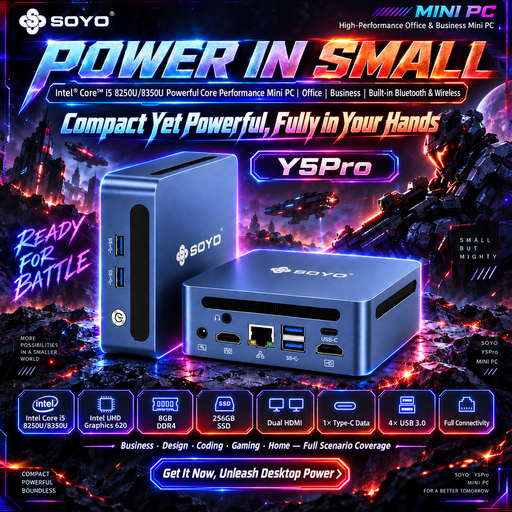
A mini PC for a setup with a monitor chosen separately.
The product name lists Windows 11, 8 GB DDR4, a 256 GB SATA SSD and Intel Core i5 8250U/8350U; check which processor variant you’ll receive.
 No image available
A Mac mini for a desktop setup with a monitor chosen separately.
Apple M6 chip with 12-core CPU and 12-core GPU, 16 GB memory and 256 GB SSD.
 No image available
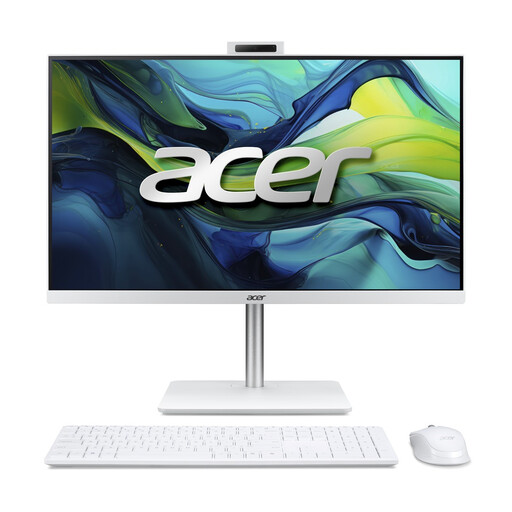
An all-in-one for anyone who wants to combine a screen and computer in one workspace.
23.8-inch Full HD IPS screen, Intel Core 5 120U, 16 GB DDR5, 1 TB PCIe NVMe SSD and Windows 11 Home.
 No image available
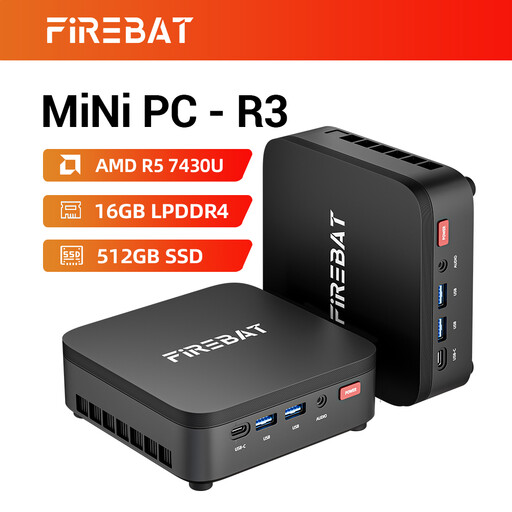
A mini PC for a workspace with a monitor chosen separately.
The product name lists 16 GB RAM, 512 GB SSD, Wi-Fi 6, Bluetooth 5.2 and 4K Triple Display.
 No image available
A mini PC for a setup with a monitor chosen separately.
Intel Core Ultra 7 155H, 16 GB DDR5, 1 TB SSD and Windows 11 Pro.
Tracked changes in Word are a document feature. First check that your chosen programme and version support the revision workflow you need; Microsoft Support doesn’t describe this feature as something that depends on a graphics card.
According to Microsoft, the ‘No Markup’ view only hides changes temporarily. Accept or reject them, then check the file before sharing it.
Windows File History can copy file versions to an external drive or network location. Set it up for the folder you’re working in and check that you can restore an earlier version.
According to the Dutch government, many distance purchases come with a 14-day cooling-off period; exceptions and the terms of purchase still apply. Products must also be of satisfactory quality. There’s no fixed statutory guarantee period in the Netherlands; if a product is faulty, the seller is your point of contact.