
Volunteer indexing records
Wants to organise and retrieve scans and digital minutes. Image scans may need text recognition to make their contents searchable; Adobe describes OCR for scanned PDF documents.


Choose a desktop that works with your scanner and indexing software, and lets you back up your archive folders separately to an external storage device. A compact Windows PC suits a small permanent workspace, an SFF desktop is a good choice if you may need internal expansion, and a Mac mini fits an existing macOS workflow. Check the exact configuration, connections and recovery process; a larger internal SSD is not a backup in itself.
Wants to organise and retrieve scans and digital minutes. Image scans may need text recognition to make their contents searchable; Adobe describes OCR for scanned PDF documents.
Wants to keep backup copies away from the working drive and be able to restore them if files change, disappear or the PC fails. The National Cyber Security Centre and Microsoft Support describe backup and recovery options.
Needs to connect equipment and, if minutes contain personal data, put appropriate access controls and retention periods in place. The Dutch Data Protection Authority emphasises that organisations must decide for themselves which security measures are appropriate.
First check that your scanner and indexing software work with the desktop. Then decide which storage and connections suit your archive and workspace.
Suitable for: a small permanent workspace, with a scanner and indexing software that support Windows.
Bear in mind: check the ports and exact configuration; Lenovo states that the monitor is sold separately with the ThinkCentre configuration mentioned.
Suitable for: if you may need internal expansion or connections for existing equipment. ASUS lists SATA, USB-A, VGA and HDMI among the connections on the ExpertCenter D5 SFF.
Bear in mind: the case takes up more space than a mini PC; check the ports on the exact configuration.
Suitable for: an existing macOS workflow using software that also works with your scanner. Apple describes automatic external backups with Time Machine.
Bear in mind: check whether older devices need an adapter and which storage configuration you want. Apple lists a 256 GB SSD as the base configuration for the 2024 Mac mini with M4.
| Concern | What should you check? | Who is this important for? |
|---|---|---|
| Making records searchable | Check that the operating system and indexing or OCR software work with your files. Compare the required storage with the size of your own archive. | If I want to search image scans by keyword, I first want to know whether my software can do that. Around 29% of consumers put searchability first. |
| Recoverable local backup | Check that you can connect an external drive and that the backup feature saves the archive folders you need. Try restoring some files. | I want to be able to restore minutes if something happens to the working copy, not just have extra space on the same PC. Around 29% of consumers are primarily concerned with recoverable copies. |
| Access to minutes and privacy | Check user accounts and, if the data requires it, encryption and how the recovery key is stored. Agree who can access the minutes and copies. | If my minutes contain personal data and several people use the workspace, I want to manage access and retention carefully. Around 24% of consumers put this first. |
| Connecting a scanner and fitting out the workspace | Compare the ports on the exact configuration with your scanner and monitor. Also check that the case will fit and whether you need internal expansion. | I want to use my existing scanner and monitor without the desktop taking up too much room. Around 18% of consumers prioritise connections or available space. |
Files stored only on the working drive remain dependent on that PC. The National Cyber Security Centre advises keeping important data in multiple versions.
Plan for a separate backup device and try restoring files before transferring your entire archive.
Allow time for recovery tests and for using a separate backup device.
A PDF containing a scan as an image is not automatically searchable text. Adobe describes text recognition as a way to make text in scanned PDF documents readable.
Test your chosen indexing software with a representative scan before choosing a desktop configuration.
Allow time to process scans, and check whether your workflow requires suitable OCR software.
Several memory and storage configurations are described for the ASUS ExpertCenter D5 SFF. So a product family page does not necessarily tell you which combination a particular configuration has.
Check the full model number and the ports on the device you plan to buy.
The Pro Mini 400 G9 is a compact business Windows desktop range. For configuration 9H6Z2ET#ABH, HP lists Windows 11 Pro, 16 GB RAM and a 512 GB SSD.
The ThinkCentre M70q Gen 5 Tiny is a compact Windows desktop. For model number 12TD0017MH, Lenovo lists Windows 11 Pro, 16 GB RAM and a 512 GB SSD.
The ExpertCenter D5 SFF D500SE has a larger desktop case, which may suit you if you need internal connections or support for existing equipment.
The Mac mini may suit an existing macOS workflow. Apple documents USB-C connections and Time Machine with external storage.
This Joybuy selection focuses on compact mini PCs for a permanent archive workspace. Check that your scanner and indexing software work with each model; note that the MSI is a barebone configuration.
 Image unavailable
This compact model may suit a permanent workspace; check that your scanner and indexing software work with the stated Windows configuration.
The product name lists Windows 11, 8 GB DDR4 memory and a 256 GB SATA SSD.
The processor is listed as Intel Core i5 8250U/8350U; check which variant comes with the configuration.
The product name lists Bluetooth 5.2 and Wi-Fi 5.
 Image unavailable
This compact desktop may suit a permanent archive workspace; check that your scanner and indexing software are compatible before buying.
The product name lists Windows 11 Pro, 16 GB LPDDR4X memory and a 512 GB SATA SSD.
The listed connections are HDMI 2.0, DisplayPort 1.4b and USB-C; check that they suit your monitor and other equipment.
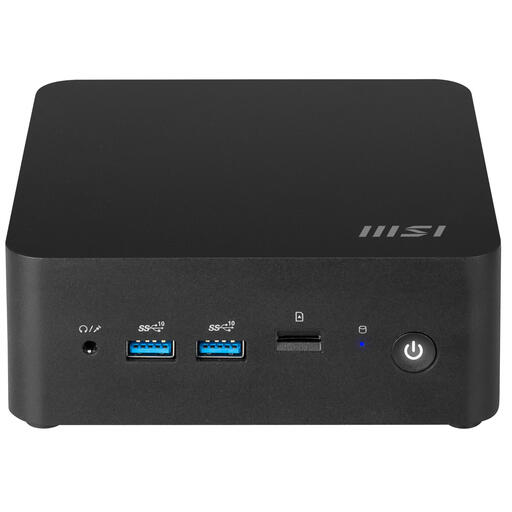 Image unavailable
This barebone model may suit you if you want to build a compact workspace yourself; check which components and software are included with this configuration.
The product name lists an Intel SoC and a 0.84-litre case.
Not as your only backup. The National Cyber Security Centre advises keeping important data in multiple versions; also agree how to restore files and test that they can be recovered.
On Windows, File History can save files to an external drive or network location. Microsoft Support also explains how to add folders outside the default libraries. On a Mac, Time Machine can use an external drive. Run a recovery test to check that you can restore the documents you need.
The Dutch Data Protection Authority states that the GDPR does not set a general, specific retention period for personal data. If minutes contain personal data, the responsible organisation must decide how long it is necessary to keep them and what security measures are appropriate for the risks. Specific obligations may depend on the organisation and the records.
Not automatically. Names may be personal data, and publishing them requires an applicable GDPR legal basis. Before publishing, check which information needs to be public and who needs access.
Check whether you need a monitor, a suitable connection for the scanner and a separate backup device. Lenovo states that the monitor is sold separately with the ThinkCentre Tiny configuration mentioned; Apple describes using Time Machine with an external drive.