What should you consider when choosing?
First, check your course’s application requirements. Then work out how much processing power and local storage you need, and how much space you have on your desk.
| Consideration |
What should you check? |
Who needs to consider this? |
| Software compatibility |
Check the exact application version, required operating system, processor architecture and any plug-ins. |
If my course requires specific software, I want to know whether it will work on the desktop I choose. Around 33% of consumers put software compatibility first. |
| Simulation performance |
anyLogistix specifies a minimum of 16 GB RAM and recommends 64 GB or more; AnyLogic specifies 4–8 GB. The Autodesk FlexSim Knowledge Base explains that a single model run uses one processor core, while parallel replications can use multiple cores. |
For larger models or simultaneous experiments, I want to match memory and processing power to my simulations. Around 27% of consumers give simulation performance top priority. |
| Local files and back-ups |
Estimate how much SSD space you’ll need for your project files, and plan a separate back-up as well. VeiligInternetten lists external storage and the cloud as possible places to keep a copy. |
If I save project files and results locally, I want enough SSD space and a separate copy to help prevent data loss. Around 20% of consumers put storage and back-ups first. |
| Workspace and upgradability |
Check whether you already have a monitor and peripherals, which connections you need, and whether the components in the exact configuration can be changed later. |
If my desk has limited space or I want the option to change components later, I look at the size, connections and upgrade options. Around 20% of consumers make their workspace and upgradability a top priority. |
Joybuy products for studying and project files
This selection includes compact PCs, an all-in-one and desktops with upgrade options. If you’re buying a barebone, check which components you’ll need to complete the computer.
 No image available
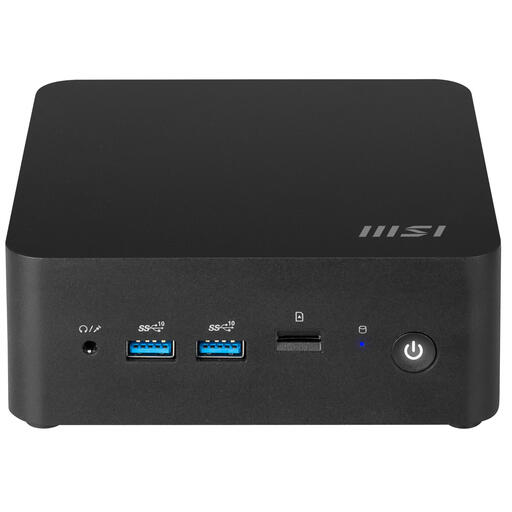
MSI Cubi NUC 1MG-244BEU barebone mini PC
Its compact size could suit a study space where desk room is limited.
The case has a capacity of 0.84 litres and supports VESA mounting. The listed Intel Core 3 100U and support for up to 64 GB memory are specifications to compare with your application’s requirements. This model is a barebone, not a fully specified desktop configuration.
View at Joybuy
 No image available
HP 24-cr0050nd All-in-One (895R0EA#ABH)
The built-in display could suit you if you’re looking for an integrated study setup.
This configuration lists a 23.8-inch FHD IPS display, Windows 11 Home, a 512 GB SSD and 8 GB LPDDR5X memory. The memory is onboard and can’t be upgraded. anyLogistix specifies a minimum of 16 GB RAM, so check whether this configuration is suitable for the software you use.
View at Joybuy
 No image available
OMEN 35L GT16-0162nd (D49NFEA#ABH)
The listed memory upgrade option could be useful if you expect larger models to need more RAM in the future.
This configuration lists an Intel Core i7-14700F, Windows 11 Home, 16 GB DDR5 and a 1 TB SSD. The description says it can be upgraded to 128 GB RAM. anyLogistix recommends 64 GB or more, so compare that recommendation with your own usage before choosing a configuration.
View at Joybuy
 No image available
SOYO Y5Pro mini PC
The mini PC format could suit a compact workspace with a separate monitor.
The description lists Windows 11, 8 GB DDR4, a 256 GB SATA SSD, and HDMI and USB-C display outputs. The processor options are listed as Core i5 8250U or 8350U; check which version comes with the model you’re buying. anyLogistix specifies a minimum of 16 GB RAM, compared with the 8 GB listed for this configuration.
View at Joybuy
 No image available
Shark Max Bite R500 gaming PC RTX5060/R5/16GB/500GB
The desktop format could suit you if you’re looking for local storage and a computer with upgrade options.
The listed configuration has an AMD Ryzen 5 5500 processor, 16 GB DDR4 and a 500 GB NVMe SSD. anyLogistix recommends 64 GB or more RAM; compare that recommendation with your software requirements and the size of your models.
View at Joybuy
Frequently asked questions
How do you work out how much RAM you need?
Start with the version of the software you’ll actually use. anyLogistix specifies a minimum of 16 GB and recommends 64 GB or more; this isn’t a general requirement for every logistics course. Larger models and parallel runs may need more memory.
How do you set up a desktop for local project files?
Estimate the SSD space you’ll need for your project files and results, and make a separate back-up regularly as well. VeiligInternetten lists an external drive or the cloud as possible places to keep a copy; saving files locally alone doesn’t give you a separate back-up.
Is a Mac mini suitable if your course recommends Windows?
It depends on your course requirements and the software you’re required to use. Tilburg University recommends Windows for the student services it describes because of software compatibility; this advice doesn’t automatically apply to every course. Check the requirements for the exact application versions and plug-ins, too.
Do you need to buy an additional warranty with a desktop in the Netherlands?
No, an additional paid warranty is optional. According to the Dutch government, when you buy as a consumer in the Netherlands, you’re entitled to a product that meets the required standards, and there is no fixed statutory warranty period. If a product is faulty, the seller must provide a solution.
What can you do if your desktop turns out to be faulty?
When you buy as a consumer in the Netherlands, you’re entitled to a product that meets the required standards. According to the Dutch government, the seller must provide a solution if a product is faulty. What you can expect depends, among other things, on the product and the sales information.


