Start by choosing a desktop that can run your development tools locally. Then consider your existing monitor, preferred case and the peripherals included to decide which setup is right for you. A compact desktop may be enough for this project, while an all-in-one or larger desktop is mainly worth considering if you want to include your choice of screen or specific expansion options. Bear in mind that Microsoft says an internet connection and a Microsoft account are needed for the initial personal setup of Windows 11; programming locally after installation is a separate matter.
Who is this desktop guide for?
Developer avoiding cloud tools
You want to manage code and test files locally, and plan ahead for installing software and keeping a separate backup. VeiligInternetten lists an external hard drive or USB flash drive as an option for backing up files outside the cloud.
User with established development tools
You already have a programming language, editor or operating system in mind and want to check that they will work on your desktop. Microsoft's Visual Studio Code documentation sets out system requirements for different platforms.
Buyer looking for a complete workstation
You want to know whether your monitor and input devices will work, or whether you need to buy anything else. Lenovo says the monitor is sold separately for the ThinkCentre configuration reviewed; HP says the keyboard and mouse are not included with the OmniDesk configuration reviewed.
What factors should guide your choice?
| Buying concern |
What to look for |
Who should consider this? |
| Working locally and storing files |
Check that your editor can be installed locally and plan a separate backup on external storage. VeiligInternetten lists an external hard drive or USB flash drive as options. |
If I want to keep my code and test files locally, I also want to be able to manage a separate copy outside the cloud. Around 33% of consumers prioritise working locally and keeping their files. |
| Software compatibility |
Make a note of your programming language, editor and required system versions. Microsoft sets out platform requirements for Visual Studio Code and installation requirements for Windows 11. |
If I already use specific development tools, I want to know first whether they will run on my chosen system. Around 27% of consumers prioritise compatibility with programming software. |
| Complete workstation |
Check which components are included and whether the video outputs suit your monitor. The HP OmniDesk configuration reviewed lists HDMI and DisplayPort; Lenovo says the monitor is sold separately for the ThinkCentre configuration reviewed. |
If I still need a monitor or input devices, I want to be able to put together a complete workstation. Around 20% of consumers focus mainly on connections and included components. |
| Backups and upgrades |
Plan to keep a separate copy of your project files. If future upgrades matter, check the options for the exact configuration; Lenovo describes the ThinkCentre range reviewed as offering access for servicing and upgrading memory and storage. |
If I keep my files locally, I also want to know how to maintain an external copy and whether upgrades may be possible later. Around 20% of consumers prioritise backups and potential upgrades. |
Common buying mistakes
-
Assuming ‘no cloud tools’ means ‘no internet needed for the initial setup’
For the initial personal setup of Windows 11 Home and Pro, Microsoft lists an internet connection and a Microsoft account as requirements. This is separate from running code locally later on.
Decide in advance whether you only want to avoid cloud development tools, or whether you also want to set up your computer without an internet connection.
-
Looking only at the desktop, not the complete workstation
Some configurations may not include a monitor, keyboard or mouse. A compact case alone does not tell you whether your existing monitor will connect.
Check the included components, video outputs and monitor connection for each configuration.
-
Thinking a project folder counts as a backup
A copy on the same computer is not a separate backup if the device fails or files go missing.
Keep a recent copy on an external storage device regularly, and check that you can restore your files from it.
Brands to consider
HP
The OmniDesk Slim S03-0604nd configuration reviewed is a compact Windows desktop.
- For this configuration, HP lists Windows 11 Home, 8 GB RAM, a 512 GB SSD, and HDMI and DisplayPort connections.
- HP says the keyboard and mouse shown are not included. These configuration details are not a performance test of a calculator.
Lenovo
The ThinkCentre M70q Gen 5 Tiny configuration 12TD0017MH reviewed is a compact business Windows desktop.
- For this configuration, Lenovo lists Windows 11 Pro, 16 GB RAM and a 512 GB SSD. Lenovo says the range offers access for servicing and upgrading memory and storage.
- The monitor is sold separately for the configuration reviewed. Check the upgrade options for the exact model.
Apple
The Mac mini is a compact macOS option if your development tools work with macOS and Apple silicon.
- For the M6 base configuration reviewed, Apple lists 16 GB of memory and a 256 GB SSD, with support for external displays.
- Check that your software and monitor are compatible, and that the storage option suits your needs. These specifications are not a test of your programming project.
Desktop options at Joybuy
This selection includes a Mac mini, compact Windows desktops, an all-in-one and a barebone PC, so you can compare different local desktop setups. Check that each model's operating system, screen and peripherals suit your needs.
 No image available
Mac mini with Apple M6 chip, 12-core CPU and 12-core GPU, 16 GB, 256 GB SSD
Suitable if you want to work locally on macOS and check that your development tools and external monitor are compatible first.
The product description lists 16 GB of memory, a 256 GB SSD, HDMI and Thunderbolt 4. According to the description, this model supports up to three external displays.
Joybuy
 No image available
ASUS ROG G700TF-07265F666W, Intel Core Ultra 7 265F, 32 GB DDR5, 1 TB SSD, GeForce RTX 5070 12 GB, Windows 11 Home
A larger Windows desktop option if you want to consider other applications as well as your calculator; the components listed do not, on their own, determine how quickly your project will run.
The product name lists 32 GB DDR5, a 1 TB SSD and Windows 11 Home. Microsoft says an internet connection and a Microsoft account are needed for the initial personal setup of Windows 11.
Joybuy
 No image available
ACEMAGIC E3B Mini Desktop, AMD R5 7430U, 16 GB LPDDR4X, 512 GB SSD, Windows 11 Pro
Suitable if you want to use a compact Windows desktop with external displays and check that it connects to your monitor first.
The product name lists 16 GB LPDDR4X, a 512 GB SSD and Windows 11 Pro, with HDMI 2.0, DisplayPort 1.4b and USB-C. Microsoft says an internet connection and a Microsoft account are needed for the initial personal setup of Windows 11 Pro.
Joybuy
 No image available
MSI Modern AM273Q AI 1UM-058EU, Intel Core Ultra 7 155H, 27 inch, 2560 × 1440, 32 GB DDR5, 1 TB SSD, Windows 11 Pro
Suitable if you want to choose the computer and screen as one all-in-one setup, and check first that your software works on Windows.
The product name lists a 27-inch screen with a resolution of 2560 × 1440, 32 GB DDR5, a 1 TB SSD and Windows 11 Pro. Microsoft says an internet connection and a Microsoft account are needed for the initial personal setup of Windows 11 Pro.
Joybuy
 No image available
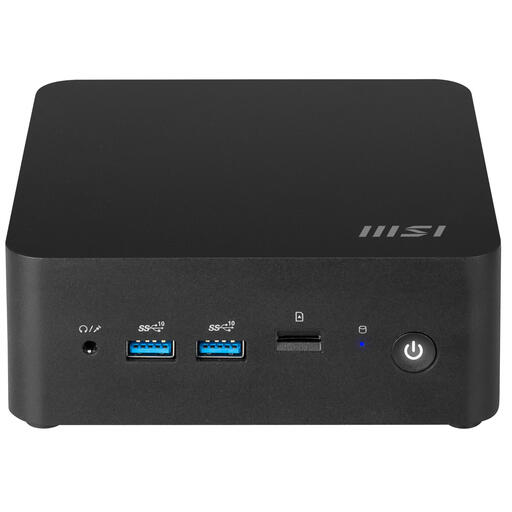
MSI CUBI NUC 1MG-244BEU barebone PC, Intel Core 3 100U
Suitable if you want to choose and install your own operating system; bear in mind that the operating system is not included.
The product description lists upgradeable memory and storage, two M.2 slots, two Thunderbolt 4 ports and support for up to four displays.
Joybuy
Frequently asked questions
Do you need a powerful gaming PC to programme a savings calculator?
Not for this project alone. First, check the requirements for your editor, programming language and operating system. Microsoft lists its own recommended hardware for Visual Studio Code, but this is not a performance guarantee for other software or larger projects.
Can you set up Windows 11 without internet from the outset?
Microsoft says an internet connection and a Microsoft account are required for the initial personal setup of Windows 11 Home and Pro. If by ‘without cloud’ you also mean that you do not want to use the internet during setup, treat that as a separate requirement; programming locally after installation is a different matter.
How can you store your project without a cloud backup?
Keep a recent copy on an external hard drive or USB flash drive regularly, and check that you can restore it. A project folder on the same computer is not a separate backup.
How can you avoid calculation discrepancies in the amounts handled by your calculator?
Choose a suitable decimal number type and set clear rounding rules. The Python Software Foundation explains that Decimal can represent decimal values exactly, unlike binary floating-point numbers. This is a software choice, not a reason to buy a more powerful desktop.
What are your rights when buying a desktop online from a business as a consumer?
Rijksoverheid says the seller must tell you about matters including the product and your cancellation period, which is usually 14 days. In the Netherlands, you are entitled to a product that meets reasonable expectations. If there is a problem, the seller is your point of contact for the statutory guarantee, even if a manufacturer's guarantee is also available.


