Who is this guide for?

Creator who uses enlarged text

You want to write and read comfortably, while also checking how visitors can enlarge the text on your portal. Choose a screen and display settings to suit your own needs; those settings do not replace testing the website. Microsoft Support explains the text size settings in Windows, while the W3C guidelines cover web content accessibility.

Image archive manager

You work with historical photos and documents and want to organise your storage and a separate backup. The National Archives and VeiligInternetten offer information on storing and backing up digital files.

Builder with limited workspace

You want to edit text and images without a large tower taking up space on your desk. A mini PC with a separate screen and an all-in-one differ in what you choose separately and how you can adapt the screen later. Lenovo Nederland and MSI describe the versions featured here as examples.

What should you look for when choosing?

Mini PC with separate screen

Choose this if: you already have a suitable screen or want to choose the size and magnification yourself.

Keep in mind: the screen is a separate choice; also check that the screen and PC have compatible connections.

All-in-one

Choose this if: you want an integrated workstation and find the built-in screen comfortable to use with your chosen text size.

Keep in mind: the screen is largely fixed at the time of purchase; try your preferred magnification on a screen of a similar size.

Tower with separate screen

Choose this if: you want to pair a separate screen with a tower and value the option to expand your setup.

Keep in mind: the tower takes up more space. HP describes the Pro Tower 400 G9 as scalable; check the expansion options for the exact version you choose.

Consideration What to look for when buying Who should prioritise this?
Comfortable reading and magnification Compare the screen and video connections; try your preferred text size or scaling setting, and test portal pages separately in a browser. When I work with enlarged text, I want to read comfortably and check how visitors see the page. Around 36% of consumers put readability and magnification first.
Storing archive files Compare the SSD capacity with the size of your files and arrange a separate backup outside the computer. I want enough space for my historical photos and documents, plus a separate copy so I can keep them safe if my computer fails. Around 29% of consumers put archive preservation first.
Editing multiple things at once Check the memory for the full model code and whether it can be upgraded on that version. When I’m editing text, images and browser pages at the same time, I focus on the memory configuration. Around 21% of consumers give working on several portal tasks at once their highest priority.
Workspace and included screen Check the dimensions, what’s included in the box and the connections on the exact version. With limited desk space, I want to know whether the screen is built in and how the setup will fit. Around 14% of consumers put a compact workstation at the top of their list.

Pitfalls to avoid when buying

  • A larger screen won’t automatically make your portal accessible

    Increasing the text size changes what you see on your own screen. You need to check the website for visitors separately.

    Choose a screen you find comfortable to use, then test the portal pages separately with browser magnification.

    Testing and updating the website separately takes extra time.

  • Keeping all your archive files only on the internal SSD

    Files stored on your computer are not a separate recovery copy if it fails or needs replacing.

    As well as internal storage, arrange a backup, for example on an external drive or in the cloud, and keep it up to date.

  • Assuming a compact desktop includes a screen

    The screen is sold separately for the Lenovo ThinkCentre M70q Gen 5 we looked at, while the MSI all-in-one we reviewed has a built-in screen.

    Check what’s included in the box and the connections on your chosen version before putting your workstation together.

Relevant brands to consider

Lenovo

ThinkCentre M-series Tiny for anyone looking for a compact PC with a screen they can choose separately.

  • For the M70q Gen 5 version we reviewed, Lenovo lists 16 GB of memory and a 512 GB SSD.
  • The screen is sold separately. These details apply to the version we reviewed and do not represent every ThinkCentre model.

MSI

Modern AM242P for anyone considering an integrated workstation.

  • According to MSI, the AM242P 1M-1223EU we reviewed has an adjustable stand, a 23.8-inch screen and a spare memory slot.
  • This version comes with 8 GB of memory. Try your preferred text magnification on the screen you intend to use to make sure it remains comfortable.

HP

Pro Tower for anyone looking to pair a separate screen with a business desktop tower.

  • HP describes the Pro Tower 400 G9 as scalable and lists support for up to three screens.
  • This information relates to the product range. Check the ports and expansion space on the configuration you choose.

Apple

Mac mini for anyone who uses macOS and wants to choose their screen separately.

  • Apple offers a Mac mini configuration with an M6 chip, 16 GB of memory and 256 GB of storage.
  • Consider whether 256 GB is enough for your archive and check that the software you need is available for macOS. There is no demonstrated advantage of this model for the accessibility of the finished portal.

Joybuy products for these setups

This selection includes mini PCs with a screen you can choose separately, as well as all-in-ones for an integrated workstation. For each version, check which components are included and whether the screen setup suits your preferred text magnification.

ACEMAGIC E3B Mini Desktop

ACEMAGIC E3B Mini Desktop

The mini PC form factor is a good fit if you want to choose your screen separately; check which screen and connections will suit your setup.

AMD R5 7430U; 16 GB LPDDR4X 3200MT/s; 512 GB M.2 2280 SATA SSD; HDMI 2.0, DP 1.4b and USB-C; Windows 11 Pro.

View at Joybuy

FIREBAT F1 Mini PC with AMD Ryzen 5 7640HS

FIREBAT F1 Mini PC with AMD Ryzen 5 7640HS

The mini PC form factor is an option if you’re looking for a compact computer with a screen you can choose separately.

AMD Ryzen 5 7640HS (6-core/12-thread); 24 GB LPDDR5; 512 GB PCIe 4.0 SSD; 4K output for three screens; USB 4.0 and HDMI 2.1.

View at Joybuy

MSI Modern AM273QP AI 1UM-061EU all-in-one PC

MSI Modern AM273QP AI 1UM-061EU

This all-in-one is an option if you’re looking for an integrated screen setup; check that you find the built-in screen comfortable to use with your text magnification.

Intel Core Ultra 5 125H; 27 inch; 2560 × 1440 pixels; 16 GB DDR5-SDRAM; 1 TB SSD.

View at Joybuy

MSI Modern AM273Q AI 1UM-058EU all-in-one PC

MSI Modern AM273Q AI 1UM-058EU

This all-in-one combines the computer and screen; check that the built-in display suits the way you work with enlarged text.

Intel Core Ultra 7 155H; 27 inch; 2560 × 1440 pixels; 32 GB DDR5-SDRAM; 1 TB SSD; Windows 11 Pro; Wi-Fi 6E.

View at Joybuy
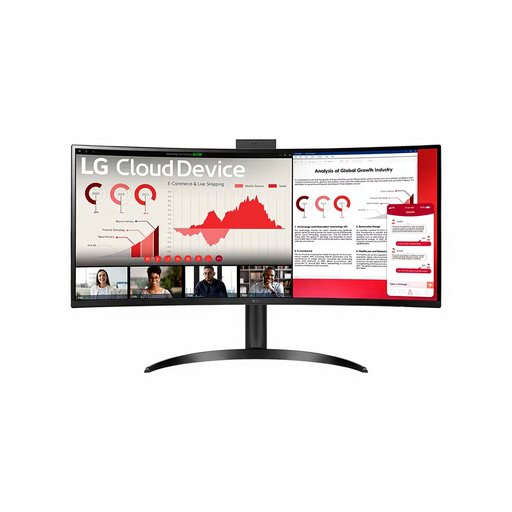
LG ThinClient BOX AIO 34CR651N-6P

LG ThinClient BOX AIO 34CR651N-6P

The AIO designation makes this worth considering if you’re looking for an integrated setup; check in advance that this thin client supports the software you need and your local archive workflow.

View at Joybuy

Frequently asked questions

Will a larger Windows font also make the portal readable for visitors?

No. Windows settings change what you see on your own screen. Test the portal pages separately with browser magnification, and use web content accessibility guidelines as a framework for your design.

How can I keep scans and photos safe if my desktop stops working?

As well as keeping files on your computer, make a separate backup, for example on an external drive or in the cloud. Update it regularly and check that you can restore your files.

Do I need to buy a screen for the Lenovo mini PC we reviewed?

For the Lenovo ThinkCentre M70q Gen 5 12TD0017MH we reviewed, Lenovo states that the screen is sold separately. Check what’s included in the box again for each different version.

Does every local history portal have to meet the accessibility requirements for government websites?

That depends on more than the subject matter alone. The Digital Accessibility of Government Decree applies to government bodies covered by the decree. Ondernemersplein also describes accessibility rules for certain services, including e-commerce; which rules apply depends on the organisation and the service it provides.

Can I put old photos and information about people online without permission?

Assess copyright and personal data for each item. According to the Dutch Government, permission from the creator is generally required to use copyright-protected photos. The Dutch Data Protection Authority separately highlights the rules on publishing other people’s personal data; the age of a photo does not settle these questions.
