Who is this writing setup for?

Writer with a chapter plan

You want to find and rearrange chapters and subheadings as you write. Microsoft Support explains that headings with heading styles applied appear in the navigation pane in Word for Windows. Check how this works in your own word processor.

Research collector

You work with historical sources and quotations alongside your manuscript, and need room for files and a backup you can restore. Zotero documents integrations with word processors, while Microsoft Support explains backup and recovery options for Windows.

Writer with a small workspace

Your choice largely depends on whether you have room for a separate computer and screen, or would prefer an all-in-one setup. The HP, Apple, Dell and Lenovo model ranges reviewed here include different types of desktop.

What to consider when buying a desktop for a history book

Compact desktop or mini PC

A good fit if: you already have a suitable screen and keyboard, and want to keep the computer compact.

Bear in mind: you choose the computer and screen separately. Check that it has the connections you need and that your software works with the operating system you choose.

All-in-one desktop

A good fit if: you want to choose your computer and screen together in one setup.

Bear in mind: you choose the computer and built-in screen together, so check the screen layout and connections on the exact model.

Separate compact desktop

A good fit if: you want a Windows setup with a screen you can choose separately, and need to connect equipment you already own.

Bear in mind: the computer takes up space separate from the screen, and configurations and connections vary by model.

Concern What to check before buying Who is this important to?
Viewing and rearranging chapters Check that your word processor has the chapter navigation you want. Microsoft Support explains that Word for Windows uses heading styles for its navigation pane. I want to move quickly between chapters and subheadings as I write. Around 33% of consumers who prioritise an overview of their chapters share this concern.
Storing sources and managing references Work out how many scans and photos you want to store. Check that your word processor works with your reference software; Zotero documents plug-ins for various word processors. Choose a backup method you can test, too. When I manage sources and quotations alongside my manuscript, I want to be able to find and restore my files. Around 25% of consumers prioritise managing and preserving their sources.
Workspace and existing peripherals Make a note of any monitor, keyboard and mouse you already have. Check the display outputs and included accessories for the exact configuration. I want to know whether my existing screen and equipment will work with the desktop format I choose. Around 25% of consumers prioritise their workspace and choice of screen.
Total cost of a complete writing setup Compare complete configurations and check which software and peripherals are included, rather than judging the computer alone. If I still need parts for a complete workspace, I want to know in advance what else I’ll need to arrange. Around 17% of consumers prioritise the total purchase cost.

Buying pitfalls

  • Assuming a faster computer will automatically give you a useful chapter overview

    In Word for Windows, headings appear in the navigation pane when heading styles have been applied. Your chapter structure therefore also depends on your document and word processor.

    Before choosing your computer hardware, create a test document with chapters and subheadings in the word processor you plan to use.

  • Comparing only the computer and overlooking the screen

    With a compact desktop, you choose the screen separately; the HP OmniStudio X 27-cx0625nd reviewed here is an all-in-one with a built-in screen.

    Compare what else you’ll need for a complete workspace with what you can reuse from your existing setup.

  • Mistaking local storage for a recovery plan

    A file on your computer is not the same as a separate backup that you can restore if it’s lost or damaged.

    Choose a backup method you can put into practice, and test whether you can restore a sample file.

Brands to consider

HP

HP has model ranges for both a separate desktop and an all-in-one for a dedicated writing space.

  • HP Netherlands describes the OmniStudio X 27-cx0625nd as a 27-inch all-in-one; the OmniDesk Slim S03-0606nd is a separate compact desktop.
  • These are details about specific models, not an independent performance comparison. Check what’s included with each configuration.

Apple

The Mac mini is a compact macOS desktop, with the screen chosen separately.

  • For the M6 configurations reviewed, Apple Netherlands lists features including 16 GB of unified memory and a choice of SSD configurations.
  • Check that the writing and research software you plan to use works with your chosen configuration and connections.

Lenovo

The ThinkCentre Neo 50s Gen 5 is an SFF desktop range for anyone who wants to use a separate screen.

  • Lenovo describes it as having an 8.2 L chassis.
  • Options vary by model. A dedicated graphics card may not be included as standard, or needed for this type of writing.

Dell

The Dell Pro Micro QCM1250 is a mini desktop option for a setup with a separate screen.

  • Dell lists the model name as QCM1250.
  • Ports and options may depend on the configuration; don’t assume a particular memory or storage configuration from the model range alone.

Joybuy desktops for this writing setup

These Joybuy products include separate desktops, an all-in-one and a mini PC. Choose based on your screen setup, the software you need and the specifications of the exact configuration.
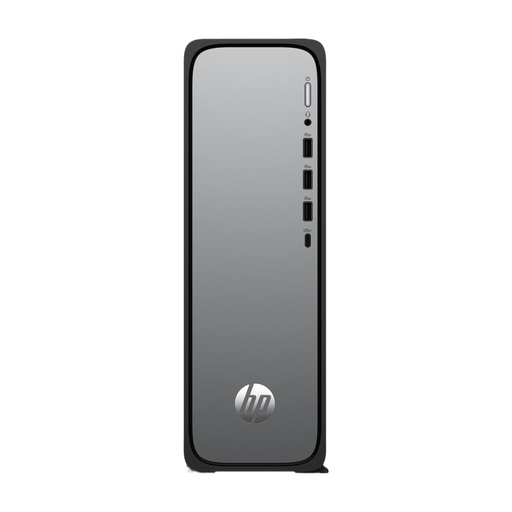
HP OmniDesk Slim S03-0006nd D49HREA#ABH

HP OmniDesk Slim S03-0006nd D49HREA#ABH

An option if you’re looking for a separate desktop and want to choose your own screen.

View at Joybuy

HP 24-cr0050nd 24-inch all-in-one

HP 24-cr0050nd 24-inch all-in-one

A good fit if you want to choose a computer and screen together in one all-in-one setup.

The product name specifies a 24-inch screen.

View at Joybuy

SOYO Y5Pro Mini PC, Intel Core i5 8250U/8350U, 8GB DDR4, 256GB SATA SSD, Windows 11, BT5.2, Wi-Fi 5

SOYO Y5Pro Mini PC, Intel Core i5 8250U/8350U, 8GB DDR4, 256GB SATA SSD, Windows 11, BT5.2, Wi-Fi 5

A mini PC to consider if you’re looking for a compact computer and want to choose your screen separately.

The product name specifies an Intel Core i5 8250U/8350U, 8GB DDR4, a 256GB SATA SSD, Windows 11, BT5.2 and Wi-Fi 5.

View at Joybuy

Shark Max Bite R500 Gaming PC RTX5060/R5/16GB/500GB, Powered by MSI

Shark Max Bite R500 Gaming PC RTX5060/R5/16GB/500GB, Powered by MSI

A desktop for a dedicated writing space; the product name identifies this configuration as a gaming PC.

The product name specifies RTX5060, R5, 16GB and 500GB.

View at Joybuy

Shark Ultimator R700 Gaming PC RTX5070/R7/16GB/1TB, Powered by MSI

Shark Ultimator R700 Gaming PC RTX5070/R7/16GB/1TB, Powered by MSI

A desktop for a dedicated writing space; the product name identifies this configuration as a gaming PC.

The product name specifies RTX5070, R7, 16GB and 1TB.

View at Joybuy

Frequently asked questions

Can I move chapters using the outline in Word?

In Word for Windows, headings with heading styles applied appear in the navigation pane, and you can move sections of your document using those headings. Microsoft notes that the feature works differently in Word for Mac and Word for the web, so try it in the version you plan to use.

How do I manage references while writing?

Zotero documents word processor plug-ins for Microsoft Word, LibreOffice and Google Docs, which let you update references and a bibliography. Check that your chosen combination and workflow are right for you before you start setting up your manuscript.

How can I protect my manuscript from being lost?

Set up a backup and check that you can restore your files. Microsoft Support explains backup and recovery options for Windows; an SSD in your new computer is not, by itself, a separate backup.

What do warranty and cooling-off periods mean when buying online in the Netherlands?

According to the Dutch government, statutory consumer protection in the Netherlands does not have a fixed legal warranty period; if a product is faulty, the retailer is your point of contact. For eligible distance purchases, you generally have a 14-day cooling-off period. Check the terms and any exceptions that apply to your purchase.
