Who is this choice relevant to?

Developers running several local databases

If database processes run alongside a development environment, it’s worth considering how much memory those simultaneous tasks need. PostgreSQL documentation explains, among other things, how the database server uses shared memory buffers.

People working from home in a quiet study

If you need to concentrate, you’ll want to know how noticeable the fan is during sustained database workloads. A compact size alone doesn’t tell you how much noise the complete computer makes.

People managing growing datasets

As data files and indexes grow, it’s sensible to consider SSD capacity and upgrade options. PostgreSQL documentation stresses that a drive must not run out of space.

What should you consider when choosing?

Compact Windows desktop

A good fit if: your database tools run on Windows and you have limited desk space.

Trade-off: a small case doesn’t prove that a PC will stay quiet during sustained queries; check the exact configuration and upgrade options.

Mac mini

A good fit if: your database and development tools work with macOS and Apple silicon.

Trade-off: compare your chosen memory and storage capacity with your files and simultaneous tasks; don’t assume it has been proven quieter.

Upgradeable desktop

A good fit if: you may want to add more storage later or adjust the components and cooling yourself.

Trade-off: a sound-dampening case alone doesn’t determine how noisy a complete PC will be; the other components and cooling also play a part.

What to consider What to look for Who is this important for?
Memory for simultaneous tasks Make a note of which databases and programmes run at the same time; compare the installed RAM and upgrade options for the exact model. I want to run database and development tasks at the same time without them competing for memory; around 36% of consumers prioritise having enough RAM for simultaneous tasks.
Noise during database work Look for noise information under workloads similar to your own, and check the testing conditions. Keep the ventilation openings clear. If I run sustained queries in a quiet study, I want to assess fan noise under that workload; around 29% of consumers prioritise a quiet environment during database work.
SSD space for data and indexes Compare available storage with your existing files, indexes and expected growth; check whether you can add a second SSD if you want to upgrade later. I want room for growing database files and indexes so that storage doesn’t fill up unexpectedly; around 21% of consumers prioritise space for datasets.
Room to make changes later Check whether the memory and storage are accessible in the model you’ve chosen; for a desktop, also look at the components and cooling in the complete configuration. I want to be able to change the memory, storage or cooling later rather than make a final decision on everything now; around 14% of consumers prioritise future upgradeability.

Pitfalls to avoid

  • Assuming a small PC will be quiet

    The size of the case or a sound-dampening enclosure is no substitute for a noise measurement of the complete PC during database work.

    Before making quiet operation your deciding factor, compare information about the exact configuration under a workload similar to your own.

  • Assuming all SSD space is available for use

    Database files and indexes take up storage space. According to PostgreSQL documentation, a full data or WAL drive can disrupt operation.

    Allow for existing files, indexes and expected growth, then check which upgrades the model you’ve chosen supports.

  • Confusing the manufacturer’s warranty with your statutory rights

    For a faulty product, the seller remains responsible for providing a solution, according to the Government of the Netherlands; a manufacturer’s warranty does not replace your statutory rights.

    Check what an additional service plan offers before choosing one.

Brands to consider

HP

The Dutch HP ProDesk 4 Mini G1i E59BWEA#ABH is a compact Windows model with 24 GB RAM and a 512 GB SSD, according to HP.

  • HP lists tool-free access and space for two SSDs for this product range.
  • Check the upgrade options for the specific model. The product specifications are not an independent noise test.

Lenovo

According to Lenovo, the ThinkCentre M70q Gen 5 Tiny 12TD0017MH comes with a Core i5-14400T, 16 GB RAM and a 512 GB SSD.

  • Lenovo describes tool-free access to memory and storage.
  • The Tiny form factor and access to components don’t tell you how quiet the PC is under load; check the model you want.

Apple

The Mac mini with M6 chip is a compact macOS option. Apple lists 16 GB of unified memory and a 256 GB SSD for the base configuration.

  • Apple offers configurations with more memory and storage.
  • Check that your database tools are compatible and that the capacity you choose is suitable; these specifications are not a comparative noise measurement.

Dell

The Dell Pro Micro QCM1250 is a compact desktop for which Dell offers configuration and service options.

  • Dell notes that images may differ from the selected configuration. Be sure to check the specifications of the model you choose.

Joybuy products

These Joybuy products offer desktop options for local database files, simultaneous tasks and a compact workspace; check the capacity and software compatibility of each model.
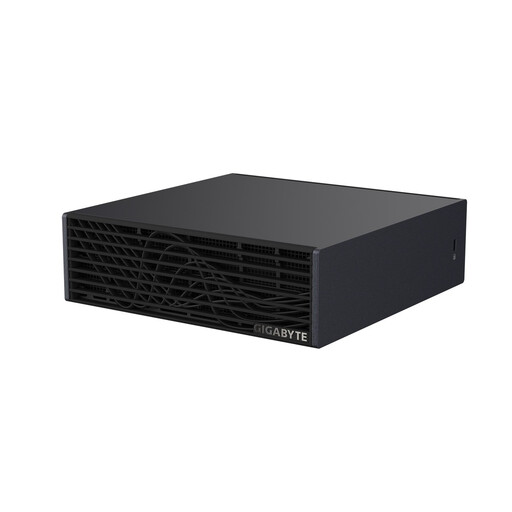
GIGABYTE AI TOP ATOM ATAGB10-9001 desktop computer

GIGABYTE AI TOP ATOM ATAGB10-9001 – NVIDIA GB10, 128 GB, 4 TB SSD

The listed memory and SSD capacity may be useful if you want to reserve plenty of space for local data; tailor the configuration to your own database workload.

Product name lists: NVIDIA GB10, 128 GB LPDDR5X and a 4 TB SSD.

Joybuy

FIREBAT A8 mini PC

FIREBAT A8 – Ryzen AI 9 365, 24 GB DDR5, 1 TB PCIe 4.0 SSD

This compact model may suit you if you have limited desk space; check that your database tools and operating system are compatible with the configuration you choose.

Product name lists: AMD Ryzen AI 9 365, 24 GB DDR5 and a 1 TB SSD.

Joybuy

Mac mini with M6 chip, 24 GB memory and 512 GB SSD

Mac mini – Apple M6 chip, 24 GB, 512 GB SSD

This Mac mini configuration may suit you if your database tools work with macOS; check that its capacity is right for your files and simultaneous tasks.

Product name lists: Apple M6 chip with 12-core CPU and 12-core GPU, 24 GB memory and a 512 GB SSD.

Joybuy
MSI CUBI NUC AI 1UMG-005EU mini PC

MSI CUBI NUC AI 1UMG-005EU – Core Ultra 7 155H, 16 GB, 1 TB SSD

The listed storage may be useful for local files and indexes; compare the memory capacity with the programmes you want to run at the same time.

Product name lists: Intel Core Ultra 7 155H, 16 GB DDR5, 1 TB SSD and Windows 11 Pro.

Joybuy
Mac mini with M6 chip, 16 GB memory and 512 GB SSD

Mac mini – Apple M6 chip, 16 GB, 512 GB SSD

This compact macOS desktop may suit you if your database tools are compatible; consider whether 16 GB of memory is enough for your simultaneous tasks.

Product name lists: Apple M6 chip with 12-core CPU and 12-core GPU, 16 GB memory and a 512 GB SSD.

Joybuy

Frequently asked questions

How do you work out how much RAM and storage you need?

Make a list of your database files, expected growth and programmes running at the same time. PostgreSQL uses memory for shared buffers, among other things; there’s no universal PC configuration based on a single minimum. Also allow space for data and indexes.

Will an SSD make every database query fast?

No. An SSD specification alone doesn’t determine how quickly every query runs. PostgreSQL explains that indexes can speed up certain lookups, but they also add overhead. So assess the complete configuration and your own workload.

What should you consider when positioning a quiet PC?

Compare noise under a workload similar to your own and make sure the PC’s position leaves ventilation unobstructed. According to the manufacturer, a configurable case may offer different options for balancing airflow and noise reduction, but it doesn’t determine the noise of the complete PC on its own.

What warranty and cooling-off period apply to online purchases in the Netherlands?

For a faulty product, the seller must provide a solution, according to the Government of the Netherlands. With distance purchases, a 14-day cooling-off period applies in many cases; check the relevant terms and exceptions. A manufacturer’s warranty does not replace your statutory rights.

Does a desktop sold in the EU have to meet safety requirements?

Yes. The Government of the Netherlands states that electronic devices placed on the EU market must meet the applicable safety requirements and carry the appropriate CE marking. Check the information for the specific offer; a product page alone does not prove that a particular product meets all the requirements.
