What should you look for when buying?
First, check the requirements for your database version and the demands of other programmes. Then compare storage, upgrade options and the dimensions of the exact model.
| What to consider |
What should you check? |
Who is this important for? |
| Memory and simultaneous workloads |
Check the installed RAM, the upgrade options for the model, and the requirements of your database version and other programmes. The buffer setting PostgreSQL documents for a dedicated database server is not a universal guideline for the PC’s total memory. |
If my database runs alongside development tools and other local services, I want to know whether they’ll all have enough memory at the same time. Around 29% of consumers give simultaneous workloads top priority. |
| Storage growth and recovery |
Estimate how much your data is likely to grow and check the SSD capacity of the exact model. Plan where to store backups and choose a method that lets you test recovery. |
I want to allow for growing files and know how to restore them. Around 29% of consumers prioritise storage growth and recovery. |
| Database and operating system compatibility |
Make a note of the database, edition and version, then check the official requirements for the operating system and processor architecture. Microsoft specifies an x64 processor for SQL Server 2022 on Windows; this requirement does not automatically apply to other databases. |
If I need to use a specific database version, I want to know in advance whether it’s supported on the PC I choose. Around 21% of consumers make compatibility their first buying consideration. |
| Size and expandability |
Compare the dimensions, connections, installed components and available slots of the exact model number. Don’t rely on the product family name alone. |
With limited desk space, I want to know where the PC will fit without overlooking the possibility of upgrading it later. Around 21% of consumers base their choice mainly on size and upgrade options. |
Brands to consider
These examples can help you compare product ranges and configurations; a brand mention alone doesn’t indicate availability.
Lenovo
The ThinkCentre M70t Gen 5 is a tower option, while the M70q Gen 5 is a compact model. Lenovo documents these models separately.
- The separate product specifications can help you compare the tower and compact models.
- Check which components and free slots are actually available in each configuration.
HP
According to HP Netherlands, the HP Pro Tower 400 G9 99P69ET#ABH is a Windows tower with a clearly specified configuration: Intel Core i7-14700, 16 GB RAM and 512 GB SSD.
- The configuration lists the processor, operating system, memory and SSD.
- Check the availability and upgrade options for the specific configuration before relying on them.
Dell
Dell Netherlands lists the Pro Slim QCS1250 as a compact desktop. The configuration described has a Core Ultra 7 265, 16 GB DDR5 and 512 GB SSD.
- The configuration listed includes specific processor, memory and storage details.
- Another listing under the QCS1250 family name specifies a Core Ultra 5 235. Compare the processor and other components of the exact configuration.
Apple
The 2024 Mac mini is a compact macOS option. Apple lists configurable memory and storage options for the M4 version.
- Apple Support Netherlands describes several memory and SSD configurations for this 2024 model.
- Check in advance that your database software works with macOS and the configuration you choose. The x64 requirement Microsoft Learn lists for SQL Server 2022 on Windows doesn’t confirm compatibility with macOS.
Joybuy products
This Joybuy selection includes compact desktops and tower PCs with a range of memory and storage configurations. Check which components and upgrade options come with the exact model.
 No image available
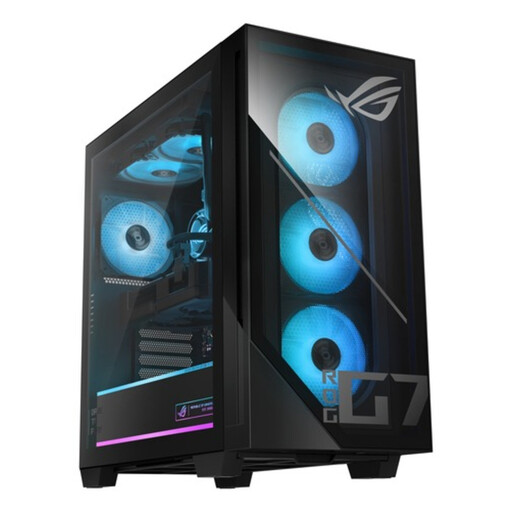
ASUS ROG G700TF-07265F666W desktop PC
The listed memory and storage configuration is worth comparing if you need a database PC that also runs other applications.
Intel Core Ultra 7 265F; 32 GB DDR5; 1 TB NVMe SSD; NVIDIA GeForce RTX 5070 12 GB; Windows 11 Home.
View at Joybuy
No image available
ASUS ROG G700TF-05225F170W desktop PC
Compare this configuration’s listed memory and storage capacity with the requirements of your database and the programmes you use at the same time.
Intel Core Ultra 5 225F; 32 GB DDR5; 1 TB PCIe 4.0 SSD; NVIDIA GeForce RTX 5070 12 GB; Windows 11 Home.
View at Joybuy
 No image available
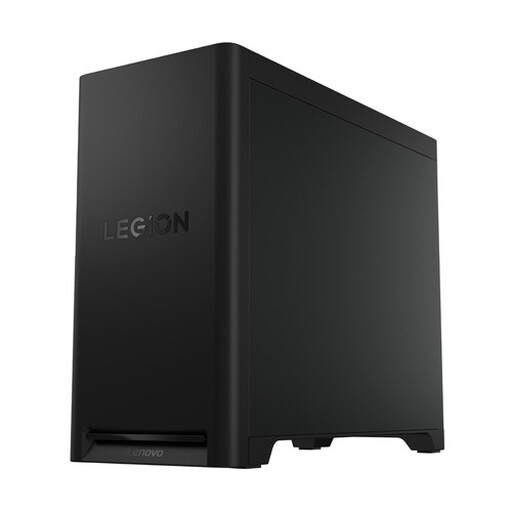
Lenovo Legion T5 30IAX10
The listed configuration and storage options may be useful if your data files are growing and you’re considering adding internal storage later.
32 GB DDR5; 1 TB PCIe 4.0 SSD; NVIDIA GeForce RTX 5070; Wi-Fi 7; Windows 11 Home.
The description lists space for up to three M.2 SSDs and a 3.5-inch drive; check the configuration and included components.
View at Joybuy
 No image available
Lenovo ThinkCentre M70q Gen 5
The compact size may suit you if you have limited desk space. At the same time, check that the memory and storage configuration can handle your workload.
Intel Core i7-14700T; 16 GB DDR5; 512 GB SSD; Windows 11 Pro.
The description lists an upgradeable maximum of 64 GB memory and two M.2 storage slots.
View at Joybuy
 No image available
MSI CUBI NUC AI 1UMG-005EU
A compact model may suit a small workspace. Compare its listed configuration with the requirements of your database software and other applications.
Intel Core Ultra 7 155H; 16 GB DDR5; 1 TB SSD; Windows 11 Pro.
View at Joybuy
Frequently asked questions
How much RAM do I need for my local database?
There’s no single amount that suits every local database and workload. Choose memory based on your database version and everything else running at the same time. Microsoft’s SQL Server 2022 installation details don’t guarantee a certain level of performance for your use. The PostgreSQL documentation gives a buffer setting, not a minimum for the PC’s total memory.
Is an SSD enough for a backup?
No. An SSD inside your PC alone doesn’t make a complete backup and recovery plan. The PostgreSQL Global Development Group describes SQL dumps, file-level backups and continuous archiving, among other methods. Choose an approach that suits your data and test that you can restore it.
What should I check about the warranty and service?
Check which components and any additional service are included with the configuration you choose. In the Netherlands, statutory warranty is separate from any manufacturer’s or seller’s warranty on offer. According to ACM ConsuWijzer, the seller is responsible if a product breaks sooner than expected during normal use.
Can I store personal data in a local database on my home PC?
Using a local PC doesn’t automatically make processing either permitted or prohibited. If an organisation processes personal data, the Dutch Data Protection Authority says it must determine appropriate security measures based on the risks. If you’re using work data, check your organisation’s policy first.
Do I have a cooling-off period when buying online in the Netherlands?
As a consumer, you generally have 14 days to change your mind from the date of delivery when buying online, according to ACM ConsuWijzer. There are exceptions, so check the terms for the specific purchase. If you’re buying as a business, don’t assume this consumer right applies.


