Who is this workstation for?

Library lending data analyst

Works with spreadsheets, pivot tables or dashboards and wants a screen and PC configuration suited to the size of the data. The KB, the national library of the Netherlands, describes dashboards for library services; Microsoft Support points out that workbooks with data models can be large.

Employee working beside a window

Reads figures for long periods in changing daylight and wants to adjust the screen, workstation and any window coverings to suit. Arboportaal recommends suitable window coverings and positioning the workstation appropriately in relation to windows.

Library IT manager

Buys a workstation for an organisation and aligns its management and security with the risks if lending data can be traced back to individuals. The Dutch Data Protection Authority describes risk analysis as the starting point for a security plan.

What to consider when choosing

Mini desktop with a separate screen

A good fit if: you have limited desk space and want to position the screen independently of the PC in relation to the window.

Bear in mind: you may need to buy a suitable screen and input devices separately; ports and expansion options vary by configuration.

Larger desktop with a separate screen

A good fit if: expandability or more local memory matters more to you than a compact case.

Bear in mind: choose a configuration to suit your software and files. A larger PC takes up more desk space and won’t prevent reflections.

All-in-one PC

A good fit if: you want an integrated setup and can check in advance that the built-in screen can be positioned well beside the window.

Bear in mind: your choice of screen and PC is less flexible; if you’re considering a thin client, also check that its operating system and setup work with your analysis software.

Consideration What should you check? Who is this important for?
Readability beside a window Check the screen’s adjustability and specifications, and assess its position in relation to the window and any window coverings. Arboportaal highlights suitable window coverings and workstation positioning as factors to consider. When I’m reading figures for a long time beside a bright window, I want to position the screen well and minimise reflections. Around 33% of consumers say readability beside a window is their top priority.
Performance for analysis List the programmes you use, file sizes and simultaneous tasks, then compare the exact memory, storage and expansion specifications. Microsoft Support explains that Excel has both worksheet limits and limitations that depend on available memory and system resources. When my data files and analysis tools are the deciding factors, I want to choose a configuration to suit them rather than choosing based only on the case. Around 27% of consumers put analysis performance first.
Data protection Establish whether data can be traced back to individuals, then let your organisation decide what access controls, updates and management capabilities are needed. The Dutch Data Protection Authority recommends tailoring security measures to the risks. If lending data could be traced back to individuals, I want the PC to meet my organisation’s security policy. Around 20% of consumers make data protection their top priority.
Space and a complete setup Check what’s included with each configuration and whether its ports are suitable for the screen and other components you want to use. When I’m setting up a workstation in the space available, I want to know in advance which components are compatible and what I’ll need. Around 20% of consumers put space and a complete setup first.

Common mistakes

  • Upgrading only the PC to fix a screen that’s hard to read

    Reflections and contrast with the surroundings call for attention to the screen, its position and, if needed, window coverings. A faster PC won’t change the light coming in.

    First assess your workstation beside the window, then choose an adjustable screen that suits your setup. Arboportaal highlights window coverings and the position of the workstation in relation to windows.

    You may need a different screen or to adjust your workstation.

  • Assuming a mini PC is a complete workstation

    A compact PC may be supplied separately from a screen and input devices, so the PC alone may not be everything you need for your workstation.

    Before you buy, check the exact configuration and which components are included.

    You may also need to arrange a suitable screen, keyboard, mouse or cables.

  • Assuming a business PC protects your data on its own

    If lending data can be traced back to individuals, your organisation must tailor security to the data and the risks. The Dutch Data Protection Authority describes risk analysis as the first step in creating a security plan.

    Ask your organisation to establish whether the data can be traced back to individuals and what security and management measures are needed.

    Access management, setup and maintenance also need attention from your organisation.

Brands to consider

Lenovo

The ThinkCentre M70q Tiny is a range of business mini desktops for those who want to choose their PC and screen separately.

  • For an M70q Gen 6 configuration, Lenovo Netherlands lists 16 GB RAM and a 512 GB SSD, and describes the storage as expandable.
  • For a separate M70q Gen 5 configuration, Lenovo states that the screen is sold separately. Check what’s included with each configuration.

HP

ProDesk Mini is a business range; the right configuration depends, among other things, on your preferred screen setup and management requirements.

  • For a ProDesk 4 Mini G1i configuration, HP Netherlands lists Windows 11 Pro, 24 GB RAM and a 512 GB SSD.
  • Features of larger OmniDesk models don’t automatically apply to a ProDesk configuration.

Dell

Dell Pro Micro is a compact business desktop that lets you choose your screen separately.

  • For the QCM1250 configuration, Dell Netherlands lists Windows 11 Pro, 16 GB DDR5 and a 512 GB SSD.
  • Check the ports and configuration your organisation needs for the exact model.

ASUS

The ExpertCenter PN64 is a mini PC range where the exact configuration matters for screen connections and included components.

  • ASUS lists features including two HDMI outputs for some models.
  • Specifications vary by model. Check whether your chosen model includes an operating system and the memory configuration you want.

Joybuy products

These mini PCs are designed for a workstation with a separately chosen screen. Check the ports, configuration and included components for each model.

SOYO Y5Pro mini PC

SOYO Y5Pro Mini PC, Intel Core i5 8250U/8350U

A mini PC for a compact workstation with a separately chosen screen. Check that its ports are suitable for your screen.

Intel Core i5 8250U/8350U, Windows 11, 8 GB DDR4 and 256 GB SATA SSD.

Wi-Fi 5 and Bluetooth 5.2.

View at Joybuy

ASUS Ascent GX10 GX10-GG0003BN mini PC

ASUS Ascent GX10 GX10-GG0003BN, GB10

A mini PC for a workstation with a separately chosen screen. Check the ports on the exact configuration before choosing a screen.

GB10, 128 GB LPDDR5x and a 1 TB SSD.

View at Joybuy

Lenovo ThinkCentre M70q Gen 5 mini PC

Lenovo ThinkCentre M70q Gen 5, Intel Core i7-14700T

This mini PC is designed for use with a separately chosen screen; according to the product description, the screen is not included.

Intel Core i7-14700T, 16 GB DDR5, 512 GB SSD and Windows 11 Pro.

View at Joybuy
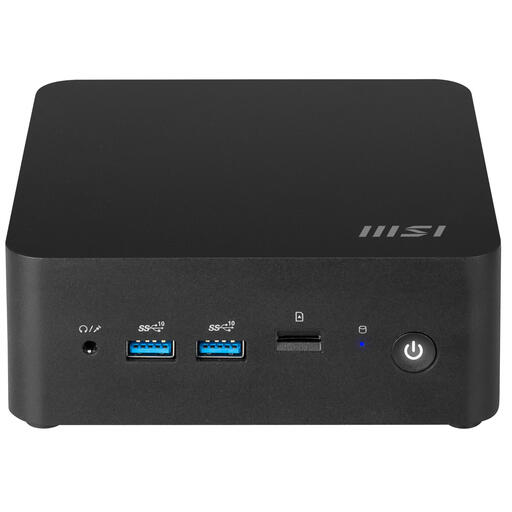
MSI CUBI NUC 1MG-244BEU barebone mini PC

MSI CUBI NUC 1MG-244BEU, barebone

As a barebone, this mini PC requires you to check which components and configuration you’ll need for your analysis workstation.

Intel Core 3 100U and a 0.84-litre case.

The product description lists two HDMI ports, two Thunderbolt 4 ports and support for up to four screens.

View at Joybuy
MSI CUBI NUC AI 1UMG-005EU mini PC

MSI CUBI NUC AI 1UMG-005EU, Intel Core Ultra 7 155H

A mini PC for a workstation with a separately chosen screen. Check that the video outputs are suitable for your preferred screen setup.

Intel Core Ultra 7 155H, 16 GB DDR5, 1 TB SSD and Windows 11 Pro.

The product description lists support for up to four screens and VESA mounting.

View at Joybuy

Frequently asked questions

Will a faster desktop help with glare beside a window?

No. A faster desktop won’t change the light coming in. Position your screen and workstation appropriately in relation to the window and use window coverings if needed. Also check that the screen is adjustable and doesn’t reflect too much light.

How can you tell whether a larger dataset needs a more powerful PC?

Start by considering the software you use, the actual file size and the number of tasks running at the same time. Microsoft Support explains that Excel has both worksheet limits and limitations caused by available memory and system resources. This doesn’t mean there’s one fixed amount of RAM that will suit every library lending analysis task.

What should you check after choosing a mini PC?

Check that the outputs on your chosen PC are suitable for your screen and that the keyboard, mouse and power adapter are included with the exact configuration you’re buying. When positioning the PC, keep the ventilation openings clear, following the product instructions.

Does the GDPR apply to library lending data, and what warranty cover applies to a purchase?

The GDPR is relevant when lending data can be traced directly or indirectly back to an individual. Your organisation must tailor security to the risks. For purchases by consumers in the Netherlands, statutory conformity protection applies alongside any commercial warranty. According to Business.gov.nl, the Dutch government’s business information service, consumer law does not apply in the same way to sales to organisations.
