What should you look for when choosing?
First, check which engine features and project tasks your desktop needs to handle. Then choose the PC’s size and position, and make sure cables and ventilation remain unobstructed throughout the desk’s full height adjustment.
| What to consider |
What to check |
Who should consider this? |
| Graphics capabilities |
Check the GPU and video memory of the exact model, and compare them with your engine and the rendering features you want. Epic Games specifies 8 GB or more of graphics memory for the Unreal configuration described. |
If I create complex 3D levels, I want a GPU that suits my scenes and the features I use. Around 33% of consumers give graphics suitability top priority. |
| Compilation time |
Compare the CPU and the installed and upgradeable RAM of the model you choose, and assess them alongside the GPU your levels require. |
If I often compile code or shaders, I want to make my choice with these regular tasks in mind, not just the graphics card. Around 27% of consumers prioritise compilation time. |
| Space and cables |
Measure the available space, keep ventilation openings clear and test power, display and peripheral cables throughout the desk’s full range of movement. |
If my PC is going next to a sit-stand desk, I want the case to fit and the cables to stay slack when the desk moves. Around 27% of consumers start by considering how the PC will fit into their workspace. |
| Upgrades and aftercare |
Compare the specifications of the model you choose with the product range’s maximum capabilities. Consider additional cover separately from your statutory consumer rights. |
If I want to upgrade components later, I want to know what the model includes now and what upgrades are possible. Around 13% of consumers give upgradeability and after-purchase costs top priority. |
Joybuy desktops for level design
This selection from Joybuy includes desktops with a dedicated graphics card for level design, as well as a compact barebone PC for a workspace where space matters. For each model, check the specifications you need, which components are included and how much room the PC will take up around your sit-stand desk.
 No image available
Gaming Desktop PC Ryzen 7 7800X3D, GeForce RTX 5080, 32GB DDR5, 1TB NVMe SSD, Windows 11 Trial
A tower configuration to compare for complex 3D levels where a dedicated GPU is relevant.
Ryzen 7 7800X3D; GeForce RTX 5080 with 16 GB of graphics memory; 32 GB DDR5; 1TB NVMe SSD. The operating system is listed as Windows 11 Evaluation Version.
Joybuy
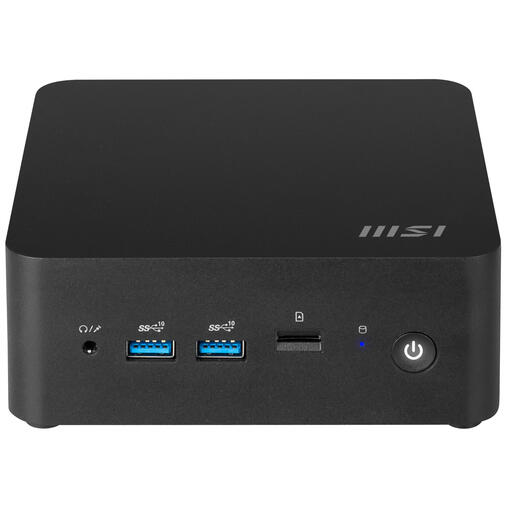 No image available
MSI Cubi NUC 1MG-237BEU PC/Workstation Barebone
A compact barebone PC to consider if workspace is limited; check which components are included with the model before you buy.
0.84-litre case; Core 7 150U; supports up to 64 GB DDR5 RAM according to the product description; VESA mounting is listed. This model is sold as a barebone PC.
Joybuy
 No image available
OMEN 35L Gaming Desktop GT16-0160nd C2FK7EA#ABH
A tower with a dedicated GPU to compare for levels where graphics capabilities matter.
Core i7-14700F; RTX 5060 with 8 GB of graphics memory; 16 GB RAM; 1 TB SSD. RAM is upgradeable to 128 GB. Leave at least 10 cm of space around the PC for ventilation; don’t use it in a closed cabinet.
Joybuy
 No image available
Shark Max Bite R500 Gaming PC RTX5060/R5/16GB/500GB
A tower configuration to compare for level design with a dedicated graphics card; check that the memory suits your project.
Ryzen 5 5500; RTX 5060 with 8 GB; 16 GB DDR4; 500 GB NVMe SSD. Keep the ventilation openings clear.
Joybuy
 No image available
RGB Gaming PC RTX 5060 Ryzen 5 16GB 480GB SSD
A tower to compare if you’re looking for a desktop with a dedicated graphics card for level design.
Ryzen 5 5500; RTX 5060 with 8 GB GDDR7 memory; 16 GB DDR4; 480 GB M.2 PCIe 4.0 SSD. Windows 11 is listed as not activated.
Joybuy
Frequently asked questions
Do you need 32 GB of RAM for every level design project?
No, it depends on the engine and the project. Epic Games specifies 32 GB of RAM for the Unreal configuration described; Unity 6.3 recommends at least 8 GB to run the editor and notes that performance varies with project complexity. Compare the requirements for your version of the engine with the projects you create.
How should you position a computer next to a sit-stand desk?
Keep the ventilation openings clear and test the full height adjustment with the cables connected. The Steelcase guide to adjustable desks warns about cords being pulled out and objects getting in the way while the desk is moving. Check the clearance and cable route needed for your own desk.
Are you always entitled to just two years of statutory warranty in the Netherlands?
No. According to the Dutch government, there is no fixed statutory warranty period in the Netherlands; you’re entitled to a product that meets what you could reasonably expect. If a consumer product is faulty, the retailer is your point of contact. Additional warranties are separate from these statutory rights.
What product rules apply when selling a desktop in the Netherlands?
Electrical and electronic equipment must comply with the relevant European rules when placed on the market. According to Ondernemersplein, the responsible manufacturer must provide the required CE marking and EU declaration of conformity. This doesn’t confirm that a specific model has been individually inspected.
What can you do with your old computer when you replace it?
Milieu Centraal explains that when you buy a new, similar appliance, you can hand in an old electrical appliance at the shop free of charge, including when you buy online. Back up your files and delete your personal data beforehand.


