Who should consider these options?

Beginner with one free socket

You want to learn Python at a fixed workstation and still need a screen. Consider the connections required for the complete setup, not just the size of the computer. Dell Netherlands describes the EC24260 as an all-in-one, while Raspberry Pi describes a specific monitor that can be powered by the Pi 500.

Beginner with an existing screen

You want to reuse a suitable screen and can check the power requirements for the computer and screen separately. A compact computer with an external screen is a different setup from an all-in-one. Apple Netherlands describes the Mac mini as a computer for use with external screens.

Python learner who wants to experiment

You want to explore your computer setup as well as follow lessons, and are open to using Raspberry Pi OS, provided the specific screen and power supply combination works for you. Raspberry Pi describes the Pi 500 and how the Raspberry Pi Monitor is powered.

What should you look for when choosing?

All-in-one

A good fit if: you don’t have a screen yet and want to use the computer and display together in one fixed spot.

Bear in mind: the screen is integrated, so check what else is included in your chosen configuration.

Mini PC with a separate screen

A good fit if: you already have a suitable screen or want to choose the components separately. The Mac mini is one example of a computer designed for use with external screens.

Bear in mind: a separate screen needs its own power supply, so a compact computer won’t automatically solve a shortage of sockets.

Raspberry Pi 500 with Raspberry Pi Monitor

A good fit if: you also want to experiment with a Linux-based computer setup.

Bear in mind: according to Raspberry Pi, the specific Raspberry Pi Monitor can be powered through a USB port on the Pi 500. This won’t necessarily work with other screens.

Tower or other desktop

A good fit if: you already have a screen and want to keep choosing components separately.

Bear in mind: the computer and screen remain separate components, so you’ll need to check their connections and power requirements individually.

Consideration What should you look for? Who is this most relevant to?
Number of sockets Count the power supplies for the computer, screen and any other devices. Only rely on USB power for the specific Pi 500 and Monitor combination mentioned. I want my complete learning setup to fit the available sockets; around 36% of consumers prioritise the number of sockets they need.
Getting started with Python Check the operating system and follow the Python installation instructions for that system. I want to install Python without following instructions for a different system; around 29% of consumers prioritise having a suitable Python installation.
Reusing a screen Check whether you can connect your current screen, and which cables and power supply you’ll need. If I already have a suitable screen, I want to know if I can use it for my learning setup; around 21% of consumers prioritise reuse and the components required.
Flexibility Check the connections on the exact model and decide which components you may want to choose separately later. I want to be able to choose or replace the computer and screen separately in future; around 14% of consumers prioritise a flexible workstation.

Common pitfalls

  • Assuming a mini PC will automatically need only one socket

    A mini PC may need an external screen, which also needs a power connection. So the computer’s compact size doesn’t tell you how many sockets the whole workstation will need.

    Before you buy, plan out the complete setup and count the power connections for the computer, screen and any other devices.

  • Assuming one monitor’s USB power feature applies to all screens

    Raspberry Pi describes this power option for the Raspberry Pi Monitor when used with the Pi 500, not for any USB screen.

    Check the exact combination of computer, monitor and power supply. Also check the regional keyboard layout and what’s included in your chosen kit.

  • Assuming the manufacturer’s warranty covers all your rights

    According to ACM ConsuWijzer, your statutory guarantee rights are separate from any guarantee offered by the seller or manufacturer.

    Keep your proof of purchase and contact the seller if something goes wrong. Also assess the problem in light of what you could reasonably expect from the product.

Brands to consider

Dell

In the Netherlands, Dell offers both all-in-ones, such as the EC24260, and separate desktop computers. This gives you the option to compare different setups within the same brand.

  • Dell Netherlands describes the EC24260 as a computer with an integrated screen.
  • Check the configuration and what’s included. Features of this model won’t necessarily apply to other Dell desktops.

Raspberry Pi

The Raspberry Pi 500 is a computer built into a keyboard, for anyone looking to explore a different setup while learning to code.

  • According to Raspberry Pi, the specific Raspberry Pi Monitor can be powered through a USB port on the Pi 500.
  • Check what’s included in the kit and the regional keyboard layout. This power option won’t necessarily work with other screens.

Apple

Apple offers the Mac mini for use with a separate screen, as well as iMac models that are all-in-ones. The Python Software Foundation provides installation instructions for macOS.

  • The Mac mini is an option if you want to use an external screen.
  • You’ll need a screen for the Mac mini. Check the screen’s connections and power requirements too.

HP

HP offers mini desktops and all-in-ones in its business-focused Pro range.

  • HP describes the ProDesk 4 Mini G1i as having a flexible USB-C connection and supporting a single-cable setup.
  • This manufacturer’s description doesn’t confirm that every screen can power the PC or that the complete workstation will use only one socket.

Lenovo

The IdeaCentre AIO 27IRH9 is one example of Lenovo’s all-in-one setup.

  • Lenovo lists an integrated 27-inch screen and several possible configurations.
  • Not every configuration is available in every region, so check which version you’re looking at.

All-in-one desktops on Joybuy

These Joybuy products are all-in-one desktops with integrated screens, so you don’t need to choose a separate monitor for a basic setup. Check the exact model to see which power supply and accessories you’ll need.

HP 24-cr0050nd 895R0EA#ABH All-in-One

HP 24-cr0050nd 895R0EA#ABH All-in-One

The integrated screen suits a fixed learning space where you don’t want to choose a separate monitor.

Listed features: 23.8-inch FHD IPS screen, Ryzen 5 7520U, 8 GB memory, 512 GB SSD and Windows 11 Home. According to the product description, the mains adapter must be purchased separately.

Joybuy

LG AIO 24CQ651N-6N All-in-One

LG AIO 24CQ651N-6N All-in-One

The integrated screen is a good option if you want to create a fixed learning space without choosing a separate screen.

The product description lists a 24-inch Full HD IPS screen and 8 GB DDR4 memory.

Joybuy

MSI Modern AM242P 1M-1223EU All-in-One

MSI Modern AM242P 1M-1223EU All-in-One

An integrated screen can be a good fit for a fixed setup where you don’t want to choose a separate monitor.

Listed features: Intel Core 5 120U, 8 GB DDR5 memory, 512 GB SSD, 23.8-inch Full HD IPS screen and Windows 11 Pro. According to the product description, the mains adapter isn’t included and must be purchased separately.

Joybuy

Lenovo Yoga AIO 27IAH10 F0J2001DNY

Lenovo Yoga AIO 27IAH10 F0J2001DNY

The integrated 27-inch QHD screen is ideal for a fixed workstation without a separate monitor.

The product name lists an Intel Core Ultra 7 255H, 16 GB LPDDR5X memory, a 1 TB SSD and Windows 11 Home.

Joybuy
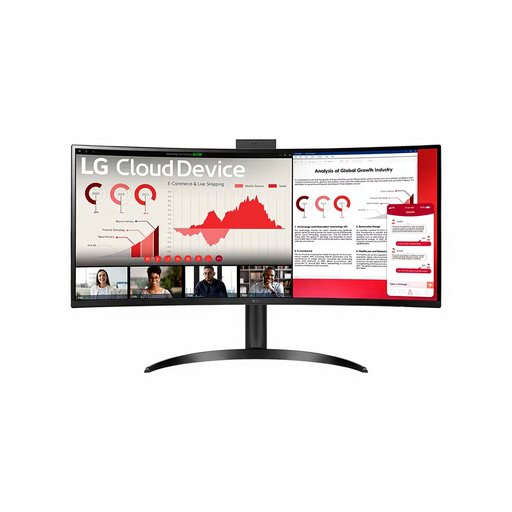
LG ThinClient BOX AIO 34CR651N-6P

LG ThinClient BOX AIO 34CR651N-6P

The integrated 34-inch screen could suit a fixed setup where you don’t want a separate monitor, but no operating system is installed. Bear this in mind before you plan to install Python.

Listed features: Wide Quad HD screen, Pentium Silver N6005, 8 GB memory and 16 GB eMMC storage.

Joybuy

Frequently asked questions

Is a mini PC without a separate screen a complete workstation?

Not if you don’t already have a usable screen. Check the screen’s connection and power supply too: the computer’s small size doesn’t determine how many sockets the full setup needs.

Can I use Python on Windows, macOS or Linux?

Yes. The Python Software Foundation provides separate installation instructions for Windows, macOS and Unix platforms, including Linux. Windows doesn’t include a system-supported Python installation by default, so check how to install Python on the PC you choose.

Can I connect extension leads to one another if I don’t have many sockets?

Don’t assume this is a suitable solution. The Fire Service advises using undamaged extension leads and not connecting them to one another. Consider the connections required for your complete workstation.

What if my desktop develops a fault soon after I buy it?

When you buy as a consumer, you have statutory guarantee rights in addition to any manufacturer’s warranty. According to ACM ConsuWijzer, if a product breaks sooner than could reasonably be expected under normal use, the seller must put things right free of charge, for example by repairing or replacing it.

Do I have a cooling-off period when I buy online in the Netherlands?

When you buy online from a business, you’ll generally have a statutory 14-day cooling-off period from the date of delivery. ACM ConsuWijzer and the Dutch Government explain this period; check which exceptions and returns conditions apply to your purchase.
