What should you look for?
Expandable tower
A good fit if: you often use large files alongside design software or want to upgrade the memory and storage later.
Bear in mind: the larger case and the configuration of the specific model; a monitor may be sold separately.
Compact, ready-to-use mini desktop
A good fit if: you have limited desk space and your design software works with the desktop’s operating system.
Bear in mind: the memory and storage configuration, available workspace, and the monitor and input devices you need.
Mini PC kit to build yourself
A good fit if: you want to choose and install the memory, SSD and operating system yourself.
Bear in mind: component compatibility and the extra set-up work required before the computer is ready to use.
The percentages refer to consumers choosing a desktop for this community garden map and show the main purchasing concern for each group.
| What to consider |
What should you check? |
Who is this more important to? |
| Memory and large files |
Check the installed RAM, upgrade options and your software’s requirements. For Photoshop 27.x, Adobe lists 8 GB RAM as the minimum and 16 GB or more as recommended; this is not a general QGIS requirement. |
If I want to open large map layers and design software at the same time, I’ll look first at the memory and software requirements. Around 36% of consumers prioritise working with large files simultaneously. |
| Storage for source files and versions |
Compare your file sizes with the SSD capacity and available free space, and check whether you can add more storage. Adobe recommends 100 GB of available disk space for Photoshop; this is not a measure of the space needed for an entire map archive. |
If I want to keep source material and previous map versions locally, expandable storage is important to me. Around 29% of consumers are primarily concerned about archive space. |
| Software and monitor set-up |
Check the operating system and your software’s requirements, as well as the screen ports, cables and monitor for the exact model. Lenovo states that the monitor is sold separately with the ThinkStation P3 Tower. |
If my existing software or monitor will determine my choice, I’ll check compatibility and connections first. Around 21% of consumers prioritise software and monitor compatibility. |
| Size and what’s included |
Check how much space the case takes up and whether the model is a complete desktop or a kit. For a kit, check whether memory, an SSD and an operating system are included. |
If I have limited desk space, I want to know in advance how much room the computer takes up and how much I’ll still need to install myself. Around 14% of consumers make a compact set-up their top priority. |
Desktops at Joybuy
These desktops vary in memory, storage and form factor. Compare each model with your design software and files, and check the CE marking for the exact model before buying.
 No image available
Gaming Desktop PC Ryzen 7 7800X3D, GeForce RTX 5080, 32 GB DDR5, 1 TB NVMe SSD
The listed 32 GB DDR5 and 1 TB NVMe SSD are useful points to compare with your design software requirements and source files.
The product name states Windows 11 Trial/Evaluation Version; check which Windows licence and version are included with this model.
View at Joybuy
 No image available
Shark Bloodlust R700, 16 GB, 1 TB
You can compare the listed 16 GB memory and 1 TB storage with your programmes’ requirements and the space your files take up.
The product description mentions support for additional storage drives; check the options and configuration for the model you choose.
View at Joybuy
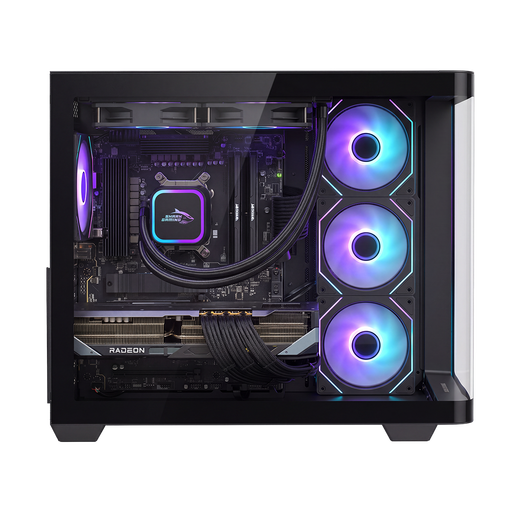 No image available
Shak RGBeast R700 Gaming PC, RX9070XT/R7, 16 GB DDR5, 1 TB NVMe SSD
The listed configuration includes 16 GB DDR5 memory and a 1 TB NVMe SSD; compare these with your software requirements and local files.
The product description lists Windows 11 Home. Check that the software you use works with this model.
View at Joybuy
 No image available
Lenovo Legion T5 30IAX10, Intel Core Ultra 7, 32 GB DDR5, 1 TB PCIe 4.0 SSD
The listed 32 GB DDR5 and 1 TB SSD are useful points to consider if you want to compare large source files with a desktop’s memory and storage capacity.
The description mentions an upgrade to 64 GB memory and space for additional M.2 and 3.5-inch storage; check the options for the exact model.
The product name also lists an NVIDIA GeForce RTX 5070, Wi-Fi 7 and Windows 11 Home.
View at Joybuy
 No image available
NVIDIA DGX Spark Founders Edition, GB10 Mini PC, 128 GB RAM, 4 TB SSD
The product name lists 128 GB RAM and a 4 TB SSD. Also check that NVIDIA DGX OS and the available connections suit your intended software and workspace.
The compact design may be useful if you have limited desk space.
View at Joybuy
Frequently asked questions
Do I need to buy a more powerful desktop straight away for a large raster map?
Not just because a map takes a long time to display. QGIS describes overviews, also known as pyramids, as a way to display raster layers more quickly at different zoom levels. Before choosing hardware, also consider which programmes and files you use at the same time.
How much free SSD space does Photoshop need alongside my map files?
For Photoshop 27.x, Adobe lists 10 GB of available disk space as the minimum and 100 GB as the recommendation, as well as a fast internal SSD in the recommended configuration. This is not the same as the total storage space your source archive needs.
Is the ASUS NUC15CRS-B kit ready to use straight away?
No. According to ASUS, the kit reviewed doesn’t include pre-installed memory, storage or an operating system. Check which components you’ll need and whether they’re compatible with the exact kit.
Is 32 GB memory automatically enough for my map design work?
It depends on the programmes, files and tasks you run at the same time. Compare the system requirements of your own software with the configuration; Adobe recommends 16 GB or more for Photoshop 27.x, but this isn’t a general requirement for other programmes.
What should I look for in a desktop’s CE marking?
The Dutch government states that electronic devices offered for sale on the EU market must have the applicable CE marking. Check the marking and documentation for the exact model; don’t assume this based on the brand name or product title alone.


