For manual indexing and viewing scans, a business desktop or mini PC is a more practical choice than a graphics workstation. If you also process lots of scans at once or use text recognition, your software requirements, storage plan and device connections will be decisive. A fast PC won’t automatically preserve links to your source files.
Who is this desktop choice for?
Manual advert indexer
You enter descriptions and want to be able to find each listing alongside the right scan. The National Archives describes metadata as helping people manage, find and interpret information. So make sure you record your filenames and references carefully too.
Manager of a large collection of source files
You’re working with a growing collection of scans and need to plan how much storage you’ll need and how to keep recoverable copies. Microsoft describes File History as a way to back up files and folders to an external drive or network location.
Text recognition user
As well as entering information manually, you may want to recognise or organise text from scans. The setup you need depends on your chosen software and files. For example, Transkribus describes a workflow for recognising and organising newspaper pages.
What should you look for when buying?
Start with your indexing and scanning workflow. Then check storage, recovery, software and connections against your own files and devices.
| What to consider |
What should you check? |
Who is this important for? |
| Link between the index and source |
Test with sample files to see whether links are preserved when you move, export and restore them. |
If I want to check an advert later, its description needs to keep pointing to the right scan. Around 33% of consumers put this source link at the top of their buying priorities. |
| Storage and recovery |
Measure the size of your collection, allow for growth, and test recovery of both the index and the scans. |
I want enough working space and a recoverable copy of my index and source files. Around 27% of consumers prioritise storage and recovery. |
| Scans and text recognition |
Check your software’s system requirements and try it with a representative set of scans. |
If I process scans alongside the index, my OCR software and test files need to work with the PC I choose. Around 27% of consumers prioritise text recognition and multitasking. |
| Connections and workspace |
Compare the USB and display connections you need with the ports on the exact model, and check that it will fit on your desk. |
I want to connect my scanner, storage device and monitors, while taking the available space into account. Around 13% of consumers prioritise peripherals and workspace layout. |
Common buying mistakes
-
Comparing only the series name
Products with the same series name can have different processors or included components. For example, Lenovo lists a Core i5-14500T for the ThinkCentre M70q Gen 5 model 12TD0083EZ, while a Joybuy listing specifies a Core i7-14700T. These are different configurations.
Compare the full model number and the specifications of the exact item on offer.
-
Assuming a large internal SSD is a back-up
Keeping work files on your PC isn’t the same as having a separate copy that lets you restore both the index and the source files.
Plan to back up to a separate drive or network location, and test that you can restore both types of files.
You’ll need a separate storage location for a recoverable copy.
-
Assuming OCR will automatically create accurate indexes
Text recognition can support a scanning workflow, but a supplier’s description isn’t proof of how accurately it will handle your Dutch source material.
Test it with your own scans before relying on automated processing for your indexing workflow.
Allow time to check and, if necessary, correct the recognised text.
Brands worth considering
HP
HP offers compact business desktops, including the Pro Mini 400 G9.
- For model 6D494EA#ABH, HP lists Windows 11 Pro, 16 GB of memory and a 512 GB SSD.
- Check the ports and software compatibility of the exact model. The stated capacity doesn’t prove it will be enough for every collection.
Lenovo
The ThinkCentre M70q Gen 5 Tiny is a range of compact Windows desktops for business.
- For model 12TD0083EZ, Lenovo lists a Core i5-14500T, 16 GB of memory, a 512 GB SSD and Windows 11 Pro.
- Check the full model number: another version in the same range may have a different processor.
Dell
The OptiPlex Micro 7020 is a range of compact business desktops.
- Dell publishes instructions for the OptiPlex Micro 7020 covering components such as memory modules and M.2 SSDs.
- The manual doesn’t confirm which processor, storage or warranty comes with a specific item on offer.
Apple
The Mac mini is a compact macOS option if your indexing and scanning software is compatible with it.
- For the 2024 Mac mini, Apple lists, among other options, an M4 model with 16 GB of unified memory and a 256 GB SSD. Other storage configurations are available.
- Check the exact model, software compatibility, and the display connections and adaptors you’ll need.
ASUS
The ExpertCenter PN64 is a mini PC range with several configurations.
- ASUS lists features including DDR5 memory and an M.2 NVMe SSD for the range.
- Specifications can vary by model and market. Check that memory, storage and the operating system are included with the configuration you choose.
Joybuy products
These desktops and mini PCs are designed for working with scans and files locally. Compare the software requirements, storage needs and connections of your own workspace with the specifications of the exact model.
 No image available
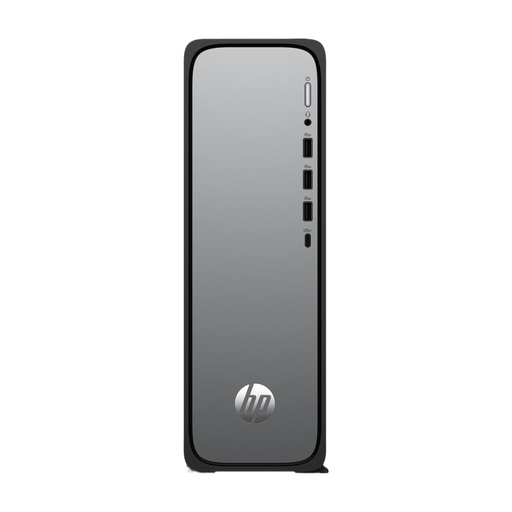
HP OmniDesk Slim S03-0006nd D49HREA#ABH
A desktop option for working with files locally. Check that Windows 11 Home is compatible with your indexing software.
8 GB DDR5 memory; 512 GB SSD; Windows 11 Home; USB-A and USB-C ports.
Joybuy
 No image available
SOYO Y5Pro Mini PC, Intel Core i5-8250U/8350U
A compact Windows 11 mini PC for working locally. Check which of the two listed processor options comes with the item on offer.
8 GB DDR4 memory; 256 GB SATA SSD; four USB ports; HDMI; Wi-Fi 5 and Bluetooth 5.2.
Joybuy
 No image available
Gaming Desktop PC Ryzen 7 7800X3D, GeForce RTX 5080
This desktop lists generous local memory and storage capacity. Check that the configuration suits your software and workflow.
32 GB DDR5 memory; 1 TB NVMe SSD. The product description lists Windows 11 Evaluation Version. Check the terms for your intended use.
Joybuy
 No image available
Lenovo Yoga Mini 01IPH11 Copilot+ PC, Intel Core Ultra 5 325
A compact mini desktop for a Windows workspace. Check that your software and monitors work with this model.
16 GB LPDDR5X memory; 512 GB PCIe 4.0 SSD; Windows 11 Home; Wi-Fi 7.
Joybuy
 No image available
Lenovo IdeaCentre Mini
A compact desktop option for working with scans and files locally. Check that the connections are compatible with your devices.
16 GB DDR5 memory; 512 GB NVMe SSD; Windows 11 Home; 1-litre case.
Joybuy
Frequently asked questions
Do I need a separate graphics card for historical adverts?
A separate graphics card isn’t usually essential for writing descriptions manually and viewing scans. For image processing or OCR software, check the system requirements and test it with representative files.
How can I stop the index from losing track of source files when I switch computers?
Use consistent filenames and references, and test exporting and restoring a small sample collection before switching computers. Keep a separate copy of the relevant files too. When set up, Microsoft File History can back up to an external drive or network location.
What do the warranty and cooling-off period mean when buying online in the Netherlands?
For a consumer purchase, the seller is responsible if a product doesn’t meet what you could reasonably expect. ACM ConsuWijzer explains that the legal guarantee is separate from a manufacturer’s warranty. Online purchases usually come with a statutory 14-day cooling-off period after delivery, subject to exceptions that must be disclosed in advance.
Can I publish scanned historical adverts and names online without checking?
Don’t assume material is free to publish just because it’s old or because you own a scan. The Dutch Government notes that copyright-protected material can’t simply be shared or made public. For personal data, the applicable GDPR legal basis and any relevant exception must be assessed in the specific circumstances by the Dutch Data Protection Authority. This doesn’t mean that every historical advert is still protected or contains personal data about living people.


