
Reader of maps and project documents
You compare plans, maps and supporting information at a fixed workstation. Check the file formats, display and connections before choosing a computer.


Start with the file formats and software you actually need to use: a compact Windows PC and a Mac mini aren’t automatically interchangeable. Then compare the storage capacity with your local project folders and check the display connections and included accessories. Large AutoCAD 2026 datasets, point clouds and 3D models have different requirements from simply viewing maps and documents.
You compare plans, maps and supporting information at a fixed workstation. Check the file formats, display and connections before choosing a computer.
You store project files and related data locally and want to keep opening and restoring them after moving to a new PC. The QGIS documentation explains that moving or renaming data files can make project layers unavailable.
You may work with large datasets, point clouds or 3D models rather than simply viewing documents. The requirements of your particular software and version are what matter; for these demanding tasks, Autodesk specifies additional hardware requirements for AutoCAD 2026.
A good fit if: you need Windows software and want to use an existing monitor or choose the computer and monitor separately.
Bear in mind: Lenovo lists 16 GB RAM and a 512 GB SSD for the ThinkCentre Neo 50q Gen 5 configuration; the monitor, keyboard and mouse are sold separately.
A good fit if: your required software and project files work on macOS; QGIS is available for macOS.
Bear in mind: Apple lists 16 GB unified memory and 256 GB SSD storage for the M6 base configuration mentioned. Check that the storage capacity is sufficient for your local archive.
A good fit if: you work with large AutoCAD datasets, point clouds or 3D models.
Bear in mind: for these tasks in AutoCAD 2026, Autodesk specifies 32 GB RAM or more, as well as additional graphics requirements. These aren’t general requirements for reading plans.
| Consideration | What to check before buying | Who places more importance on this |
|---|---|---|
| Compatibility with files and software | Make a note of your file formats, software and versions. QGIS offers downloads for Windows and macOS; Autodesk states that its specialist AutoCAD toolsets are available for Windows only. | I want to make sure my own files and software work on the system I choose. Around 36% of consumers give software and project file compatibility their highest priority. |
| Local storage and backup | Compare the SSD capacity with your project folders and associated data. Bear project references in mind and set up a separate backup. | If my plans and data are stored locally, I want to be able to open and restore them all after moving to a new PC. Around 29% of consumers prioritise storing and restoring local project files. |
| Monitor and connections | Check that the connections on the exact desktop configuration match your monitor, and find out which accessories are included. Lenovo states that the monitor, keyboard and mouse are sold separately for the ThinkCentre configuration mentioned. | I want to compare plans easily at a fixed workstation and make sure I can connect my monitor. Around 21% of consumers give their choice of monitor and a complete, suitable workstation their highest priority. |
| Processing power for demanding CAD data | Work out whether you’ll simply view files or also work with large datasets, point clouds or 3D models. Compare the requirements of your specific software version with the full PC configuration. | When I edit large CAD files, I want the memory and graphics hardware to be suited to the task. Around 14% of consumers put demanding CAD work at the top of their purchasing priorities. |
A QGIS project may refer to separate data files. According to the QGIS documentation, these sources can become unavailable if files are moved or renamed. What’s more, storage on your PC isn’t a backup.
When you move to a new PC, transfer the entire project folder and its associated data, check that the project opens and set up a separate backup. Microsoft Support explains how to back up files to an external drive or network location using File History.
This backup approach also requires you to set up an external drive or network location.
According to Lenovo, the monitor, keyboard and mouse are sold separately for the ThinkCentre configuration reviewed.
Check what’s included with the exact configuration and compare its connections with your existing monitor and cables.
You may also need a monitor, keyboard, mouse or suitable cables to complete your workstation.
The additional requirements Autodesk specifies for large datasets, point clouds and 3D models don’t automatically apply to viewing documents or maps.
First decide which tasks and software you use, then compare the requirements of the relevant software version with the desktop configuration.
A compact Windows workstation that lets you choose your monitor separately.
The ProDesk 4 Mini G1i is a compact Windows desktop to consider as a separate configuration.
The Mac mini is a compact macOS option if your required software and files are compatible.
The Pro Micro Plus QBM1250 is a compact business Windows desktop with configurable components.
These product options are aimed at viewing local project files at a fixed workstation, with separate choices for compact computers, integrated displays and more powerful configurations.
 No image available
The product name specifies a mini PC with 128 GB RAM and 4 TB SSD storage. Check that your required GIS and CAD software works with the stated NVIDIA DGX OS.
Operating system: NVIDIA DGX OS.
 No image available
This all-in-one PC combines the computer and a 27-inch display, giving you an integrated screen for viewing plans at a fixed workstation.
Processor: Intel Core Ultra 7 155H. Memory: 32 GB DDR5-SDRAM. Storage: 1 TB SSD. Operating system: Windows 11 Pro.
For large AutoCAD 2026 datasets, point clouds or 3D models, Autodesk specifies 32 GB RAM or more, as well as additional graphics requirements. Check the full configuration for these tasks.
 No image available
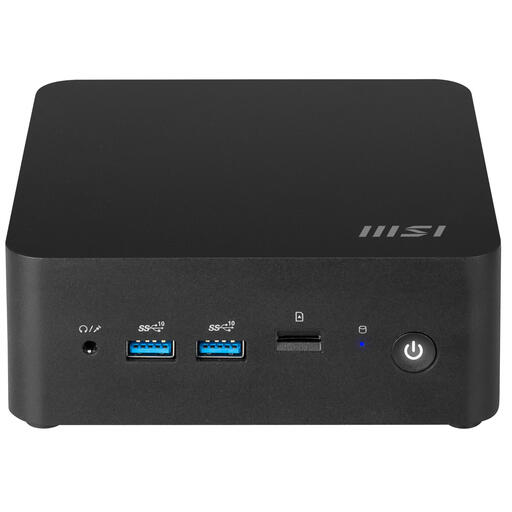
This compact barebone PC may suit a workstation you want to configure yourself. Before buying, check which components and software configuration you’ll still need.
Size: 0.84 litres. Processor: Intel Core 3 100U.
 No image available
If you want to view plans in one place, this all-in-one model combines a computer with a 24-inch display.
Check the memory and graphics configuration of the exact model if you work with large CAD files. For demanding AutoCAD 2026 tasks, Autodesk specifies 32 GB RAM or more, as well as additional graphics requirements.
 No image available
This mini PC lists Windows 11 Pro and HDMI 2.0. Check that the connection is compatible with your monitor and that the SSD is large enough for your local project folders.
Memory: 16 GB LPDDR4X. Storage: 256 GB M.2 2280 SATA SSD. Display output: 4K at 60 Hz. Wireless networking: Wi-Fi 5.
For large AutoCAD 2026 datasets, point clouds or 3D models, Autodesk specifies 32 GB RAM or more; the product name lists 16 GB.
Not based on the subject alone. For large datasets, point clouds or 3D models in AutoCAD 2026, Autodesk specifies additional graphics requirements. First check whether you’ll actually be doing these tasks.
Transfer the data files referenced by the QGIS project and check that the project opens after the move. The QGIS documentation explains that moved or renamed files can result in missing data sources. You should also make a separate backup.
Check that your monitor can connect to the exact computer configuration and find out which accessories are included. For the ThinkCentre configuration reviewed, Lenovo states that the monitor, keyboard and mouse are sold separately.
It depends on the tasks and the AutoCAD version. For AutoCAD 2026, Autodesk specifies 32 GB RAM or more for large datasets, point clouds and 3D modelling. This recommendation doesn’t automatically apply to viewing standard project documents.
QGIS is available for macOS, but also check that all your other required software and file workflows are compatible. For specialist AutoCAD toolsets, Autodesk lists Windows as the required operating system.