What should you look for when choosing?
First decide whether you want to use your existing screen and peripherals. Then look at memory, local storage and any upgrades that might suit the way you work.
| What to consider |
What should you check? |
Who is this important for? |
| Multiple windows |
Compare the memory in the exact configuration and bear in mind that tabs may reload when Chrome’s Memory Saver is on. |
If I want to keep reference material and my website editor open at the same time, I’ll consider how that fits with the way I work. Around 33% of consumers prioritise working on several things at once. |
| Local photos and files |
Compare SSD capacity and decide where you’ll store original images and backups. |
If you want to store garden photos and website files locally, you can choose a storage capacity that suits your archive. Around 27% of consumers make local file storage their top buying priority. |
| Screen and workspace |
Check whether a screen and input devices are included, which ports the computer has and whether they’re compatible with your monitor. |
If I want to arrange multiple windows so they’re easy to read, I’ll consider the screen space and my desk setup. Around 20% of consumers make a permanent workspace their top priority. |
| Upgrading later |
Check the documentation for the exact model before counting on extra storage or other upgrades. |
If you think you may want to change components later, check which options are documented for the configuration you’ve chosen. Around 20% of consumers make future upgrade options their top buying priority. |
Desktops and workspace options at Joybuy
This selection includes Mac mini configurations and a compact Windows mini PC for browser and website work, as well as a desk option for setting up a permanent workspace.
 Image unavailable
Apple Mac mini M6, 16 GB, 256 GB SSD
A compact macOS option for anyone with compatible peripherals who stores files locally.
16 GB unified memory and a 256 GB SSD. Apple lists support for multiple external displays.
View at Joybuy
Image unavailable
Apple Mac mini M6, 16 GB, 512 GB SSD
A compact macOS option for anyone who wants to use compatible peripherals and store files locally.
16 GB unified memory and a 512 GB SSD. Apple lists support for multiple external displays.
View at Joybuy
Image unavailable
Apple Mac mini M6, 24 GB, 512 GB SSD
A compact macOS option for anyone who wants to use their own peripherals. Check that your website tools are compatible with macOS first.
24 GB unified memory and a 512 GB SSD. Apple lists support for multiple external displays.
View at Joybuy
 Image unavailable
ACEMAGIC E3B Mini Desktop, AMD R5 7430U
A compact Windows mini PC for anyone who wants to use a separate screen. Check that the ports are compatible with your monitor.
Windows 11 Pro, 16 GB LPDDR4X 3200MT/s and a 512 GB M.2 2280 SATA SSD. The listed ports are HDMI 2.0, DP 1.4b and USB-C 4K; the description states that it supports up to three screens.
View at Joybuy
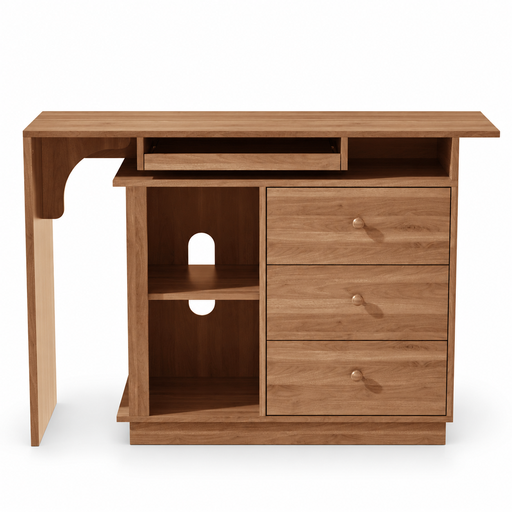 Image unavailable
Extendable computer desk with keyboard tray, storage cupboard and 3 drawers
A desk option for anyone setting up a permanent workspace around their computer.
View at Joybuy
Frequently asked questions
Is 4 GB RAM enough because Windows 11 can run with it?
No. The minimum system requirement isn’t a recommendation for running multiple browser windows and a website editor. Microsoft lists 4 GB as the minimum for Windows 11 and notes that specific apps and hardware may need more. So consider how you use your browser and editor.
Why do some Chrome tabs reload?
When Memory Saver is on, Chrome may deactivate inactive tabs. They reload when you open them again. You can manage this feature in Chrome’s performance settings.
Does the computer itself need to meet WordPress’s server requirements?
Not if you manage a WordPress site hosted elsewhere through your browser: WordPress lists PHP, a database and HTTPS as requirements for the host. A local installation works differently, so check which setup you’re using.
Can I still rely on Windows 10 for a new workspace?
Standard support for Windows 10 ended on 14 October 2025. Microsoft lists a separate ESU programme for eligible devices. If you’re offered a Windows 10 computer, check which specific support option applies to that device.
What are my rights when I buy a desktop online as a consumer?
According to ACM ConsuWijzer, online consumer purchases generally come with a statutory 14-day cooling-off period from delivery; check which exceptions apply. The statutory guarantee is separate from any manufacturer’s or seller’s warranty. These consumer rules don’t necessarily apply to business purchases.


