
A writer looking for quiet
You write in a quiet room and mainly want to avoid fan noise. MeLE describes the Quieter 4C as fanless; a compact case alone doesn’t tell you whether a computer is fanless.


If fan noise disrupts your concentration, a fanless mini PC is the clearest option, provided the exact configuration meets your needs and you already have a suitable screen and keyboard. An all-in-one can combine several components, while a compact Windows desktop or Mac mini may suit you if you want to keep using a separate screen or familiar software. The available specifications don’t allow us to make a general claim about which option is quietest.
You write in a quiet room and mainly want to avoid fan noise. MeLE describes the Quieter 4C as fanless; a compact case alone doesn’t tell you whether a computer is fanless.
You need a screen and input devices that are comfortable to use during longer writing sessions. HP lists these components for the OmniStudio configurations reviewed; specifications vary between configurations.
You want to keep using your familiar writing software and documents, and decide in advance how to restore previous versions or backups. Microsoft explains version history for files in OneDrive; Apple describes Time Machine as a backup feature for Mac.
Choose this option: if you want to avoid fan noise and already have a suitable screen and keyboard.
Bear in mind: the processor and storage vary by configuration; fanless doesn’t tell you how noisy your keyboard is.
Choose this option: if you also need a screen and would prefer to consider an integrated setup.
Bear in mind: check the screen size, readability and adjustability; the HP models reviewed don’t specify a noise level.
Choose this option: if you want to keep using Windows software or an existing screen.
Bear in mind: the Lenovo configuration reviewed is sold without a monitor and keyboard; the specifications don’t tell you whether the fan is audible.
Choose this option: if you want to use macOS and your screen and writing software are compatible.
Bear in mind: assess the complete setup and arrange a way to recover your documents; the specifications don’t provide a comparable noise level.
| What to consider | What should you check? | Who is this important to? |
|---|---|---|
| Noise while writing | Check whether the exact configuration is fanless; don’t assume this from its size alone. Consider your keyboard noise too. | If I write in a quiet study, I want to avoid fan noise. That’s why around 33% of consumers put reducing noise first. |
| Readability and workspace | Check the screen size, adjustability, reflections and which input devices are included with the configuration. | For long writing sessions, I want a screen that’s comfortable to position and read. Around 27% of consumers choose mainly based on their writing workspace setup. |
| Restoring documents | Check where your files are stored and set up a recoverable copy or version history; test that you can restore a file. | If I want to retrieve chapters and previous versions, I need a recovery option that works with my storage. Around 20% of consumers put document retention first. |
| Software and complete setup | Check your writing software’s system requirements, your screen’s connections and which components are included. | I want to keep using my writing software and useful peripherals without overlooking anything. Around 20% of consumers start by checking compatibility and the complete setup. |
A small case doesn’t prove that a computer has no fan. The manufacturer describes only the MeLE Quieter 4C configuration mentioned here as fanless.
Check the cooling system for the exact model, and consider how noisy your keyboard is too.
The Lenovo ThinkCentre reviewed is sold without a monitor and keyboard, while HP lists these components for the OmniStudio configurations reviewed.
Check what’s included in the complete setup and whether you can use your existing screen and input devices.
With a separate desktop, you may still need to arrange a screen or input devices.
Version history applies to files saved in the relevant service. As Apple explains, Time Machine needs to be set up on a Mac using a storage device.
Set up a recovery option before a long writing session and test that you can retrieve an earlier version or backup.
You may need an additional storage device for a backup on separate storage.
The Quieter 4C is worth considering if you’re specifically looking for a fanless mini PC.
The OmniStudio all-in-ones reviewed are worth considering if you’re looking for a computer with a screen and input devices.
The ThinkCentre neo 50q Gen 4 is a compact Windows desktop designed for use with a separate screen.
The Mac mini is worth considering if you want to put together a compact macOS setup with a separate screen.
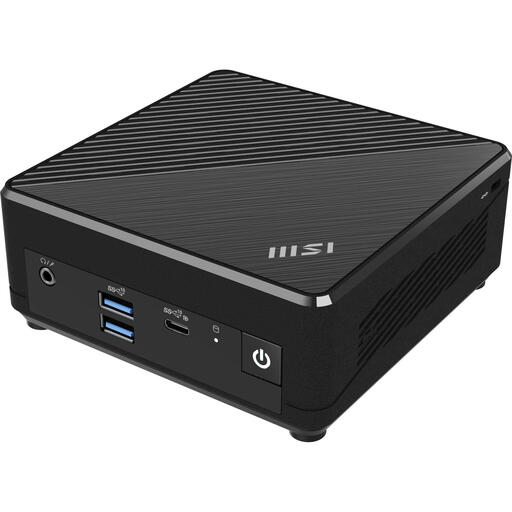
The PN series is a compact mini PC option to consider if you want to choose your own screen and peripherals.
These product picks focus on compact computers with a separate screen and all-in-one desktops for a writing workspace.
 No image available
Suited to a compact Windows writing setup with a separate screen; check that your writing software works with the processor variant you choose.
The product name lists Windows 11, 8 GB DDR4, a 256 GB SATA SSD, Bluetooth 5.2 and Wi-Fi 5.
 No image available
Suited to anyone looking for a compact Mac mini setup with a separate screen; check the connections and compatibility with your writing software.
The product name lists 16 GB of memory and a 512 GB SSD.
 No image available
Suited to a compact Windows setup with a separate screen; check that the listed configuration meets your writing software’s requirements.
The product name lists Windows 11 Pro, 4 GB DDR4 and a 128 GB SSD.
 No image available
Suited to anyone looking for an all-in-one with an integrated screen; consider whether its screen setup works for your desk and longer writing sessions.
The product name lists an Intel Core Ultra 7 255H, 16 GB LPDDR5X and a 1 TB SSD.
 No image available
Suited to anyone looking for an integrated desktop setup; check which components are included with this configuration.
The product name identifies this as a 24-inch all-in-one. The power adapter for this configuration must be purchased separately.
Not necessarily. According to MeLE, the Quieter 4C configuration mentioned is fanless; check the exact configuration and connections, and remember that other equipment can make noise too.
Check that you have a suitable screen and input devices. Lenovo states that the monitor and keyboard are sold separately with the ThinkCentre configuration reviewed; HP lists a screen, keyboard and mouse for the OmniStudio configurations reviewed.
First check where your document is stored and test a recovery option. Microsoft explains version history for files in OneDrive; Apple describes Time Machine as a backup option for Mac, set up using a storage device.
According to the Dutch government, online purchases are often covered by a 14-day cooling-off period; check the terms that apply to your purchase. In addition, if a product is faulty, the seller must provide a solution. The Netherlands doesn’t have a fixed statutory warranty period that applies to every product.
Arboportaal sets out requirements for employees’ screen-based workstations. According to this information, if employees work at a screen for more than two hours a day, the screen and keyboard must not be attached to each other. These rules for employees aren’t automatically a legal purchasing requirement for personal use.