What should you look for when buying?
First check the software you already use, then choose a configuration to suit your mix and the way you’ll hand in your project.
Mac mini
A good fit if: you work on macOS, or have checked that your DAW, plug-ins and audio interface are compatible with it.
Bear in mind: for the M6 configuration reviewed, Apple Netherlands lists 16 GB unified memory and a 256 GB SSD as the starting point. Choose storage to suit your own projects and libraries.
Windows mini desktop
A good fit if: you need Windows software or a Windows audio driver. Ableton recommends using a suitable ASIO driver for Live on Windows.
Bear in mind: the HP configuration reviewed was listed as unavailable. If you choose a different version, check the specifications again. Dell configurations can also vary.
| Consideration |
What should you check? |
Who is this important to? |
| Processing headroom for your mix |
Compare the processor and memory in the exact configuration with the number of tracks and plug-ins in your projects. Ableton lists 8 GB as the minimum for Live 12 and recommends 16 GB or more in its broader performance guidance. Meeting the minimum doesn’t guarantee a smooth experience with a busy mix. |
If you use lots of tracks or demanding effects at the same time, you’ll want to choose a configuration suited to your own sessions. Around 36% of consumers prioritise processing headroom for their mix. |
| DAW and plug-in compatibility |
Check which version of your DAW is supported, and make sure essential plug-ins and interface drivers are compatible with the operating system and processor architecture. |
If you already use specific software, you’ll want to keep using it on your new desktop. Around 29% of consumers prioritise compatibility between their DAW, plug-ins and operating system. |
| Storage and project transfer |
Check that the SSD has enough room for your projects and libraries. Before transferring a project, collect the media it uses; a larger SSD won’t automatically make a project folder complete. |
If you need to take your mix in for assessment, you’ll want its audio files to come with it and the project to open on another computer. Around 21% of consumers prioritise storage and transfer. |
| Audio connections and latency |
Check the port and driver for your audio interface, as well as the inputs and outputs you need. A smaller buffer can reduce latency, but puts more demand on the processor. |
If you record or monitor directly while mixing, you’ll want your interface and driver to work with the desktop. Around 14% of consumers prioritise audio connectivity. |
Desktops at Joybuy
This selection includes compact desktops for a mixing workstation. Before buying, check that your DAW, plug-ins and audio interface are compatible, and that there’s enough storage for your projects.
 No image available
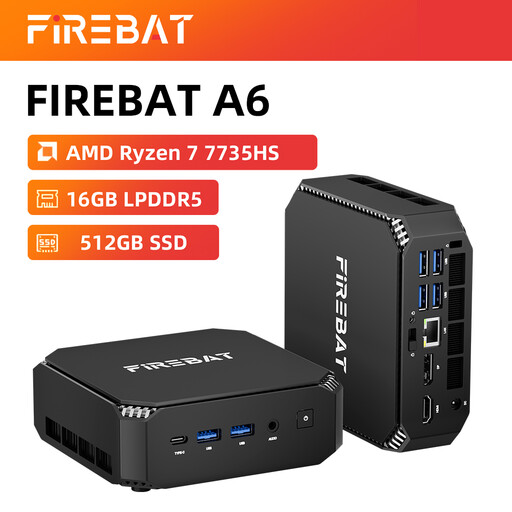
FIREBAT Mini PC A6, Ryzen 7 7735HS, 16 GB RAM, 512 GB SSD
A compact desktop option for a mixing workstation. Check that your DAW and audio interface are compatible.
The product name lists 16 GB RAM and a 512 GB SSD.
The product information lists two M.2 slots.
View at Joybuy
 No image available
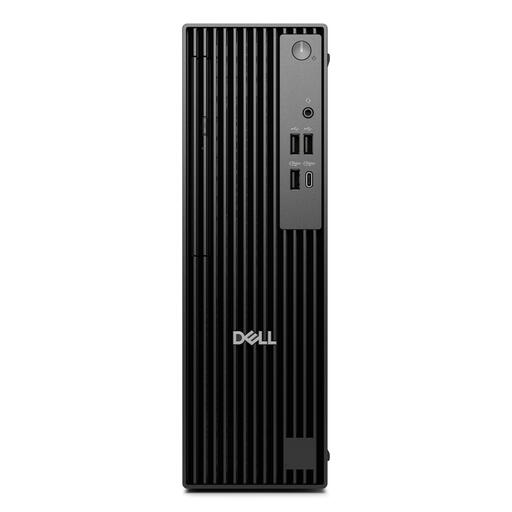
Dell Pro QCS1250, Core Ultra 5 235, 16 GB DDR5, 512 GB SSD
A Windows desktop option if your DAW and peripherals are compatible with this version.
The product information lists Windows 11 Pro, 16 GB DDR5 and a 512 GB SSD.
The power adapter must be purchased separately.
View at Joybuy
 No image available
Lenovo ThinkCentre M70q Gen 5, Core i7-14700T, 16 GB DDR5, 512 GB SSD
A compact Windows desktop option. Check that your DAW, plug-ins and interface work with this version.
The product name lists 16 GB DDR5 and a 512 GB SSD; the product information says the memory is expandable up to 64 GB.
The power adapter isn’t included and must be purchased separately.
View at Joybuy
 No image available
MSI CUBI NUC AI 1UMG-005EU, Core Ultra 7 155H, 16 GB DDR5, 1 TB SSD
A compact Windows desktop option for a mixing workstation. Check that your software and audio interface are compatible before buying.
The product information lists Windows 11 Pro, 16 GB DDR5 and a 1 TB SSD.
The product information says it supports up to four displays.
View at Joybuy
Frequently asked questions
Do I definitely need a separate audio interface for mixing?
Not for the mixing and portfolio scenario described here alone. If you want to connect a microphone or instrument, or monitor with low latency, a suitable interface can provide the connections you need. Also check that its driver and port will work with your setup. Ableton explains the role of an audio interface when connecting audio sources.
How do I hand in an Ableton Live project for assessment?
Use ‘Collect All and Save’ and transfer the entire project folder. Ableton says this feature collects the media used in the project, but doesn’t copy plug-ins. Check that the required plug-ins are available on the receiving computer.
What cooling-off period and warranty apply to online purchases in the Netherlands?
When you buy something online from a business, you’re generally entitled to a 14-day cooling-off period, subject to exceptions set out by the Dutch government. You’re also covered by statutory consumer rights: according to ACM ConsuWijzer, if a product doesn’t meet what you could reasonably expect under normal use, the seller must put things right under the applicable conditions. A manufacturer’s warranty doesn’t automatically limit those statutory rights.
Can I include a mix featuring someone else’s music in my portfolio?
Don’t assume that using music in a portfolio is automatically permitted. The Dutch government explains that you may generally need permission to use copyright-protected music, and that a private copy can’t be distributed or made public. BumaStemra says that the permission needed for adaptations or remixes depends on the rights holders involved and the circumstances.
Should I budget for software as well as the desktop?
That depends on your existing licence and the DAW you choose. Image-Line says the free FL Studio trial lets you export projects, but you can’t reopen saved projects after closing them. Before your assessment, check that your licence suits the way you want to work.


