
Reading reference material and viewing water maps
You compare study materials with Dutch map layers and want to view them clearly. The PDOK Viewer displays online map layers.


For written work and online water maps, you don’t automatically need a desktop for demanding GIS tasks: the PDOK Viewer displays online map layers. If your course specifies ArcGIS Pro 3.7, Esri lists the supported Windows operating systems. So check the software and version first, then compare screen connections, desk space and what comes with the PC.
You compare study materials with Dutch map layers and want to view them clearly. The PDOK Viewer displays online map layers.
You need to process maps or geodata locally. First, check which GIS application and version your course requires: QGIS offers installation options for Windows and macOS, while Esri lists the supported Windows operating systems for ArcGIS Pro 3.7.
You’re looking for a permanent study space with a compact computer and want to check in advance how to connect your screen and peripherals.
Start with the software specified by your course. Then you can assess which screen setup, case and peripherals will suit your study space.
| What to consider | What should you check? | Who is this important for? |
|---|---|---|
| Reference material and maps side by side | Check your screen’s connections and the PC’s video outputs, and find out whether the screens you want are included. | If you want to view study materials and online water maps side by side, having the right screen setup is a key consideration. Around 31% of consumers give top priority to viewing reference material and maps clearly. |
| Required GIS software | Ask which software and version you need, then compare the system requirements with the operating system and configuration of the exact model. | If you need to run GIS locally, first make sure the required application will work on your desktop. Around 31% of consumers prioritise compatibility with the GIS software they need. |
| Space and evening use | Measure the space available for the computer and check the connections for your existing screen and input devices. If noise is a concern, look for an independent measurement of the exact model. | If you have a permanent study space with limited desk room, the computer’s size matters; compact doesn’t automatically mean quiet. Around 23% of consumers put a suitable workspace at the top of their list. |
| Complete study setup | Check what’s included and make a list of any accessories you still need, as well as any required software or access provided through your course. | If you still need a screen or input devices, you’ll want to know in advance what a complete setup involves. Around 15% of consumers prioritise the total purchase cost. |
QGIS offers installation files for macOS, but Esri lists the supported Windows operating systems for ArcGIS Pro 3.7. The two programmes aren’t necessarily interchangeable for an assignment.
Before buying, ask which application and version your course requires, and check its system requirements.
If your assignment requires Windows software, you may need access to a suitable Windows computer.
For the Lenovo ThinkCentre neo 50q model we looked at, the screen and keyboard are sold separately. What’s included may vary between models.
Check the included items and connections before putting together the rest of your study setup.
The shape of the case alone doesn’t tell you how much noise a computer makes when it’s in use.
If noise matters for your evening study space, look for an independent measurement of the exact configuration.
IdeaCentre includes mini PCs, towers and all-in-ones; ThinkCentre neo 50q is a separate compact Windows range.
The Pro Mini 400 G9 is a compact Windows desktop that you can compare with other mini PCs as a specific configuration.
The Mac mini with macOS is a compact option for studying in a browser or using QGIS, provided you don’t need Windows-specific course software.
Dell offers towers and all-in-one desktops, giving you different form factors to consider alongside compact PCs.
This Joybuy selection includes all-in-one and Windows desktops for a permanent study space. Check the software, connections and included items for each model.
 No image available
An all-in-one with a built-in screen could suit a permanent study space if you’d rather not have a separate monitor.
23.8-inch Full HD IPS screen, 8 GB of memory, SSD and Windows 11 Home. The power adapter must be purchased separately.
 No image available
A compact Windows mini PC is an option if you want to save space and already have a suitable screen.
Windows 11, 8 GB of memory and a 256 GB SATA SSD. The title lists Intel Core i5 8250U/8350U; the description mentions two HDMI outputs and a Type-C video output. Dimensions: 105 × 113 × 45 mm.
 No image available
This Windows desktop is worth considering if you’re thinking of choosing a tower for your studies. Check that the configuration suits the software you’ll actually use.
32 GB DDR5 memory, 1 TB NVMe SSD and Wi-Fi 6E. Windows 11 is listed as an evaluation version; check which software access and licence you’ll need.
 No image available
This slim Windows desktop is worth considering if you want to connect an existing monitor. Check beforehand that the ports are compatible with your screen.
16 GB DDR5 memory, 512 GB SSD and Windows 11 Pro. The description lists HDMI and DisplayPort outputs; the power adapter must be purchased separately.
 No image available
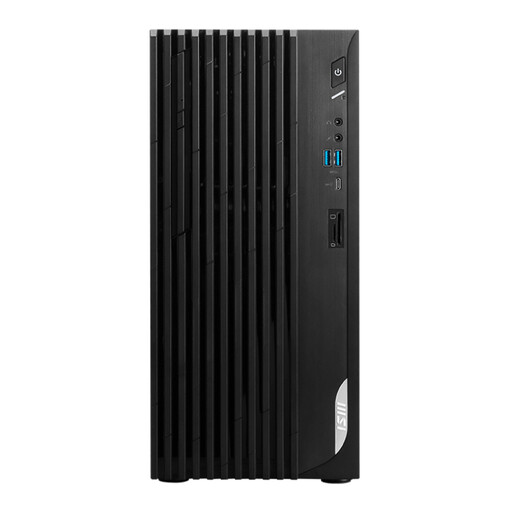
This Windows tower is an option if you’re looking for a desktop for a permanent study space and want to connect an existing screen.
Intel Core i5-14400, 8 GB DDR4 memory, 512 GB SSD and Windows 11 Home. HDMI and DisplayPort outputs are listed.
Not if you’re only viewing map layers in the PDOK Viewer. If you’re working locally with GIS software, first check which application and version your course specifies, then compare its requirements with the desktop you’re considering.
QGIS offers installation files for macOS and Windows, but that doesn’t make the applications interchangeable. Esri lists the supported Windows operating systems for ArcGIS Pro 3.7, so check which programme your assignment actually requires.
Compare the desktop’s video output with your screen’s connection, and check whether a keyboard and mouse are included. For the Lenovo ThinkCentre neo 50q model we looked at, the screen and keyboard are sold separately.
No. ACM ConsuWijzer distinguishes between a manufacturer’s or seller’s warranty and the statutory guarantee. If a product is faulty, the seller is responsible for providing an appropriate solution; the statutory guarantee doesn’t have the same fixed end date for every PC.
According to ACM ConsuWijzer, online consumer purchases often come with a statutory cooling-off period of up to 14 days after delivery. Check the applicable terms, as some purchases, including certain made-to-order products, are exempt.