Who is this guide for?

Family archivist dealing with duplicate entries

You want to find letters, senders and dates without automatically merging people with the same name or repeated entries. The National Archives describes arranging and describing records as part of digital archiving.

Digitising paper letters

You want to use a scanner and a comfortable screen for reading and data entry. So check the connections and what comes with the computer, not just the case.

Looking after a family archive for the long term

You want to be able to understand and find your digital files in the future. The National Archives highlights the importance of descriptions and context, alongside a preservation plan and backup.

What should you look for when buying?

What to consider What to look for Who is this most important for?
Indexing and checking for duplicates Check that your chosen software works with the operating system on the exact model you’re considering and has the fields you need. I want to find letters by sender and date without automatically merging people with the same name or repeated entries. Around 31% of consumers focus on careful indexing and checking for duplicates.
Importing and comparing scans Check the connections and software for your scanner and monitor, as well as the available USB and display ports. When digitising paper letters, I want to use my scanner and monitor without running into connection problems. Around 25% of consumers focus on having a suitable workstation for scanning.
Storing and restoring your archive Compare the SSD capacity with the size of your collection and check that you can connect your backup storage to the model. I want to be able to find scans later and recover from mistakes, so one copy on my computer isn’t enough. Around 25% of consumers focus on preserving and restoring their archive.
Setting up a complete workstation For each model, check whether the operating system, memory, storage, monitor and input devices are included. I want to know in advance whether I’ll need a monitor, keyboard or other components as well as the computer. Around 19% of consumers focus on having a complete workstation that suits their needs.

Common pitfalls

  • Assuming a faster PC will solve duplicate entries

    Archiving also involves arranging and describing records. Context such as the sender, date and provenance helps you decide whether entries really are duplicates.

    Test your indexing method on a small batch of letters, including a possible duplicate, before combining a large collection.

    Allow time for descriptions and manual checks.

  • Comparing a mini PC kit with a complete desktop

    According to ASUS, the NUC 14 Pro Kit comes without a pre-installed operating system, memory or storage. The monitor and keyboard are sold separately for the Lenovo ThinkCentre model reviewed.

    Make a note of what’s included with each specific model, then compare the complete workstation. A kit also requires you to install the missing components.

  • Keeping the only copy on your new computer

    A backup and a well-organised, clearly described archive serve different purposes. A mistake when deleting files could mean losing information from your scans or index.

    Keep a separate copy and test that you can restore it before permanently deleting possible duplicates.

    Separate storage and recovery checks require extra management and time.

Brands to consider

Lenovo

The ThinkCentre neo 50q Gen 4 model 12LM006LEZ is a specific mini PC to compare if you already have a monitor.

  • Lenovo lists Windows 11 Pro, 16 GB RAM and a 512 GB SSD for this model.
  • The monitor and keyboard are sold separately for this model. Check the connections and what’s included with the specific order.

HP

The Pro Mini 400 G9 and Pro Tower 400 G9 offer two different desktop form factors.

  • HP lists Windows 11 Pro, 16 GB RAM and a 512 GB SSD for both models 6D494EA#ABH and 99P69ET#ABH.
  • Compare the exact model and check which peripherals are included; features listed for a product family don’t necessarily apply to every configuration.

ASUS

The NUC 14 Pro range includes both a complete Mini PC and a kit you can configure yourself.

  • ASUS distinguishes between the complete NUC 14 Pro Mini PC and the NUC 14 Pro Kit.
  • ASUS states that the kit comes without a pre-installed operating system, memory or storage. Specifications vary by configuration.

Dell

The OptiPlex Micro 7020 is a compact business desktop with a Dutch user manual.

  • The manual covers, among other things, replacing SSD and memory modules.
  • Check which components and features are actually included with each version on sale.

Joybuy desktops

This Joybuy selection includes mini PCs and a tower PC for a compact or permanent workstation. Choose a model that suits your archive software, scanner, monitor and peripheral requirements.

SOYO Y5Pro Mini PC

SOYO Y5Pro Mini PC

The mini PC form factor may suit a compact workstation; check that the connections work with your scanner and monitor.

The product name lists an Intel Core i5-8250U/8350U processor, 8 GB DDR4, a 256 GB SATA SSD, Windows 11, Bluetooth 5.2 and Wi-Fi 5. Several video outputs are also listed.

View at Joybuy

Lenovo Yoga Mini 01IPH11 Copilot+ PC

Lenovo Yoga Mini 01IPH11 Copilot+ PC

This mini desktop is worth considering if you’re looking for a compact computer for your archive work.

The product description lists an Intel Core Ultra 5 325, 16 GB LPDDR5X, a 512 GB PCIe 4.0 SSD, Intel Graphics and Windows 11 Home. HDMI, USB and Wi-Fi 7 are also listed.

View at Joybuy

Lenovo IdeaCentre Mini

Lenovo IdeaCentre Mini

The mini PC form factor may suit you if desk space is limited and its connections work with your setup.

The product description lists an Intel Core 5 210H, 16 GB DDR5, a 512 GB SSD and Windows 11 Home. The case has a volume of 1 litre, and several display ports are listed.

View at Joybuy

Lenovo ThinkCentre M70q Gen 5

Lenovo ThinkCentre M70q Gen 5

Consider this mini PC if you’re looking for a compact model with Windows 11 Pro for your archive work.

The product name lists an Intel Core i7-14700T, 16 GB DDR5, a 512 GB SSD and Windows 11 Pro. The product description lists several USB and display connections.

According to the product description, the power adapter is not included and must be purchased separately.

View at Joybuy
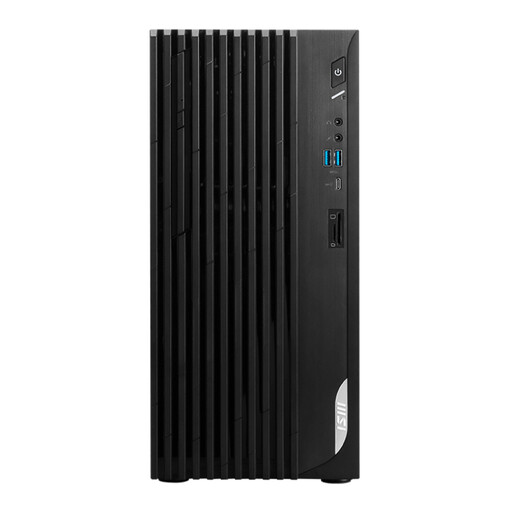
MSI PRO DP180 14A-824EU tower PC

MSI PRO DP180 14A-824EU

A tower is an alternative if you’re comparing a fixed desktop setup with a mini PC.

The product name lists an Intel Core i5-14400, 8 GB DDR4, a 512 GB SSD and Windows 11 Home. The product description lists HDMI, DisplayPort and several USB connections.

View at Joybuy

Frequently asked questions

Can a desktop reliably merge duplicate family entries automatically?

Don’t assume the computer will do this reliably for you. Record the context of each letter as you index it, then check possible duplicates in your chosen software before deleting files or entries. The National Archives describes metadata as information about, among other things, the context in which records were created or received.

Do I need a separate scanner and monitor for this workstation?

That depends on your source material and the model you choose. The monitor and keyboard are sold separately for the Lenovo ThinkCentre neo 50q Gen 4 model reviewed. Also check that your scanner and monitor’s connections and software are compatible.

Is a backup the same as a usable digital family archive?

No. The National Archives distinguishes digital archiving, which includes selecting, arranging and describing records, from simply making a backup. Keep a copy you can restore, and also check that your index and scans remain understandable.

What if the computer breaks down after the manufacturer’s warranty expires?

According to the Dutch government, a manufacturer’s warranty is in addition to your statutory rights; you may still be entitled to a product that works properly after it expires. If there’s a problem, contact the seller. Keep your proof of purchase and read the terms of any additional warranty.

Does the GDPR apply if I index or share family correspondence online for private use?

According to the Dutch Data Protection Authority, processing data solely for personal or household use is outside the scope of the GDPR. The exemption for private publication applies only under certain conditions, including that the information is visible only to family or friends and cannot be found publicly. Check the applicable privacy rules before publishing information publicly.
