
Reader of energy research
You compare Dutch energy tables, charts and documents, and want your software and screen setup to suit the way you work. Statistics Netherlands publishes energy figures through StatLine.


Start with the software and files you actually use. For CBS tables, documents and the occasional call, you’ll need the right combination of operating system, memory, screen space and audio equipment. A mini PC suits an existing screen, an all-in-one gives you an integrated setup, and a larger desktop is worth considering only if that specific configuration meets your needs. Always check which components are included.
You compare Dutch energy tables, charts and documents, and want your software and screen setup to suit the way you work. Statistics Netherlands publishes energy figures through StatLine.
You read sources and occasionally make a call or video call. Check that the calling app you use, along with the microphone, speakers and any camera you need, is compatible with your computer setup. Microsoft outlines the requirements for the Teams app, but these alone don’t tell you how well your entire workflow will perform.
You might download energy-label data, for example, and want to check what storage space and software you’ll need to save and open your files. EP-Online provides bulk data files and update files.
Choose based on the software and files you use first, then compare the screen and calling equipment you need.
Ideal if: you already have a screen and want a compact computer, for example for Windows software.
Bear in mind: check the display outputs and, if needed, source your own camera, microphone and speakers.
Ideal if: you want an integrated screen and, potentially, built-in equipment for calls.
Bear in mind: you choose the screen and computer together, so check that the screen size and operating system suit you.
Ideal if: specific connections or replaceable components matter more to you than a compact case.
Bear in mind: a larger case doesn’t automatically tell you which components are replaceable; check the exact configuration.
| What to consider | What to check before buying | Who this matters most to |
|---|---|---|
| Comparing sources and documents | Check that your research software works with the operating system and that the display outputs suit the screens you want to use. | If I compare CBS tables and documents side by side, I want my software and screen setup to support that. For around 36% of consumers, comparing sources is their top buying priority. |
| Making calls between tasks | Check the requirements of your calling app and which microphone, speakers, camera and connections are included. | If I want to discuss things while reading, I want to know whether the app and the audio equipment I need will work together. For around 29% of consumers, calls are at the top of their wish list. |
| Storing local energy data | Work out which files you’ll download, whether you’ll process them locally and how much free storage you’ll need. | If I store or process energy files locally, I want to know in advance how much storage and which software I’ll need. For around 21% of consumers, local data files are their top buying priority. |
| Putting together a complete workspace | Compare your existing screen, cables and peripherals with what’s included in the exact configuration. | If I need a complete setup, I want to know which components I’ll still need to add. For around 14% of consumers, a workspace that meets their needs comes first. |
With a mini PC, you choose the screen and calling equipment separately; an all-in-one has an integrated screen and sometimes a built-in camera.
Compare the complete setup and check which components are included with each configuration.
With a standalone computer, you may need to buy a separate screen, cables, camera, headset or speakers.
Microsoft outlines the requirements for the Teams client, not how your combination of documents, data files and calls will work.
Also check the system requirements for your research software and consider the files you want to open.
Apple describes an M6 base configuration for the Mac mini. Microsoft states that regular support for Windows 10 ended on 14 October 2025.
Check the full model details and supported software version before choosing a configuration.
HP offers the Pro Mini 400 G9 and Pro Tower 400 G9 in different case formats.
The Mac mini with a separate screen and the iMac with its integrated screen suit different fixed workspaces, provided your software supports macOS.
The Dell Pro Micro QCM1250 is a compact business Windows desktop for a workspace with a separate screen.
The ThinkCentre M75q Gen 5 Tiny range is worth considering if you want a compact PC to suit your existing screens and network connections.
This selection includes compact computers with a separate screen and all-in-ones with an integrated screen, for consulting energy sources and, if needed, keeping in touch.
 No image available
Suits a setup with a separate screen if your research software supports macOS.
The product name lists 24 GB of memory and a 512 GB SSD. The product description mentions Thunderbolt 4, USB-C, HDMI and support for up to three external screens.
 No image available
Suits anyone who wants to view documents and windows on an integrated screen and make video calls between tasks.
The product description lists a 27-inch QHD screen, Windows 11 Home, 16 GB of memory and a 1 TB SSD. It also mentions a built-in 5MP camera and microphone array.
 No image available
Suits anyone who wants an integrated screen and call equipment in one workspace.
The product name lists 24 GB of memory and a 512 GB SSD. The product description mentions a 4.5K screen, camera, microphones and built-in speakers; check that your research software works with macOS.
 No image available
Suits anyone who wants an integrated screen and built-in equipment for calls.
The product description lists a 23.8-inch Full HD IPS screen, Windows 11 Home, 8 GB of memory and a 512 GB SSD, plus a webcam, microphone and speakers. The power adapter must be purchased separately.
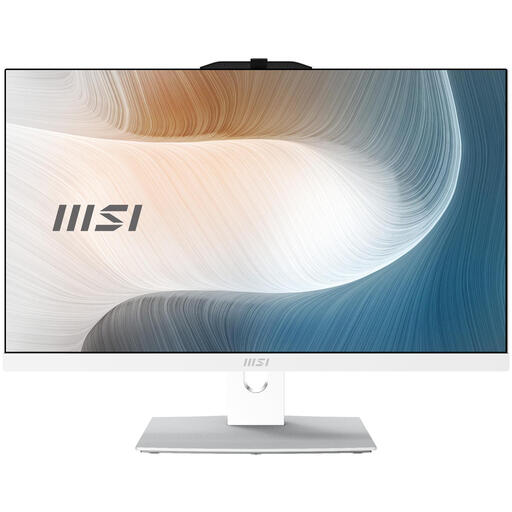 No image available
Suits anyone looking for an integrated screen and a fixed Windows workspace.
The product name lists a 23.8-inch Full HD touchscreen, Intel Core 3 100U, 8 GB DDR5, a 256 GB SSD and Windows 11 Pro. The power adapter must be purchased separately.
Not necessarily. First check the system requirements for the software you use to analyse data. For online tables and documents, the main thing is that the operating system and screen setup suit your work.
You’ll need a compatible screen, a working microphone and speakers; you’ll also need a camera for video. Microsoft lists this equipment in the Teams requirements, but check the requirements for the app you actually use too.
According to ACM ConsuWijzer, consumers generally have up to 14 days after delivery to change their mind about an online purchase, subject to exceptions. Your statutory guarantee is separate from any manufacturer’s warranty: if a product is faulty, the seller is responsible for providing an appropriate solution.
For work calls where an organisation communicates with employees or customers, the Dutch Data Protection Authority says the organisation must provide secure options for video calls or chat. This is guidance for organisations and doesn’t make every private buyer a regulated party to a call.
No. Microsoft states that regular support ended on 14 October 2025. Microsoft describes Extended Security Updates as a separate, temporary option, so a Windows 10 listing doesn’t mean regular support is continuing.