What should you look for?
Choose your operating system and screen setup first, then decide how you’ll copy and restore your diary folders locally. Cloud syncing isn’t the same as backing up to an external drive.
| What to consider |
What should you check? |
Who is this important for? |
| Restorable offline back-up |
Check the external drive connection, back-up destination, folders included and restoration steps. |
If I need an earlier version or a deleted passage, I want to be able to restore it from a local drive. Around 36% of consumers rank file recovery as their top priority. |
| Confidentiality |
Check the encryption of internal and external storage separately, and keep passwords or recovery keys safe. |
My diary contains personal notes, so I want to know who can access the back-up too. Around 29% of consumers put confidentiality first. |
| Writing and editing setup |
Check that your writing software works, that you can connect your screen, and which peripherals are included. |
I want to write comfortably and edit my diary in a dedicated workspace, with a screen and input devices that suit the way I work. Around 21% of consumers give their writing setup top priority. |
| Total cost and support |
Include the cost of a screen, keyboard, mouse and external drive, if needed; read the support terms alongside your statutory rights. |
I’d rather compare the complete workspace and back-up options than just the computer. Around 14% of consumers focus first on the total cost. |
Desktop options at Joybuy
This selection includes compact Mac and Windows PCs, a tower and an all-in-one for writing with a local external back-up option. For each model, check that the connections, operating system and included components suit your workspace.
 No image available
Mac mini with Apple M6 chip, 24 GB, 512 GB SSD
A macOS option if you want to use Time Machine with an external drive; Apple Support explains this back-up method.
This model lists 24 GB memory, a 512 GB SSD, and USB-C, Thunderbolt and HDMI connections.
Budget for an external back-up drive and any separate screen and input devices you may need.
View at Joybuy
 No image available
ACEMAGIC AK1PLUS Mini PC, Intel Celeron N5095, 16 GB, 256 GB SSD
A compact Windows 11 Pro option if you’re looking for a mini PC with connections for an external drive; check that File History includes your diary folders.
The product name lists 16 GB LPDDR4X memory and a 256 GB SSD; the description mentions HDMI 2.0.
View at Joybuy
 No image available
SOYO M5 Mini PC, AMD Ryzen 4300U, 16 GB, 512 GB SSD
A compact Windows 11 Pro desktop option for writing with a local external back-up; check the back-up settings and the connection for your drive.
The product name lists 16 GB memory and a 512 GB SSD. The product description mentions HDMI, DisplayPort, USB-C and USB 3.0 connections.
View at Joybuy
 No image available
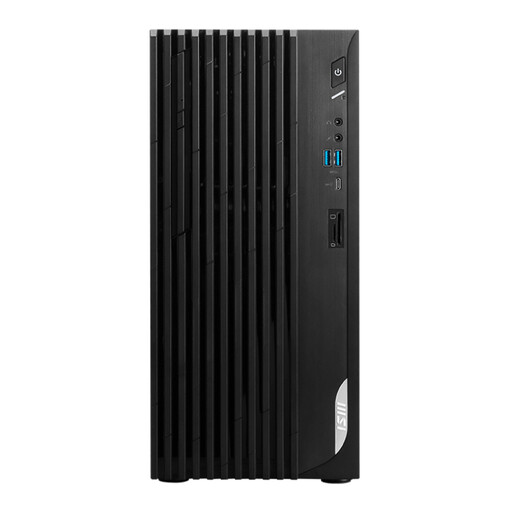
MSI PRO DP180 14A-824EU, Intel Core i5-14400, 8 GB, 512 GB SSD
A Windows 11 Home tower if you’re looking for a larger desktop setup and want to use File History with an external drive.
The product description lists 8 GB DDR4 memory, a 512 GB SSD, and HDMI, DisplayPort and USB connections. Check which components are included for your workspace.
View at Joybuy
 No image available
Lenovo Yoga AIO 27IAH10 F0J2001DNY, 27-inch QHD, 16 GB, 1 TB SSD
This Windows 11 Home all-in-one has an integrated screen for a dedicated writing space; the description also lists a wireless keyboard and mouse as included.
The product description mentions a 27-inch QHD screen, an Intel Core Ultra 7 255H, 16 GB memory and a 1 TB SSD. Check that the USB connections suit your external back-up drive.
View at Joybuy
Frequently asked questions
Is Windows Backup the same as an offline back-up?
No. Microsoft Support describes Windows Backup as syncing selected folders with OneDrive. Microsoft describes File History separately as an option for an external drive; include the folder containing your diary files and try restoring a file.
How do I connect a back-up drive to a Mac?
Apple Support describes connecting a USB or Thunderbolt drive directly for Time Machine. Apple recommends a back-up device with at least twice the storage capacity of your Mac; check that the connection suits your chosen computer and drive.
Is encryption automatically enabled on every Windows desktop?
No. Microsoft says device encryption isn’t available on every device and isn’t automatically enabled when you use a local account. Check the setting on your PC and keep any recovery key safe.
Who can help if my desktop is faulty in the Netherlands?
According to the Dutch Government, the seller must provide a solution if there’s a problem with a product, under the statutory guarantee. A manufacturer’s guarantee or an extended guarantee is in addition to this; the Dutch Government says there’s no fixed statutory guarantee period in the Netherlands.
Is a personal diary always covered by the GDPR?
No. The Dutch Data Protection Authority says that processing data purely for personal or household use isn’t covered by the GDPR. If you publish information about other people for a wider audience, you can’t necessarily rely on this exemption; how you publish it matters.


