
Designer with a local development environment
You create schemas and also run development software or a database locally. Before choosing a compact model, compare your programmes’ requirements with the desktop’s memory and upgrade options.


Working with schemas, SQL and documentation at a shared desk doesn’t automatically call for a large desktop. A compact model could be a good fit if its ports match your monitors and it won’t get in the way. Lenovo Netherlands lists three display ports for the ThinkCentre configuration reviewed here; check that they’re available on the exact model you’re considering. If you also run local databases or development environments, compare its memory, storage and upgrade options with your software’s requirements.
You create schemas and also run development software or a database locally. Before choosing a compact model, compare your programmes’ requirements with the desktop’s memory and upgrade options.
You want to view diagrams, SQL and documentation side by side. Check that the ports on the exact model work with your monitors. DBeaver describes diagrams as a way to explore database structures and relationships visually.
You have limited desk space of your own and share the workspace with colleagues. Check the dimensions, placement options and noise information for the specific configuration; a compact case alone tells you nothing about how noisy it is.
First, decide whether you’ll mainly view schemas in external databases or also do development work locally. Then compare the connections and available space with your workspace requirements.
| What to consider | What should you check? | Who is this important for? |
|---|---|---|
| Capacity for development work | Compare the requirements of your database, diagram and any container software with the memory, storage and upgrade options of the exact model. | If I run local databases or development software as well as working with schemas, I want to choose a configuration that suits those programmes. Around 33% of consumers put capacity for their own development workload first. |
| Monitor connections | Compare the number and type of video outputs with the inputs on your monitors; also check which accessories are included. | If I want to view diagrams, SQL and documentation side by side, my desktop needs to work with the monitors I use. Around 27% of consumers prioritise their preferred screen layout. |
| Placement in a shared space | Check the dimensions and mounting options. If your workspace is sensitive to noise, ask for noise data for the configuration you’ve chosen. | With little spare desk space, I want to know where the PC can go and whether colleagues will be sitting nearby. Around 20% of consumers prioritise suitability for a shared space. |
| Management, data protection and service | Discuss access and support requirements with IT, and compare the security features and service terms of the exact model. | If the PC is for work, I want to know how access and support are arranged and what data protection is needed. Around 20% of consumers prioritise management, data protection and service. |
A small case can free up desk space, but it doesn’t tell you how loud the desktop you choose will be while you’re working.
Consider placement and noise separately. If the shared space is sensitive to noise, ask for information about the specific configuration.
A listed video output won’t necessarily match the connection on your existing monitor. Lenovo says the monitor is sold separately for the ThinkCentre configuration reviewed here.
Compare the connections on the exact model with the inputs on your monitors, and check what’s in the box.
According to Ondernemersplein, the statutory 14-day cooling-off period does not apply when a business owner makes the purchase.
Before ordering, check who is legally making the purchase and read the terms that apply to it.
The ThinkCentre neo 50q Gen 5 Tiny is a compact business desktop for workspaces where room is limited. Lenovo Netherlands lists 16 GB RAM and three display ports for the configuration reviewed here.
The HP Pro Mini 400 G9 reviewed here is a compact business range, while the larger Pro Tower 400 G9 range is designed by HP with scalability in mind.
The OptiPlex 7020 Micro is a compact business model where desk space and mounting options may be important.
The Acer Veriton N Pro VN4710GT is a compact business desktop. The listed DT.VXVEH.00B configuration features an Intel Core i5, 16 GB RAM and a 512 GB SSD.
These PCs are compact mini desktops for workspaces where screen layout and desk space matter. Compare the listed configuration with your own software requirements.
 No image available
The listed video outputs may be useful if you want to view schemas alongside other work windows; check that they’re compatible with your monitors.
The product information lists two HDMI outputs and a Type-C video output. The case is listed as 105 × 113 × 45 mm.
 No image available
The listed memory configuration and storage expansion may be useful if you also work on local development; choose a model that suits the software you use.
The product information lists two HDMI 2.0 ports and expandable storage. Windows 11 Pro is mentioned in the product name.
 No image available
The listed connections for up to three screens may suit a workspace where you want to view diagrams and documentation side by side; check the connectors on your monitors.
The product name lists 16 GB LPDDR4X 3200MT/s and a 512 GB SSD. The product information lists HDMI, DisplayPort and USB-C for video output, as well as Windows 11 Pro.
 No image available
The listed output for three screens may be useful if you want to work with multiple windows side by side; check that the connection is compatible with your screens.
The product name lists 16 GB RAM and a 512 GB SSD. The product information specifies simultaneous output to three 4K screens.
 No image available
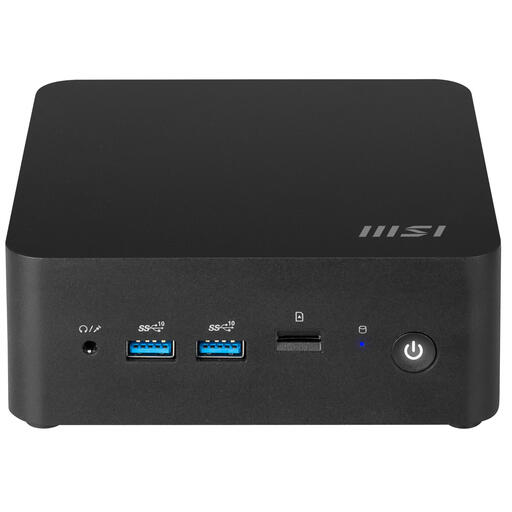
The compact design and listed support for multiple screens may be useful if desk space is limited; bear in mind that some setup is still required.
The product information lists a volume of 0.84 litres, VESA mounting and support for up to four screens. This barebone model is listed without an operating system, which you’ll need before you can use database software.
The DBeaver documentation consulted doesn’t specify a requirement for a separate graphics card for diagrams. Choose based on the software and screens you use, and any local development workload. Don’t treat that documentation as setting a universal graphics card requirement.
Check that the desktop can be positioned and connected according to the model’s instructions without getting in the way of the workspace. Arboportaal states that employers must organise screen-based work so that it doesn’t pose a risk to health and safety. This is a responsibility relating to the workplace, not a fixed desktop specification.
According to Ondernemersplein, the statutory 14-day cooling-off period does not apply when a business owner makes the purchase. Check who is legally making the purchase and read the terms for the specific order; compare the warranty and service terms for the exact model separately.
No. The Dutch Data Protection Authority states that organisations processing personal data must decide on appropriate technical and organisational measures based on the risks involved. A desktop feature doesn’t replace that assessment.