If you already have a suitable monitor, a desktop tower or mini PC could suit writing and laying out a club welcome pack. If you need a screen too, compare all-in-one PCs. For each configuration, check the memory, storage, connections, included peripherals and compatibility with your document software. Adding images to a document is not the same as intensive image editing.
Who is this choice relevant to?
Club editor
You mainly write and edit text, and insert reference images. Choose a configuration suited to your document work; you won't necessarily need a computer for demanding creative tasks. SeniorWeb describes everyday Office tasks as general computer use, while Microsoft Support explains how to insert images in Word.
Club image organiser
You store images alongside the document and consider how to transfer and back up your files. Microsoft Support outlines various backup options; privacy rules may also apply to images showing identifiable members.
Club workspace organiser
You are comparing a desktop computer with an all-in-one and want to know which components are already included. Check what's supplied with the exact configuration: HP and Lenovo's manufacturer information shows that this can vary between configurations.
What should you look for?
Desktop tower
Choose this option: if you already have a suitable monitor and want to store files locally. According to Acer, the Acer Aspire XC-1760 configuration reviewed has 8 GB RAM, a 1 TB SSD and an SD card reader.
Bear in mind: the monitor connection and box contents need to suit your existing setup.
Mini PC
Choose this option: if you have limited desk space and already own a monitor and input devices. According to Lenovo, the Lenovo ThinkCentre neo 50q Gen 4 reviewed has 16 GB RAM and a 512 GB SSD.
Bear in mind: Lenovo says a monitor and keyboard are sold separately with this configuration. If you're also considering a Mac mini, check software and existing file compatibility.
All-in-one
Choose this option: if you also need a screen and want the computer and monitor in one device. For the HP OmniStudio 24cu0611nd reviewed, HP lists a 23.8-inch FHD screen, wireless keyboard and mouse.
Bear in mind: check the exact configuration and make sure the screen setup will fit in the available space.
Start with what you already own: your monitor and peripherals will help determine which form factor is practical. Then compare the configuration with your document work, image files and backup approach.
| Consideration |
What should you check? |
Who should pay particular attention? |
| Writing and layout |
Check the document software, operating system and memory for the exact configuration. SeniorWeb recommends 8 GB as the minimum for everyday Office tasks. |
I mainly want to write and edit text and insert images, not carry out intensive image editing. Consumers whose first priority is document work account for around 40% of this breakdown. |
| Images and backups |
Compare local storage with your files and check how you can transfer images. Microsoft Support describes cloud storage and backups to an external or network drive as different options. |
I want to keep the original images with the document and find them again later. Consumers who put image files first account for around 30% of this breakdown. |
| Workspace and connections |
Make a note of your monitor, video connection, keyboard and mouse, then compare them with what's included with the exact configuration. |
I need to consider the space available on the desk and equipment the club already owns. Consumers who put their workspace setup first account for around 20% of this breakdown. |
| Complete setup |
Check what's included and whether you can continue using your existing software and equipment. |
I want to know in advance which components I need to use the computer as a complete workspace. Consumers who put buying a complete setup first account for around 10% of this breakdown. |
Buying pitfalls
-
Assuming a mini PC is a complete workspace
A mini PC doesn't automatically come with a monitor and keyboard. Lenovo says these are sold separately with the ThinkCentre configuration reviewed.
Before choosing a form factor, compare what the club already owns with what's included in the box for the exact model.
You may need to buy missing components, such as a monitor or keyboard, separately.
-
Choosing powerful graphics just because your document includes images
Inserting images is a different task from using demanding photo or video editing software.
First decide whether you only need to insert existing images or edit them extensively as well.
-
Mistaking local SSD storage for a backup
Keeping files on your computer is no substitute for creating a separate backup. Microsoft Support describes cloud storage and an external or network drive as different options.
Decide how the club document and original images will be backed up outside the computer.
-
Using images without checking usage rights
Privacy rules may apply to images of identifiable people, while copyright conditions may apply to protected images belonging to others.
Before sharing the pack, check the appropriate legal basis for images of members, and the licence, permission or exception that applies to other images.
Brands to compare
Acer
The Aspire XC-1760 reviewed is a desktop tower for anyone who wants to use an existing monitor.
- For configuration DT.BHWEH.00X, Acer lists 8 GB RAM, a 1 TB SSD, an SD card reader, and an included keyboard and mouse.
- These specifications apply only to the configuration listed; check that it works with your monitor.
HP
The OmniStudio 24cu0611nd reviewed is an all-in-one for a workspace that needs a screen too.
- For DR9N2EA#ABH, HP lists a 23.8-inch FHD screen, 12 GB RAM, a 512 GB SSD, and a wireless keyboard and mouse.
- These are manufacturer specifications for this configuration, not an independent performance test or a statement about other HP models.
Lenovo
The ThinkCentre neo 50q Gen 4 Tiny is a compact Windows desktop for a workspace with existing peripherals.
- For part number 12LM006LEZ, Lenovo lists 16 GB RAM, a 512 GB SSD and Windows 11 Pro.
- Lenovo says the monitor and keyboard are sold separately; these specifications don't automatically apply to the whole range.
Apple
The Mac mini is a compact macOS option if the software you need and your existing files are suited to that setup.
- Apple lists several configurations, including models with M6 or M5 Pro and a choice of memory and storage options.
- Check your chosen configuration, compatibility with existing equipment and what's needed for a complete workspace.
ASUS
The NUC 14 Essential is a compact PC option where the connections and exact configuration matter.
- For this product range, ASUS lists HDMI, DisplayPort and USB-C with video signal, among other connections.
- ASUS says specifications and regional availability may vary; check what the retailer includes with the individual configuration.
Joybuy products
These Joybuy products include all-in-ones, mini PCs and desktop towers for document work and storing reference images. For each configuration, check which peripherals you already have and what else you'll need for a complete workspace.
 No image available
Acer Aspire C24-A WI5418 NL All-in-One
An option if you're looking for a desktop with an integrated screen for your club document and local files.
23.8-inch Full HD IPS screen; Intel Core 5 120U; 16 GB DDR5; 1 TB SSD; Windows 11 Home.
View at Joybuy
 No image available
Lenovo Yoga Mini 01IPH11 Copilot+ PC
A compact option if you already have a suitable monitor and input devices, and want to keep desk space to a minimum.
Intel Core Ultra 5 325; 16 GB LPDDR5X; 512 GB SSD; HDMI 2.1; Windows 11 Home; 0.65-litre case.
View at Joybuy
 No image available
Lenovo IdeaCentre Mini
A mini PC option for document and office work if you already have a suitable monitor and peripherals.
16 GB DDR5; 512 GB SSD; HDMI 2.1; Windows 11 Home; 1-litre case.
View at Joybuy
 No image available
SOYO M5 Mini PC AMD Ryzen 4300U
A compact desktop option if your existing monitor supports the video outputs listed.
AMD Ryzen 4300U; 16 GB LPDDR4; 512 GB SSD; Windows 11 Pro; HDMI 2.0, Type-C and DisplayPort 1.4.
View at Joybuy
 No image available
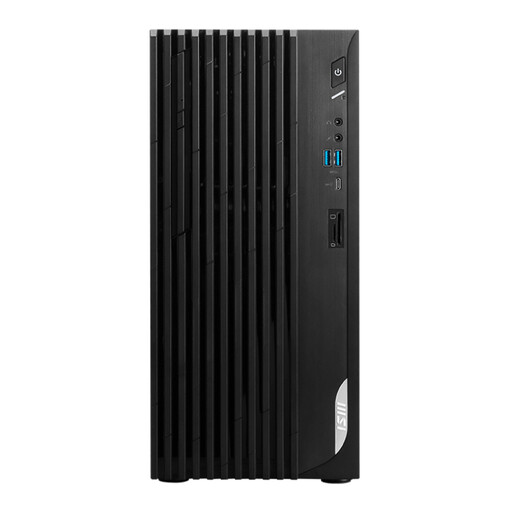
MSI PRO DP180 14A-824EU
A desktop tower option for a workspace with a separate monitor; check that the connections are right for your screen.
Intel Core i5-14400; 8 GB DDR4; 512 GB SSD; HDMI and DisplayPort; Windows 11 Home.
View at Joybuy
Frequently asked questions
Do you need a separate graphics card to add reference images to an introductory document?
Inserting images is not the same as intensive photo or video editing. SeniorWeb distinguishes everyday Office tasks and simple photo edits from demanding image-editing software. Consider a more powerful graphics configuration only if you also plan to carry out those more intensive tasks.
How do you insert images in Word and save your work?
In the versions of Word covered by Microsoft Support, you can select a file from your device via Insert and Pictures, then resize it. You should also make a backup: Microsoft describes cloud storage and an external or network drive as different options, depending on factors including internet access and the number of files.
What cooling-off period and warranty apply to online purchases in the Netherlands?
According to the Dutch government, many applicable consumer purchases made at a distance come with a 14-day cooling-off period; exceptions and the buyer's status are important. The Netherlands has no fixed statutory warranty period: you are entitled to a product that works properly, and the seller is your point of contact if something is faulty. Check which terms apply if the club is making the purchase itself.
Can the club include recognisable photos of members or images from the internet in the pack?
If an organisation uses images of identifiable people, the GDPR may apply and an appropriate legal basis is required. Consent is one possible example, but it is not the only legal basis. According to Auteursrecht.nl, prior permission is generally needed to use protected images belonging to others, unless an applicable exception or licence allows it. The answer depends on the images and how the club distributes the pack.


