Start with a desktop that runs your DAW, plug-ins and audio interface. Then compare the processor, memory, storage and connections your choir project requires. A compact Mac or Windows desktop may suit a permanent workstation, while a configurable Windows PC could be worth considering if you want to upgrade components, provided the exact configuration allows it. None of the configurations discussed has been independently tested with your choir mix.
Who is this desktop guide for?
Choir volunteer working to a mixing deadline
You want to edit an existing recording and keep the project files safe before the presentation. Steinberg says Cubase Pro 15 has a project backup feature that can include the media used in a project; check which content is excluded from the backup.
Mixer with existing audio equipment
You already have a DAW, plug-ins or audio interface and want to check that they work with the operating system, drivers and connections on the desktop you’re considering.
Manager of a shared workstation
You’re looking for a computer that will fit in a permanent, possibly cramped space, and want to check the full order configuration before setting up the rest of the workstation.
What should you look for when choosing?
Compact Mac desktop
A good fit if: your DAW, plug-ins and interface support macOS, and you’re short on space.
Keep in mind: check the storage and memory in your chosen configuration, and factor in the cost of a display and peripherals.
Windows tower
A good fit if: you use Windows software and want a configuration with enough local storage for your project.
Keep in mind: check the ports, noise levels and upgrade options of the exact model. Specifications alone don’t show how it will perform with your session.
Compact Windows desktop
A good fit if: you need Windows but have less room for your computer.
Keep in mind: product ranges can vary in processor, storage and ports, so compare the complete order configuration.
| What to consider |
What should you check? |
Who should consider this? |
| Mixing performance |
Check the requirements of your DAW and plug-ins, as well as the memory and full processor configuration. If possible, test your own session. |
If I want to work on multiple tracks and effects, I need to know whether my own session will run smoothly enough. Around 33% of consumers rank mixing performance as their top priority. |
| Software and equipment |
Check that your DAW version, plug-ins and interface drivers are supported by the chosen operating system. Also compare the connection you need with the available ports. |
If you want to keep using your existing DAW, plug-ins and audio interface, first check that they’re compatible with each other. Around 27% of consumers put this first. |
| Project storage and backup |
Compare the SSD capacity with your source material and project versions. Keep a verified backup on separate storage. |
If I want to be able to find and restore recordings, I need to consider both storage space and a complete copy of the project. Around 20% of consumers prioritise keeping their projects safe. |
| Workstation and connections |
Check the size and ports of the exact configuration. Include a display, keyboard, interface and any additional storage in the cost of the complete workstation. |
If I’m working in a shared or cramped space, I need to know whether the computer will fit and connect to my equipment. Around 20% of consumers start by considering the workstation and overall cost. |
Common buying mistakes
-
Focusing only on the product range
Configurations can vary within the same product range. For example, Lenovo lists a ThinkCentre M70s Gen 5 configuration with 16 GB of memory but no storage selected.
Before you buy, check the processor, memory, SSD, operating system and ports included in the exact configuration you’re ordering.
-
Assuming a DAW project file is a complete backup
A project file doesn’t necessarily include all the media used. Steinberg says Cubase Pro 15’s project backup excludes some content from VST Sound archives.
Make a separate copy and check from another location that the audio and required project content are available.
Missing media can take extra time to locate when you need to restore a project.
-
Checking your audio interface only after buying
A suitable processor and enough memory don’t guarantee that your interface will work with your chosen system. The connection and driver support matter too.
Compare your interface’s requirements with the ports and software support of the exact desktop configuration.
Brands to compare
Apple
The Mac mini M6 is a compact macOS option for a permanent workstation.
- Apple Netherlands lists various memory and storage configurations, including one with 16 GB of memory and a 256 GB SSD.
- Check that your software and interface support macOS, and include a display and peripherals in the cost of the complete workstation.
HP
The OmniDesk 16L M03-0612nd is a Windows tower worth comparing if you’re looking for local project storage.
- For this configuration, HP Store Netherlands lists 16 GB of memory and a 1 TB SSD.
- Check the ports, upgrade options and how it works with your own choir mix and interface.
Lenovo
The ThinkCentre M70s Gen 5 is a configurable business desktop range running Windows.
- Lenovo lists, among other options, a configuration with 16 GB of memory.
- Storage can vary by configuration, so don’t assume the specifications for the range reflect everything included in your order.
Dell
The Pro Slim QCS1250 is a compact business desktop option running Windows, with configurable versions.
- Dell Netherlands lists configurations with 16 GB of DDR5 memory and a 512 GB SSD.
- Confirm the processor, connections and exact configuration you’re ordering. The model name alone isn’t enough to compare configurations.
Joybuy desktops for this use
This selection of Joybuy products includes compact Mac desktops, an all-in-one, a configurable barebone and other desktop options for mixing a choir recording.
 No image available
Apple Mac mini M6, 12-core CPU and 12-core GPU, 16 GB, 256 GB SSD
A compact macOS desktop to consider if your DAW, plug-ins and interface work with macOS.
16 GB of memory and 256 GB of SSD storage.
Joybuy
No image available
Apple Mac mini M6, 12-core CPU and 12-core GPU, 16 GB, 512 GB SSD
A compact macOS desktop to consider if your DAW, plug-ins and interface work with macOS.
16 GB of memory and 512 GB of SSD storage.
Joybuy
No image available
Apple Mac mini M6, 12-core CPU and 12-core GPU, 24 GB, 512 GB SSD
A compact macOS desktop to consider if your DAW, plug-ins and interface work with macOS.
24 GB of memory and 512 GB of SSD storage.
Joybuy
 No image available
Lenovo Yoga AIO 27IAH10 F0J2001DNY, 27-inch QHD, Core Ultra 7 255H, 16 GB, 1 TB SSD
An all-in-one to consider if you’re looking for a desktop with an integrated screen. Check that its listed connections work with your interface.
27-inch QHD screen, 16 GB of memory and 1 TB of SSD storage.
Joybuy
 No image available
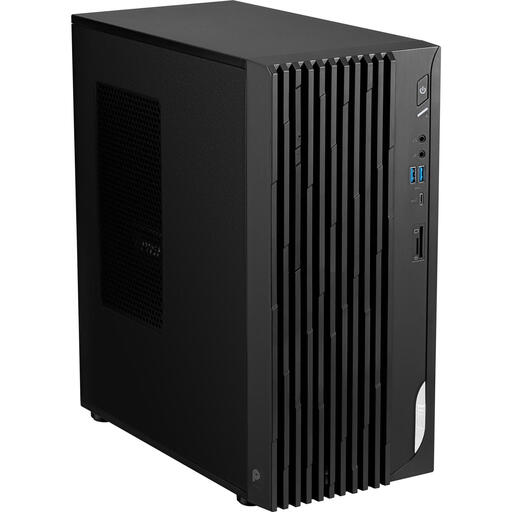
MSI PRO DP180 14A-059BEU barebone, Intel Core i5-14400
A barebone to consider if you want to build and set up the desktop yourself.
You’ll need to install RAM, storage and an operating system, so bear this in mind when comparing it with a complete mixing workstation.
Joybuy
Frequently asked questions
Do I need a separate audio interface for mixing?
That depends on your equipment and how you want to monitor or record again. If you already have an interface, check its support for your operating system, drivers and connection. Focusrite explains that a lower buffer reduces latency but gives the processor less time to process audio.
How do you transfer a choir project to another computer?
Check whether the backup includes the audio files used. Steinberg says Cubase Pro 15 copies the media used in a project, but excludes content from VST Sound archives; check those dependencies separately.
Should you buy an extended warranty for a desktop?
An additional service plan is not the same as your statutory consumer rights. The Dutch government says that if there’s a problem with a product, the seller must provide a solution. So compare any extra plan based on the additional service it offers.
Can the choir play the finished recording at a public presentation or share it online?
You need permission to play protected music in public; BumaStemra explains how to obtain it from rights holders or through a licence. Sharing it online and performers’ rights may raise separate questions. The Dutch Data Protection Authority notes that identifiable audio recordings may contain personal data. The permissions and GDPR legal basis you need depend on the repertoire, how it’s used and the organisation involved.


