What should you look for in a desktop for catalogue files?
Mini PC
Suitable for: a desk with limited space, provided the configuration has enough ports for your screen, storage and peripherals. HP, Lenovo and Apple describe compact desktop ranges.
Keep in mind: a small form factor alone tells you nothing about storage, ports or software compatibility; check the exact model.
Tower
Suitable for: a workspace with room for a separate desktop, when expansion options matter. HP presents the Pro Tower 400 G9 as an option for scalability.
Keep in mind: check the slots, drive bays and ports on the specific configuration; you’ll also need a separate monitor.
All-in-one
Suitable for: a workspace where the computer and screen form one setup. Dell lists all-in-one models in its Dutch desktop range.
Keep in mind: check that the built-in screen suits long periods of cataloguing and see which ports are available on your chosen configuration.
The right choice depends on your software, where your files are stored and the workspace you need. The percentages below indicate which of these priorities consumers may put first for this cataloguing task.
| What to consider |
What should you check? |
Who should consider this? |
| Software and file links |
Check the operating system, whether your catalogue software works and whether you can access the location of linked files. |
If I link catalogue records to scans or documents, I want to know first whether my software and file locations will work on the new computer. Around 36% of consumers put working links and software first. |
| Storage and preservation |
Choose local storage to suit your files and plan separate backups; internal storage is not a separate copy. |
If I store lots of source files, I want enough space and a plan for keeping separate copies. Around 29% of consumers put storage and preservation first. |
| Workspace and ports |
Check the screen layout, ports and which accessories are included with the configuration. |
If I use catalogue fields and documents side by side, I want a workspace that suits my screens and equipment. Around 21% of consumers put the physical workspace first. |
| Purchase and support |
Check what’s included in the box, who the seller is and the support terms; factor in anything else you’ll need for a complete workspace. |
If I’m replacing an existing computer, I want to know in advance what else I need and who to contact if something goes wrong. Around 14% of consumers put a complete purchase and support first. |
Brands to compare by product range
The product ranges mentioned offer different options. Always check the specifications of the specific configuration before buying; a brand being mentioned doesn’t mean a particular model is available.
HP
The Dutch Pro Mini 400 G9 and Pro Tower 400 G9 ranges give you a choice between a compact desktop and a tower.
- HP positions the Pro Mini for smaller workspaces and the Pro Tower for scalability.
- Check the storage, ports and room for expansion for each product number; the positioning of a product range doesn’t necessarily apply to every configuration.
Lenovo
The ThinkCentre M70q Gen 5 is a compact business desktop range for a workspace with a separate screen.
- Lenovo lists flexible expansion slots for the range.
- Lenovo states that the screen, wireless keyboard and mouse are sold separately; check your chosen configuration.
Apple
Mac mini is a compact macOS option if your catalogue software and peripherals are compatible with it.
- Apple documents several Mac mini configurations.
- The M4 specifications for the 2024 model aren’t necessarily the same as those for other configurations. Check the current configuration and your software’s compatibility.
Dell
Dell’s Dutch desktop range includes standalone desktops and all-in-one workstations.
- Dell directs customers looking for a new desktop to the Dell Pro product range.
- Dell says OptiPlex desktops are no longer available; check the specifications of the specific Dell Pro configuration.
Joybuy desktop picks for cataloguing
This selection of Joybuy products includes compact desktops, all-in-ones and gaming desktops. Compare each configuration for compatibility with your catalogue software, the storage you need and the ports required for your workspace.
 No image available
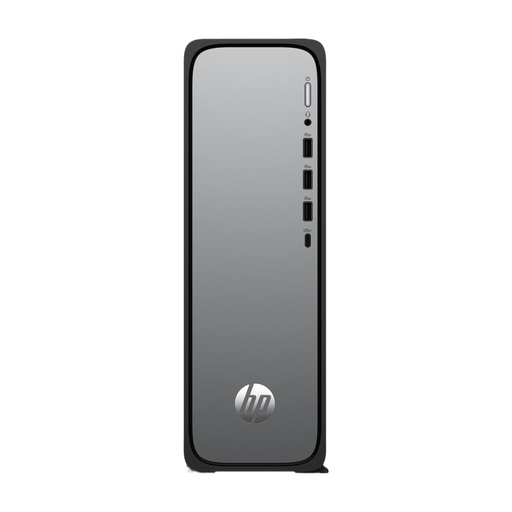
HP OmniDesk Slim S03-0006nd D49HREA#ABH
A desktop PC to compare if your catalogue software and peripherals are compatible with this configuration; check the storage and required ports before buying.
The product information states that the power adapter must be purchased separately.
View at Joybuy
 No image available
HP 24-cr0050nd All-in-One 895R0EA#ABH
An option to compare if you want your computer and screen in one setup; check that the screen layout suits long periods of cataloguing.
The product name specifies a 24-inch all-in-one. According to the product information, the memory can’t be upgraded and the power adapter must be purchased separately.
View at Joybuy
 No image available
SOYO Y5Pro Mini PC
A compact PC to compare if you have limited desk space; check that its connections suit your screens and peripherals.
The product name specifies an Intel Core i5 8250U/8350U, 8 GB DDR4, a 256 GB SATA SSD, Windows 11, BT5.2 and Wi-Fi 5. Check which processor variant applies to the configuration.
View at Joybuy
 No image available
Gaming Desktop PC Ryzen 7 7800X3D
If you’re considering this gaming desktop for cataloguing, let the requirements of your software and files guide your choice; the gaming components listed don’t automatically make it more suitable for this task.
The product name specifies a GeForce RTX 5080, 32 GB DDR5, a 1 TB NVMe SSD and Windows 11 Trial. Before buying, check which Windows licence suits your use.
View at Joybuy
 No image available
ASUS ROG G700TF-07265F666W
When comparing this gaming desktop for cataloguing, focus on your software and workspace requirements rather than the product category alone.
The product name specifies an Intel Core Ultra 7 265F, 32 GB DDR5, a 1 TB SSD, NVIDIA GeForce RTX 5070 12 GB and Windows 11 Home.
View at Joybuy
Frequently asked questions
Does catalogue software need to be installed on the desktop itself?
Not always. According to its documentation, CollectiveAccess Providence runs on a server and can be used from a computer through a standard web browser. Check how your own software is set up; server requirements don’t automatically apply to every desktop.
How can I keep linked scans and documents accessible after replacing a computer?
Record where your catalogue and files are stored, then test the links after a trial migration. The Library of Congress recommends keeping copies on different storage media and in separate physical locations.
Is a new desktop also suitable for scanning fragile books?
A desktop doesn’t automatically make a book suitable for scanning. Decide in advance how digital files will be accessed and stored; the Library of Congress recommends addressing these questions before starting a digitisation project.
What warranty applies when buying as a consumer in the Netherlands?
According to the Dutch government, statutory guarantees entitle you to a product that works properly, and the seller must provide a solution if there’s a problem. Any additional manufacturer’s or seller’s warranty is separate. Check the terms separately if you’re buying for business use.
Do I always have 14 days to change my mind when buying online?
No. According to the Dutch government, distance purchases often come with a 14-day cooling-off period, but there are exceptions. Check whether your purchase qualifies as a consumer distance sale.


