
Student with an existing DAW
You want to mix a recital using software, plug-ins and possibly an audio interface you already own. Check that all these components are compatible first. (Ableton)


First, choose a desktop that works with your DAW, plug-ins and audio interface. Then match the memory and storage to the size of your own sessions. A compact Mac or Windows desktop takes up little space, while a tower may be more appealing if internal expansion matters. More processing power won’t fix an incompatible audio driver or missing equipment.
You want to mix a recital using software, plug-ins and possibly an audio interface you already own. Check that all these components are compatible first. (Ableton)
You combine recordings and effects, and need enough processing power, memory and storage for the size of your own sessions. (Ableton)
You want to place a desktop alongside your screen and monitoring equipment, and are weighing up a compact case against connectivity and expandability. (Apple Netherlands, HP Netherlands and Lenovo PSREF)
A good fit if: you use or want to use macOS software, and have a separate screen and a compatible audio interface.
Trade-off: check the storage configuration you’ve chosen and whether your existing plug-ins and interface work with macOS.
A good fit if: you want to keep working with Windows software and a compatible audio driver, and have limited desk space.
Trade-off: check the ports on the exact model and which upgrades the configuration supports.
A good fit if: potential internal storage or other upgrades matter more to you than having the smallest possible case.
Trade-off: expansion options vary by configuration. Check the exact model and the space available in your workspace.
| What to consider | What to look for | Who it matters most to |
|---|---|---|
| Software compatibility | Make a note of your DAW, plug-ins and versions, and check that they work with the desktop’s operating system. | If I want to keep using my existing software, I need to know that it fits my workflow. Around 36% of consumers put compatibility first. |
| Memory and project space | Match the memory and storage to your sessions. For Live 12, Ableton lists 8 GB RAM as the minimum and recommends 16 GB or more for its recommended computer configuration; this isn’t a universal DAW requirement. | If you combine lots of tracks and effects or need space for project files, capacity should be a priority. This applies to around 29% of consumers who say it’s their main concern when buying. |
| Audio interface and connections | Check that the ports and driver on the exact desktop model are compatible with your interface. When setting up an interface, Ableton describes CoreAudio for Mac and ASIO for Windows. | If I want to keep using my existing interface and monitoring equipment, I check the connection and driver first. Around 21% of consumers prioritise connectivity. |
| Expandability and workspace | Check which components are included in your chosen configuration and which memory or drive slots are actually available. Lenovo warns that platform options may vary by region and model. | If you want to add components internally later or still need equipment for your workspace, compare the specific configuration. Around 14% of consumers prioritise expandability and the complete set-up. |
Minimum and recommended configurations apply to the software they were written for; they don’t automatically determine what another DAW or your session needs.
Check the requirements for your exact DAW and plug-ins, then choose a desktop to suit your projects.
Your computer connection and audio driver need to work with the interface and software you use.
Compare the ports on the exact model with your interface documentation, and check driver support in advance.
The expansion options Lenovo lists for the ThinkCentre neo 50t Gen 5 platform aren’t necessarily available in every configuration.
Check the model code, installed memory, and the storage and expansion slots available in the configuration you’re considering.
According to the Dutch government, statutory rights are separate from any additional manufacturer’s or seller’s warranty; the Netherlands has no fixed statutory warranty period.
Read what an additional service plan covers, and contact the seller if the product is faulty.
The features listed apply to the product lines and configurations described. Always check the exact configuration before you choose.
The Mac mini is a compact option for a macOS workspace.
The EliteDesk Mini is a compact Windows desktop for a business workspace.
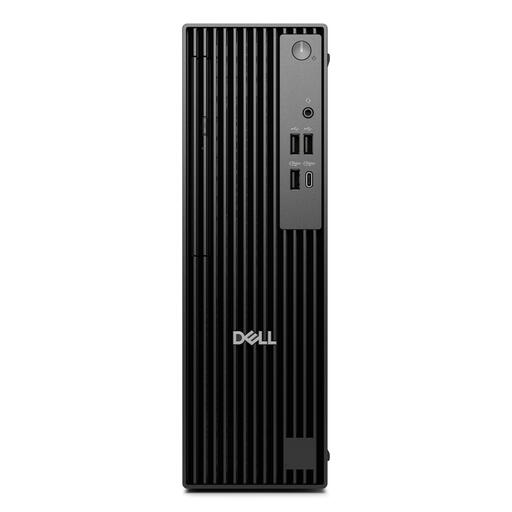
The Pro Slim is a slim Windows desktop available in a range of processor configurations.
The ThinkCentre neo 50t Gen 5 is a tower option for anyone considering potential internal upgrades.
This selection includes compact Mac and Windows desktops for anyone looking to save desk space. Before buying, check that the configuration suits your software, interface and sessions.
 No image available
A compact Mac desktop to consider if you use macOS software. Check that your plug-ins and audio interface are compatible beforehand.
M6 chip with 12-core CPU and 12-core GPU; 16 GB memory; 256 GB SSD.
No image available
A compact Mac desktop to consider if you use macOS software. Check that your plug-ins and audio interface are compatible beforehand.
M6 chip with 12-core CPU and 12-core GPU; 16 GB memory; 512 GB SSD.
No image available
A compact Mac desktop to consider if you use macOS software. Match the memory and storage to the sessions you work on.
M6 chip with 12-core CPU and 12-core GPU; 24 GB memory; 512 GB SSD.
 No image available
A compact Windows mini PC to consider if you’re looking for a small desktop set-up. Check that your audio interface’s connections and drivers are supported.
Intel Core Ultra 7 155H; 16 GB DDR5 memory; 1 TB SSD; Windows 11 Pro; Thunderbolt 4 and USB connections.
 No image available
A slim Windows desktop to consider if you want a compact workspace. Check that the configuration suits your software and connections.
16 GB DDR5 memory; 512 GB SSD; Windows 11 Pro. The adapter must be purchased separately.
It depends on your DAW, plug-ins and session. Ableton lists 8 GB as the minimum for Live 12 and recommends 16 GB or more in its computer guidance. Also check the requirements for your software and project.
First, check that your interface model and driver work with your computer and software. For Ableton Live, Ableton describes CoreAudio as the driver type on Mac and ASIO on Windows. Then enable the inputs and outputs you need.
You don’t need additional cover to benefit from your statutory rights. According to the Dutch government, the Netherlands has no fixed statutory warranty period. Check whether the terms of any extra cover genuinely add anything.
For someone else’s copyrighted music, the Dutch government says you need the creator’s permission, and a private copy must not be made available to the public. The permission or licence required for your student exhibition depends on the music and how you present it.