Who is this choice relevant to?

Editor working with multiple versions

You want to keep original nature recordings, editable project versions and final files separate, and plan the storage you need for them. The Audacity Manual distinguishes between an editable project and the final export.

Editor working on larger projects

You work with more audio files or edits at once, so you want to consider memory and potential future expansion. The desktops listed have different configurations; memory capacity alone is no proof of any particular audio performance.

Editor with a small workspace

You’re looking for a compact desktop, but also want to check that it works with your software and audio equipment, and that its storage suits your files.

What should you consider when choosing?

Compact Mac desktop

Suited to: a small workspace and software and audio equipment that support macOS. The Mac mini M6 we looked at is available with various memory and SSD configurations.

Trade-off: the base configuration we looked at has 16 GB of unified memory and a 256 GB SSD; choose your storage capacity based on your own archive.

Compact Windows mini PC

Suited to: a small workspace and a Windows-based workflow. The Lenovo ThinkCentre M70q Gen 6 configuration we looked at, model 13A4007KEZ, has Windows 11 Pro, 16 GB of memory and a 512 GB SSD, according to Lenovo Netherlands.

Trade-off: check the connections for your audio equipment and the specifications of the exact configuration you choose.

Expandable Windows tower

Suited to: anyone who may want to expand the internal storage or memory later. The HP EliteDesk 8 Tower G1i configuration we looked at, model E59BVEA#ABH, has 32 GB of RAM and a 512 GB SSD, according to HP Store Netherlands.

Trade-off: a tower takes up more space; check which expansion options and connections are available on the exact configuration.

What to consider What to look for Who is this important to?
Storage and project versions Add together your original recordings, the project copies you want and your exports; check the SSD capacity of the exact configuration. If I want to keep earlier versions and source recordings, I need space for more than just the final mix. Around 36% of consumers prioritise storage and versions.
Memory and editing headroom Check your software’s memory requirements and the RAM configuration of the exact model; consider whether future expansion is relevant. If I edit larger projects, I want to choose memory that suits my software and workflow. Around 29% of consumers give memory and editing headroom top priority.
Software and audio equipment Check that your editing software is supported and that there are suitable connections for your audio interface and any adapters. If I want to keep using my existing software and audio interface, the computer needs to be compatible with them. Compatibility is the main consideration for around 21% of consumers.
Positioning and noise Measure the space you have; if you record next to your computer, look for relevant noise measurements for the exact configuration. If I record in the same room or listen closely to quiet nature sounds, I want to consider where the computer will go and how much noise it makes. Around 14% of consumers prioritise a compact or quiet workspace.

Common buying mistakes

  • Keeping only the final mix

    An export is the finished audio file; without the editable project, you can’t change previous edits in the same way. The Audacity Manual describes the project file as the version you can continue working on.

    Keep original recordings, relevant project versions and exports clearly separated.

  • Assuming every configuration in a product range has the same SSD capacity

    Storage varies between configurations. The capacity listed for a product range may not be the capacity of the configuration you want to buy.

    Check the SSD capacity of the specific configuration and compare it with the space your own archive requires.

  • Automatically assuming a compact PC is quiet

    The size of the case alone doesn’t tell you how much noise the computer makes. Manufacturer descriptions aren’t directly comparable noise measurements.

    If you record in the same room, look for noise measurements for the exact configuration or consider placing it somewhere else.

Relevant brands to consider

Apple

The Mac mini is a compact option for a macOS workspace. Apple Netherlands lists configurations in the M6 product range we looked at with 16 GB of memory and SSD options starting at 256 GB.

  • The published configurations offer a choice of memory and SSD capacities, so you can weigh them against the size of your project archive in advance.
  • Check that your editing software and audio equipment work with macOS; specifications aren’t an independent test of audio performance.

Lenovo

The ThinkCentre M70q Gen 6 is a compact Windows desktop. The Dutch configuration we looked at, model 13A4007KEZ, has 16 GB of RAM and a 512 GB SSD, according to Lenovo Netherlands.

  • The configuration listed has clearly specified memory and storage capacities.
  • Check the connections and expandability of the exact configuration; specifications for a product range don’t necessarily apply to every configuration.

HP

The EliteDesk 8 Tower G1i is a Windows tower for anyone considering internal expansion. The configuration we looked at, model E59BVEA#ABH, has 32 GB of RAM and a 512 GB SSD, according to HP Store Netherlands.

  • HP describes expansion options and a design intended for quiet operation across the product range.
  • This isn’t an independent noise measurement. A tower takes up more space, and options vary by configuration; check the exact model.

Joybuy products

These product picks are compact Windows mini PCs to compare for storing and editing audio projects locally. Before buying, check that your chosen configuration suits your software, audio equipment and storage needs.
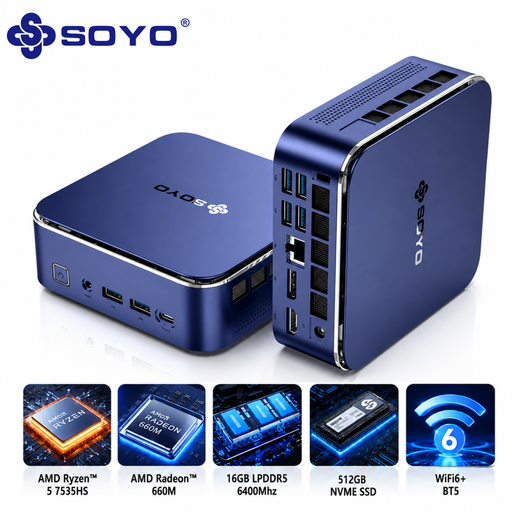
SOYO S5Air Mini PC

SOYO S5Air Mini PC, Ryzen 5 7535HS, 16 GB, 512 GB SSD

A compact Windows desktop to consider if you’re looking for a mini PC to store and edit project versions.

The product title lists an AMD Ryzen 5 7535HS, 16 GB of LPDDR5 memory, a 512 GB NVMe SSD and Windows 11 Pro. Check that the connections suit your audio equipment.

View at Joybuy

MSI CUBI NUC AI 1UMG-005EU Mini PC

MSI CUBI NUC AI 1UMG-005EU Mini PC, Core Ultra 7 155H, 16 GB, 1 TB SSD

A compact Windows mini PC to compare if you want to store audio projects locally; choose a configuration that suits your software and files.

The product title lists an Intel Core Ultra 7 155H, 16 GB of DDR5 memory, a 1 TB SSD and Windows 11 Pro. Keep the ventilation openings clear and use only the original power adapter.

View at Joybuy

Frequently asked questions

Should I keep the project if I’ve already exported the finished nature recording?

Yes, if you want to be able to change your edits later. According to the Audacity Manual, the editable project is designed for further work, while an export is the finished audio file. Check separately how your other editing software saves projects.

How can I stop noise reduction from affecting quiet nature sounds?

After editing, listen back to check that the sounds you want have been preserved. The Audacity Manual warns that excessive noise reduction can cause audible artefacts, so assess the result using your own recording before exporting the project.

What warranty applies in the Netherlands to a desktop I buy as a consumer?

According to ACM ConsuWijzer, a product should do what you could reasonably expect when used normally. If the desktop is faulty, the seller is responsible for providing an appropriate solution free of charge. Don’t assume there is one fixed statutory warranty period for every computer.

Where can I take my old desktop in the Netherlands?

Milieu Centraal says that when you buy a new, similar appliance, you can hand your old electrical appliance in to the retailer; a local recycling centre is another option. This is about disposing of an appliance, not a requirement for your new desktop.
