What should you look for when choosing?
Mac mini with macOS
A good fit if: your DAW and all the plug-ins you need work on Apple silicon, and you’re looking for a compact desktop for mixing and video playback.
The trade-off: the M6 base configuration reviewed has 16 GB of memory and a 256 GB SSD. Consider whether that storage is enough for your project, samples and video files.
Windows mini PC
A good fit if: your Windows DAW or existing Windows plug-ins are essential, or a Windows configuration better suits your software and files.
The trade-off: compare the full model number and check the connections, driver support and included equipment. Configurations can vary between versions.
The best choice depends on your main priority: room for your mix, syncing and transferring video, recording with low latency, or having everything you need for your workspace. Ableton recommends 16 GB of memory or more for Live, but your DAW and project requirements should guide your decision.
| What to consider |
What should you check? |
Who is this important for? |
| Room for tracks and plug-ins |
Check the requirements of your DAW and plug-ins, and compare the processor and installed memory of the exact version. |
I want to build a larger mix with the instruments and effects I plan to use; around 33% of consumers prioritise processing headroom. |
| Video sync and transfer |
Ask for the video format and delivery files. Test a clip in your DAW and collect the media files ready for transfer. |
I need to sync the score to the animation and open the project on another computer; around 27% of consumers prioritise video and transfer. |
| Recording with low latency |
Check that the audio interface and driver work with the operating system, and test the buffer setting with your own project. |
If you record vocals or instruments, you’ll want to monitor the input signal without distracting latency; around 20% of consumers prioritise this recording requirement. |
| Everything you need for your workspace |
Check the SSD capacity, box contents, equipment you’ll need and software licence for the exact model. |
I want to know what I already have and what else I need for a complete setup; for around 20% of consumers, the total cost of their workspace is the main consideration. |
Joybuy products
Compact desktops and mini PCs to compare for mixing an animation score. Check that the software and equipment you need are right for your workspace with each model.
 No image available
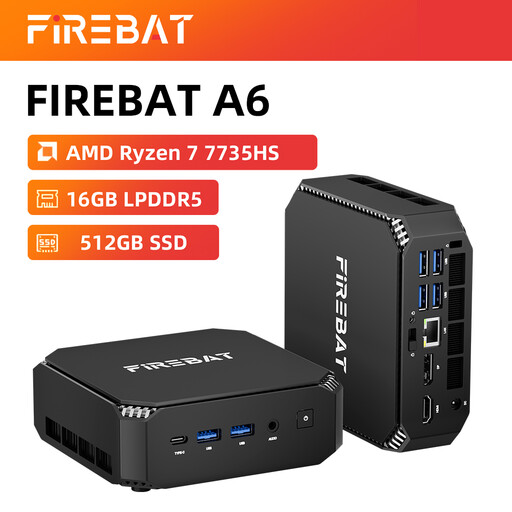
FIREBAT Mini PC A6
Could be suitable if your DAW and plug-ins work with the chosen configuration; check before buying.
Ryzen 7 7735HS, Radeon 680M graphics, 16 GB RAM and 512 GB SSD.
The product name states that it supports three displays.
Joybuy
 No image available
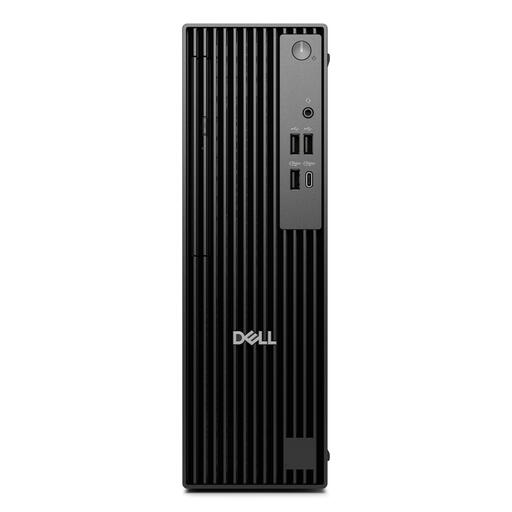
DELL Pro QCS1250
An option to compare if your Windows software and plug-ins work with this configuration.
Intel Core Ultra 5 235, 16 GB DDR5, 512 GB SSD and Windows 11 Pro.
According to the product description, the compatible charger must be bought separately.
Joybuy
 No image available
Lenovo ThinkCentre M70q Gen 5
Could be suitable if your Windows software and plug-ins work with this configuration; check the power supply you need, too.
Core i7-14700T, 16 GB DDR5, 512 GB SSD and Windows 11 Pro.
According to the product description, a power adapter is not included and must be bought separately.
Joybuy
 No image available
MSI CUBI NUC AI 1UMG-005EU
An option to compare if your Windows software and plug-ins work with this configuration.
Intel Core Ultra 7 155H, 16 GB DDR5, 1 TB SSD and Windows 11 Pro.
Joybuy
Frequently asked questions
Do you need a separate graphics card for this score?
Not necessarily. According to Ableton, a dedicated GPU is optional for video work. What your project needs depends on the DAW, the video file and whether you’ll also be editing video yourself. Test a representative clip.
How can you make sure the animation or samples are available on the exhibition computer?
If you use Ableton Live, save the project in its own folder and select ‘Collect All and Save’ before transferring the entire folder. Ableton says this feature gathers the audio and video files you’ve used, but does not copy external plug-ins. Check the receiving computer as well, and export the agreed final file.
Do you need an audio interface?
If you want to record a microphone or instrument in Ableton Live, Ableton describes using an audio interface for that connection. There’s no general requirement to buy one for mixing alone; check your existing monitoring equipment and the connections you need.
What warranty and cooling-off period apply when buying in the Netherlands?
When you buy as a consumer, the product must meet what you can reasonably expect; the Dutch government states that there is no fixed statutory warranty period. For online purchases from a business, a 14-day cooling-off period applies in many cases. Whether it applies depends on the purchase, and a manufacturer’s warranty does not replace your legal rights.
Can you use existing music in the animation without permission?
Don’t assume you can. The Dutch government states that you need permission to use other people’s copyright-protected music, and that a private copy cannot be made public. BumaStemra explains that separate permission is needed to combine existing repertoire with a film. Check with the creators or rights holders which rights you need for the music and its use at the exhibition.


