
Vandaag of morgen in huis

Kwaliteit gegarandeerd

Welkomstaanbiedingen ontgrendelen: GRATIS bezorging | Tot 80% korting | Gratis 30 dagen JoyPlus-proefperiode
Download de app
A desk may seem simple to choose, until you realise that not every model suits the space you have, your equipment or the way you work. A top that’s too small can quickly make your workspace feel cluttered. A desk without good cable management can look untidy. And a frame that looks sturdy in the product photo may still wobble on an uneven floor.
For home workers, students, gamers and families, three common pitfalls are especially important:
First, measure the spot where you plan to put the desk. Remember to allow for skirting boards, doors, radiators and the space behind an office chair. A compact desk measuring 80 x 50 cm may be enough for a laptop and notebook in a small bedroom or living room. If you work with multiple screens, you’ll generally need more desk space.
A computer desk with a corner design makes better use of a corner. For an L-shaped desk, check the length of both sides and whether you need the storage on the left or right. A reversible design is handy if you want to change the room layout later.
Always check the stated maximum static load. For an electrically adjustable desk, this usually means the combined weight of your monitors, laptop, speakers and accessories. Don’t exceed the limit.
The material matters too. Chipboard and metal frames have different properties from solid wood. A metal frame can provide extra support, but the joints and adjustable feet also affect how stable the desk is. Adjustable feet are useful on floors that aren’t completely level.
When comparing products, a stated figure is easier to verify than general claims such as ‘extra strong’. For example, the product description for the compact model below gives a maximum static load of 50 kg. The electric model has a stated limit of 70 kg.
A traditional study desk is usually fixed-height. That’s fine if one person uses it and the chair can be adjusted properly. A sit-stand desk or electric height-adjustable desk gives you more flexibility if you want to switch between sitting and standing.
For an electric model, check:
According to the electric model’s product description, the motor protection kicks in after two minutes of continuous adjustment, after which you may be unable to adjust the desk again for a short time. This is useful practical information you shouldn’t overlook. Electrical components should also be protected from liquids.
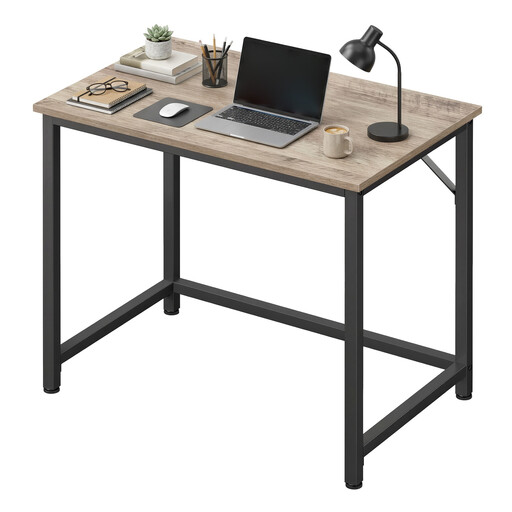
Why it suits this user: At 80 x 50 cm, this desk is a good fit for a laptop workspace, bedroom or small study. According to the product description, it can be used for work, studying or gaming.
The clearly stated dimensions make it easier to check in advance whether the desk top will fit your equipment. The adjustable feet are designed to compensate for small differences in floor level.
80 x 50 x 75.5 cm; stated maximum static load of 50 kg; steel frame and adjustable feet.

Why it suits this user: This model is designed for people who want to switch regularly between sitting and standing. Four memory presets, a USB-C port and cable management help keep your home office organised.
The product information gives the height range and maximum load of 70 kg, and mentions overheating protection. Don’t place the desk directly against a wall while adjusting its height.
140 x 60 cm; height range of 72 to 120 cm; four memory presets; USB-C port and accessories for cable management and storage.

Why it suits this user: The 150 x 110 cm L-shaped design gives you space for multiple devices and accessories. Four drawers and two open shelves are handy for documents, books and things you’d like to keep out of sight.
The reversible layout lets you position the desk to the left or right. The adjustable feet help keep it stable on a floor that isn’t completely level.
150 x 110 cm L-shaped desk top; four drawers; two open shelves; metal frame and adjustable feet.
We’ve put together a complete, up-to-date list of products that meet these strict selection criteria and the applicable European safety regulations.
Before assembly, check that all the parts are numbered and that the instructions match the model you’ve received. Sort the screws for each step, and don’t fully tighten the connections until the frame is correctly aligned. For a corner desk, it’s a good idea to check the available walking space and the position of power sockets first.
Place the desk on a flat, stable surface and adjust the feet carefully. Position monitors and other heavy devices so that the weight is evenly distributed. With a gaming desk holding multiple screens, a desktop computer and speakers, the total load is especially important.
A desk with drawers helps keep clutter at bay, but check that the drawers can open fully without hitting a wall or cupboard. With an electric desk, make sure the cables have enough slack across the full height range. Use only a suitable adapter and keep liquids away from the electrical components.
A compact desk of around 80 x 50 cm may be enough for a laptop alone. If you need space for a monitor, keyboard, documents and accessories, a wider and deeper desk is more practical. Measure your equipment and leave room for cables and your office chair to move.
It depends on the length of both sides and the amount of space you have to move around. A corner desk makes use of an unused corner, but its L-shape also takes up space on two sides. So check more than just the overall dimensions: consider the position of drawers, shelves, doors and power sockets too.
Power consumption depends on the motor’s power rating, how long you adjust the desk for and how often you do so. Check the adapter and motor information for the specific model. Don’t leave the desk moving continuously when it isn’t needed, and follow the safety instructions on overheating, load limits and obstacle detection.
