
Focused desk listener
You listen from a fixed position and want to place two speakers to your left and right. Genelec points out that the room and symmetrical placement affect your listening experience.


For focused listening from a fixed position at your desk, a pair of speakers placed to your left and right is a sensible starting point. Genelec also highlights how your listening position and room affect what you hear. A compact active set may suit you if you want a direct connection to your computer; separate studio monitors require suitable outputs and a complete pair, while a smart speaker is a better fit if wireless playback is your priority. These differences don’t tell you which option will sound best for string quartets in every home office.
You listen from a fixed position and want to place two speakers to your left and right. Genelec points out that the room and symmetrical placement affect your listening experience.
You’re looking for a compact set and want to check the dimensions, included components and computer connection in advance. ADAM Audio and PreSonus describe models with connections that may suit this kind of desk setup.
You want to play music easily from other devices and need to decide whether one speaker is enough or whether you have room for a stereo pair. Sonos explains how two Era 100 speakers can work as a stereo pair.
A good fit if: you have room for two speakers around your regular listening position and want a direct computer connection. According to ADAM Audio, the ADAM Audio D3V has USB-C audio and analogue TRS inputs.
Bear in mind: check the available desk space, the input you need and how the two speakers connect to each other. The KEF LSX II LT has a wired connection between the speakers.
A good fit if: you can set them up symmetrically and have a source or audio interface with suitable analogue outputs. Each Genelec 8010A monitor has an analogue XLR input.
Bear in mind: check whether the deal includes two monitors and suitable connection cables; an XLR input is not a direct USB-C audio input.
A good fit if: wireless playback and control are important to you. According to Sonos, you can set up two Era 100 speakers as a stereo pair.
Bear in mind: one speaker won’t give you the separate left and right placement of a pair. According to Sonos, you’ll need a separately available adapter to connect an external analogue source to the Era 100.
| What to consider | What should you check? | Who should pay particular attention? |
|---|---|---|
| Stereo placement | Can you place both speakers to the left and right of your chair at a similar height and distance? | I want to position the two channels to my left and right from my regular listening spot; around 31% of consumers prioritise stereo placement. |
| Desk space | Measure the space for both speakers and allow room for the cables. | If my desk is already full, I want to know in advance whether two speakers will fit; around 23% of consumers prioritise desk space. |
| Connection to your source | Compare the audio output on your computer, phone or player with the input on the complete model. | I want to use my existing music source without getting the connection wrong; around 23% of consumers prioritise compatibility with their source. |
| Complete setup | Check how many speakers are included, which cables you’ll need and whether any adapters are required. | Before choosing, I want to know whether the deal includes a complete pair and which other components I’ll need; around 23% of consumers prioritise clarity about the complete setup. |
For separate left and right channels, your purchase must actually include two speakers that you can connect and use.
Check the number of items in the exact offer, even if the product range is suitable for stereo.
You’ll need a separately available adapter to connect an external analogue source to the Era 100.
KEF specifies a wired connection between the LSX II LT speakers, even though the model has network features.
Plan in advance where the cable between the speakers can run.
You may need to route the cable differently or use a longer one to make the setup work on your desk.
According to ADAM Audio, the D3V is a compact active desktop pair with USB-C audio, analogue TRS inputs and detachable feet included.
According to KEF, the LSX II LT combines two active speakers with USB-C, HDMI ARC and network features, making it an option if you want to use sources beyond your desk computer.
According to Genelec, the 8010A is a compact, standalone active monitor with an analogue XLR input and placement compensation.
PreSonus sells the Eris 3.5 2nd Gen as a pair, with analogue TRS, RCA and 3.5mm inputs.
The Era 100 is a good fit if you want wireless playback; according to Sonos, two units can work as a stereo pair.
These product picks are suited to a stereo setup or speakers for a computer workspace. Check each model’s connections and included components to make sure they suit your source and desk.
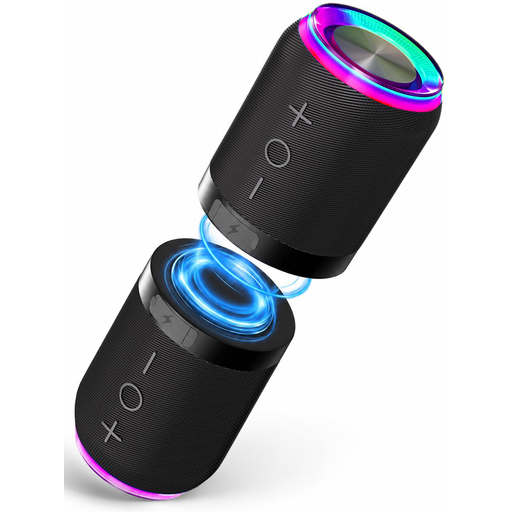 No image available
According to the product description, the two units can be separated and placed on either side of your listening position.
Connections: Bluetooth, AUX and TF card. The product name specifies IPX6 water resistance.
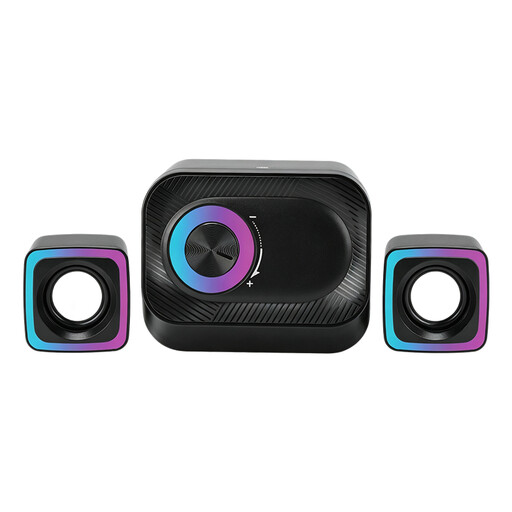 No image available
The product description mentions two satellite speakers for a PC workspace; check that you can connect the set where you want it.
Wired system with volume control and RGB lighting, according to the product name. The description mentions a volume knob.
 No image available
The product description lists two speakers for stereo playback, suited to a desk setup where you want to place one on each side.
Dimensions per speaker: approximately 72 × 73 × 65 mm, according to the product description.
 No image available
The product name describes a compact stereo set for desktop use; check that you have space on your desk for both speakers.
Dimensions per speaker: approximately 120 × 72 × 88 mm, according to the product description. The product name specifies coloured LED lighting.
 No image available
The product description mentions 2.0 stereo playback for music and connection to PCs and laptops.
Connections: USB audio, Bluetooth 5.3 and 3.5mm AUX, according to the product information. The product name specifies RGB lighting.
Place them as symmetrically as possible to the left and right of your listening position, and angle them towards you. Genelec recommends an equilateral triangle as the ideal setup for monitors. Your desk and room affect what you hear, so assess the setup from your own chair. This is a starting point, not a fixed measurement for every home office.
Don’t assume so: Sonos describes the Era 100’s USB-C port as being for line-in or Ethernet via a separately available Sonos adapter. Check which adapter and connection will work with your computer.
According to the Dutch government, when you buy as a consumer you’re entitled to a product that works properly. The Netherlands has no fixed statutory guarantee period, and the seller is your point of contact if there’s a problem. For distance sales, a 14-day cooling-off period applies in many cases. Check whether your purchase falls under these rules, for example by confirming that you’re buying from a business.
For electrical and electronic equipment covered by the applicable EU CE marking rules, the manufacturer must comply with those rules and affix the marking. Check the documentation for the specific product; a CE marking is not a listening test or a quality assessment.
No. According to the European Commission, electrical and electronic equipment bearing the WEEE marking must be collected separately for treatment and recycling, rather than disposed of as unsorted waste.