
Vandaag of morgen in huis

Kwaliteit gegarandeerd

Welkomstaanbiedingen ontgrendelen: GRATIS bezorging | Tot 80% korting | Gratis 30 dagen JoyPlus-proefperiode
Download de app
A desk for working from home needs to do more than hold a laptop. It affects how much space you have left, how tidy your cables stay and whether you can work, study or game comfortably. Yet desks are often bought based on an attractive photo or a vague term such as “ergonomic”.
Pay particular attention to these three common pitfalls:
Measure not only the space available in the room, but also your entire setup. If you’re choosing a computer desk, these questions are worth considering:
A compact desk measuring 80 × 50 cm, for example, can work well in a bedroom, student room or small home office. A 140 × 60 cm desktop gives you more room for a monitor, laptop and accessories. If you use multiple screens, speakers or a large mouse mat, you may benefit from a deeper or longer desktop.
Always check the material specifications. Many models combine chipboard with a steel frame. This isn’t the same as solid wood, but it can be suitable for everyday use when the construction is well matched to the desk’s size.
Look at:
A sturdy home office desk needs more than a high load capacity. Pay attention to the joints, leg construction and whether you can level the desk.
A height-adjustable desk, electric desk or sit-stand desk can be useful if you want to change your working position regularly. The key details are the minimum and maximum height, number of memory settings, motor controls and maximum load.
A memory function is particularly handy if several people use the same desk or you want to save your preferred sitting and standing heights. Check the safety instructions too. Electric desks need room to move freely, must not scrape against a wall when being adjusted and should be protected from liquids.
A USB-C port can charge a phone or another compatible device, but if you plan to use it regularly, check the charging function and capacity stated by the manufacturer. Think of a desk with USB-C as a practical extra, rather than a replacement for a separate charger for all your equipment.

Why it suits this type of user: This compact computer desk suits a laptop setup, student room or small workspace where easy assembly and a modest footprint are important.
The product information lists adjustable feet, so you can level the desk on an uneven floor. Bear in mind, though, that its depth is limited to 50 cm.
80 × 50 × 76 cm; steel frame; stated maximum static load of 50 kg; labelled parts for assembly.

Why it suits this type of user: The generous width suits professionals who use a monitor, laptop and documents at the same time and want a sit-stand setup.
The specifications list a steel frame, adjustable feet, cable holes and a memory function. Make sure there is enough clear space around the desk when you position it.
160 × 70 cm; adjustable from 72 to 120 cm; USB-C port; two cable holes; stated static load of 70 kg.
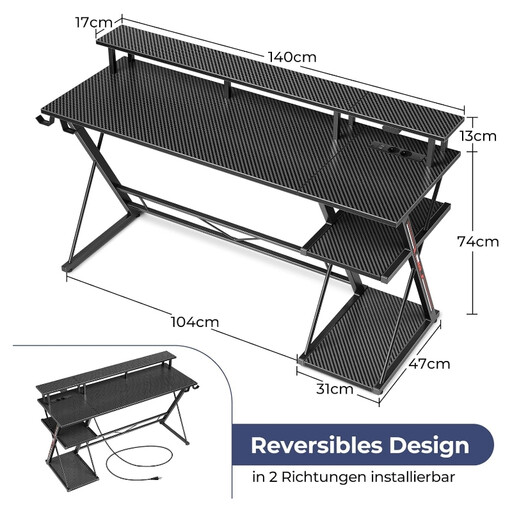
Why it suits this type of user: This gaming desk is designed for users who want to combine a monitor stand, headset hook, RGB lighting and connections for gaming or office equipment.
The connections and accessories are clearly specified: two power sockets, two USB ports, a CPU stand and a headset hook. The lighting needs to be connected to a power source and used with care.
140 cm wide; RGB LED lighting with app control according to the product description; monitor stand; CPU stand for towers up to 47 cm.

Why it suits this type of user: A household with different users can make good use of four memory settings, cable management and accessories to keep the desk tidy.
The product details list cable management, a storage bag and hooks. The stated load of 70 kg and the need to leave clear space while adjusting the desk are still worth bearing in mind.
140 × 60 cm; height range of 72 to 120 cm; four memory settings; USB-C port; three hooks and cable management.
We’ve put together a complete, up-to-date list of products that meet these strict selection criteria and current European safety regulations.
Use this quick checklist when choosing a desk for working from home:
Around 80 × 50 cm is often enough for a laptop. If you need space for a monitor, keyboard and documents, a width of 120 to 140 cm is more practical. If you work with multiple screens, look for a desktop around 140 to 160 cm wide and at least 60 cm deep.
An electric desk uses power when you adjust its height and may also use some power in standby. How often you adjust it and how long the controls stay connected will affect consumption. An energy-saving mode, available on some models in this guide, may be useful. Check the product information for exact electrical specifications.
Its lifespan depends on assembly, load, moisture, moving it around and everyday use. A desk that isn’t loaded beyond its stated capacity and is kept on a level surface will generally remain stable for longer. With an electric model, it’s also important to operate it correctly and protect the electronic components.
