Which type is right for you?

Student with a crowded desk

You want a focused breeze while you study without giving up too much desk space. So compare the footprint and adjustability of desk models. Philips and Tristar provide details of the Philips CX2050/00 and Tristar VE-5722 respectively.

Student who values quiet above all

You use a fan while concentrating or sleeping, so pay particular attention to its noise level on the setting you actually need. Philips, Duux and Rowenta list different settings or noise levels for their models; these figures aren’t automatically comparable.

Student who wants to avoid a direct draught

You want to move air around your desk without sitting directly in the airflow all the time. Check whether the head can be tilted manually and whether it has automatic oscillation. Philips and BONECO describe how their models can be directed.

What should you look for when choosing?

Compact desk fan for a focused breeze

Choose this if: you mainly sit at your desk and want to direct the airflow towards yourself.

Bear in mind: a small footprint doesn’t tell you how far you can direct the head; check how adjustable the model is.

Tilting air circulator for indirect airflow

Choose this if: you want to direct the air towards a wall or ceiling rather than straight at your face or work surface.

Bear in mind: BONECO describes the F120 as having a manually rotating head and a height of 54 cm; the product information doesn’t confirm automatic oscillation.

Adjustable desk and pedestal fan

Choose this if: you want to use the same appliance at your desk and in another spot.

Bear in mind: check the height, what’s included and whether the battery you want comes with it; Duux lists the battery as optional for the Whisper Flex² No Wi-Fi.

What to consider What should you check? Who is this important for?
Focused airflow on a small desk Compare the dimensions, footprint and tilt angle of the exact model. If I have books and a screen on my desk, I want to direct a breeze without cluttering my workspace. Around 33% of consumers have limited desk space and want focused airflow.
Noise while studying and sleeping Check which setting a stated noise level refers to; only compare figures measured on the same basis. If I study or sleep in the same room, I want to know how loud the fan is on the setting I use. Around 27% of consumers put quietness first.
Air around the desk without a direct draught Check whether the head tilts manually and whether the exact model oscillates automatically. If airflow straight at my face or papers feels uncomfortable, I’d rather direct it indirectly. Around 20% of consumers prioritise indirect air circulation.
Purchase, energy use and extras Check the stated power and how long you expect to use it; also check whether any accessories you want, such as a battery, are included. If I use the fan often, I want to factor in its energy use and any extra parts I may need. Around 20% of consumers put cost and required extras first when choosing.

How to avoid common buying mistakes

  • Confusing an air circulator with ventilation or air conditioning

    A fan moves air, but it doesn’t automatically remove polluted indoor air or lower the room temperature like an air conditioner.

    First decide whether you need a noticeable breeze, indirect airflow, fresh outdoor air or active cooling. Milieu Centraal distinguishes between ventilation and cooling.

  • Comparing noise claims without checking the setting used

    A noise rating for the lowest setting doesn’t tell you how loud the appliance is at the airflow you need. For example, Rowenta gives 32 dB(A) for the VU2740F0 at minimum speed; on its own, that figure says nothing about other settings or models.

    Check the setting and measurement conditions listed. Where possible, use test results for the exact model you’re considering.

  • Assuming an adjustable head oscillates automatically

    Manual tilting and automatic oscillation are different features. Each affects how you direct or distribute the airflow in a different way.

    Check both features separately in the information for the exact model.

  • Assuming an optional battery is included

    Duux lists the battery as optional for the Whisper Flex² No Wi-Fi, so don’t assume it’s included without checking.

    Before you buy, check which parts come with the model you’ve chosen.

    A battery sold separately may mean an extra expense and another item to carry.

Fan brands to consider

Philips

Philips describes the CX2050/00 as a desk fan with three speeds, two modes, a timer and a tilting head.

  • The speeds and modes offer different airflow settings.
  • Philips doesn’t confirm automatic oscillation for this model; tilting isn’t the same as oscillating.

Rowenta

Rowenta lists four speeds, two automatic modes and automatic oscillation for the VU2740F0.

  • The product information lists automatic oscillation and several speeds.
  • According to Rowenta, the stated 32 dB(A) applies at minimum speed; it doesn’t show how quiet the model is on a higher setting.

Duux

Duux describes the Whisper Flex² No Wi-Fi as a fan that can be used on a desk or as a pedestal model, with horizontal and vertical oscillation.

  • The two configurations may suit you if you want to use the appliance in different places.
  • The battery is optional, and according to Duux this model doesn’t support app or voice control. The stated 13 dB is a manufacturer’s claim; check how it was measured before comparing it with other models.

BONECO

BONECO describes the F120 as an air circulator with a manually rotating head that turns 270 degrees, for directing airflow straight at you or indirectly.

  • The manufacturer says you can direct the airflow towards yourself or via a wall or ceiling.
  • The product information doesn’t confirm automatic oscillation; manual adjustment may be less practical if you often change direction.

Tristar

Tristar describes the VE-5722 as a compact desk fan with two speeds, a manually adjustable angle and oscillation.

  • The manufacturer lists a grille diameter of 23 cm and dimensions of 24,5 × 27,5 × 37,5 cm.
  • The stated 48,65 dB isn’t linked to a minimum setting that can be compared with those of other models.

Joybuy product picks

This selection includes compact desk fans and adjustable models for use at your desk or elsewhere. The Netherlands Food and Consumer Product Safety Authority states that CE marking is mandatory for electrical products; check the marking on the exact model.
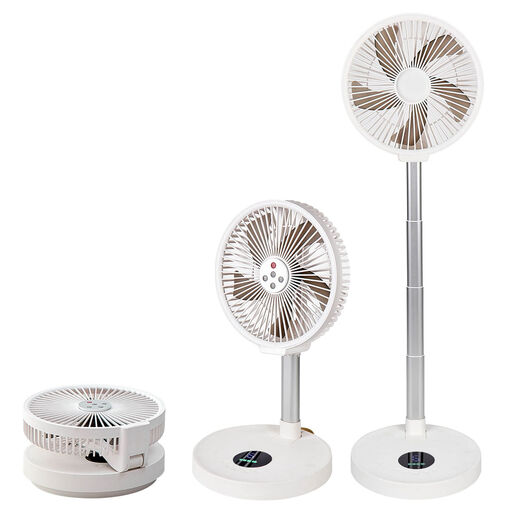
Foldable desk and floor fan, 7200 mAh

Foldable desk and floor fan, 7200 mAh

May suit you if you want one fan that you can use at your desk or as a floor model.

The product information lists a rechargeable 7200 mAh battery, remote control, six speeds, a timer, adjustable height, manual tilt and oscillation.

View at Joybuy
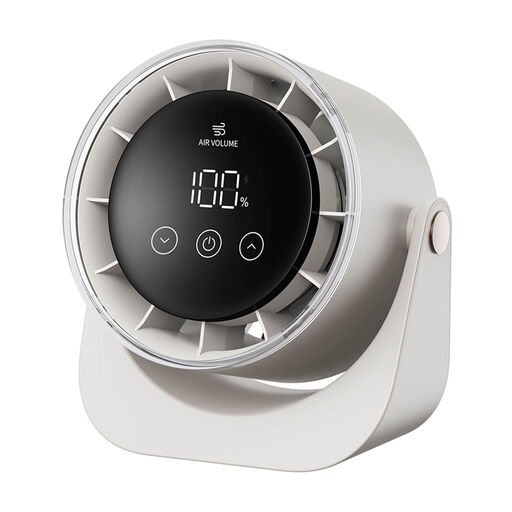
Compact cordless desk air circulator with LED display

Compact cordless desk air circulator

May suit you if you’re looking for a compact fan for your desk and want to be able to direct the airflow.

The product information lists a rechargeable battery, cordless operation, an LED display, 100 speed settings and 90° tilt adjustment.

View at Joybuy

Xiaomi Smart Standing Fan 2 with app control

Xiaomi Smart Standing Fan 2

May suit you if you want to use a fan on a desk or floor and distribute the air over a larger area.

The product information lists app control, 100 speed levels, adjustable height, automatic oscillation and a maximum airflow of 20 m³/min.

View at Joybuy
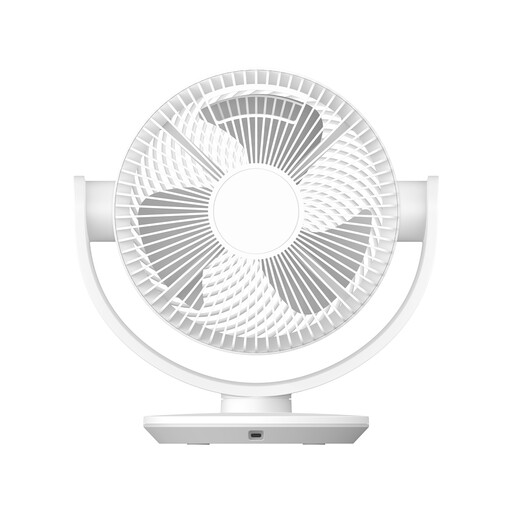
Xiaomi Smart Desktop Air Circulation Fan EU

Xiaomi Smart Desktop Air Circulation Fan EU

May suit you if you’re looking for a desk model to move air around your workspace.

The product information lists dimensions of 324 × 200 × 334 mm, a rated power of 18 W and a noise level of ≤60 dB(A).

View at Joybuy
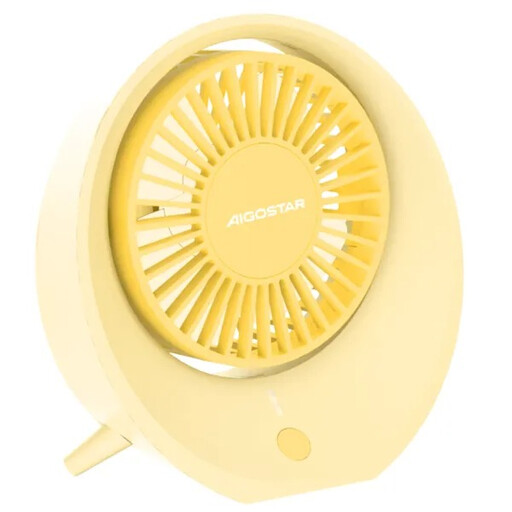
4 Inch USB Clip-on Fan - 4 Blades

4 Inch USB Clip-on Fan - 4 Blades

May suit you if you want to direct a breeze at a small workspace and attach a fan to an edge.

The product information lists three speeds, a built-in battery and dimensions of 153 × 70 × 160 mm. The stated coverage area is 2 m², so bear this in mind if you want to move air around the whole room.

View at Joybuy

Frequently asked questions

Will an air circulator actually make my student room colder?

A fan moves air, which can make you feel cooler, but it doesn’t lower the room temperature like an air conditioner. Shading and airing out the room are separate measures, as Milieu Centraal explains.

Can I keep the window or air vent closed when using an air circulator?

No, an air circulator isn’t a substitute for ventilation. For fresh air, outdoor air needs to be able to come in and polluted air needs to be able to leave; keep your existing ventilation provisions working.

Where should I place the fan, and how do I keep it clean?

Place the appliance on a stable surface and follow the instructions for the exact model when cleaning it or taking it apart. If the head tilts manually, check that you can direct it where you want without placing the fan on the edge of your desk.

What are my rights if I buy online and the fan isn’t suitable or develops a fault?

For online consumer purchases, you generally have a 14-day cooling-off period, according to the Dutch government; exceptions and conditions may apply. You also have statutory rights if a product is faulty. The Dutch government states that there’s no fixed statutory guarantee period; if a product is faulty, contact the seller.

Is CE marking mandatory for an electric fan in the Netherlands?

Yes, the Netherlands Food and Consumer Product Safety Authority states that CE marking is mandatory for electrical products. Check the marking on the exact model; the general rule doesn’t automatically confirm that an individual appliance on sale complies.
