
Vandaag of morgen in huis

Kwaliteit gegarandeerd

Welkomstaanbiedingen ontgrendelen: GRATIS bezorging | Tot 80% korting | Gratis 30 dagen JoyPlus-proefperiode
Download de app
A desk covered in charging cables, power leads and monitor cables looks untidy and makes cleaning more difficult. With effective desk cable management, you can keep connections accessible and prevent cables behind your workstation from becoming tangled. However, not every cable tray, cable spine or cable sleeve is suitable for every setup.
The main pitfalls often have less to do with appearance than with installation, dimensions and capacity. Below, you’ll find what to look out for before buying a solution for your desk or workstation.
A slim cable sleeve may look neat, but it might not have enough room for a thick power cable, HDMI cable and USB cable at the same time. Always check the diameter, length and maximum cable capacity. A 20 mm sleeve is different from a cable tray where cables can lie next to one another.
Not every desk is suitable for screw mounting. In a rented property, with a lacquered desktop or an adjustable desk, magnetic mounting or a clamp solution may be more practical. A screw-mounted cable spine provides a fixed position, but requires holes and a suitable surface.
A cable snake or cable sock can keep cables together, but it should not be so tight that you cannot replace a cable later. Only bundle cables that are undamaged. With power cables, it is important to follow the manufacturer’s instructions and avoid packing the bundle unnecessarily tightly. Cable protection also does not automatically prevent trip hazards, overloading or damaged wiring.
Measure the distance from the desktop to the floor or cable feed-through. A product length of around 130 cm may be suitable for many desks, but a height-adjustable desk may require additional movement space. Also check that the cable spine can move freely without catching on a drawer, leg or wall.
Magnetic mounting requires no tools and leaves the desktop intact. A clamp-on design is also suitable if you do not want to drill. Screw mounting provides a fixed attachment, but requires more preparation. For all variants, check that the desk’s surface and thickness are suitable.
A double cable tray or cable spine can route cables separately. This helps you organise power and data cables, but always check the actual amount of available space. A cable sleeve for up to four cables is not intended for a complete AV installation. For larger bundles, there are cable socks that, according to the product description, can conceal up to ten cables.
Want to organise cables around a gaming PC, docking station or monitor arm? Start by making a simple list of all your cables. Also allow for future connections, such as an extra screen, webcam or charger. This helps prevent you from having to buy again shortly afterwards.
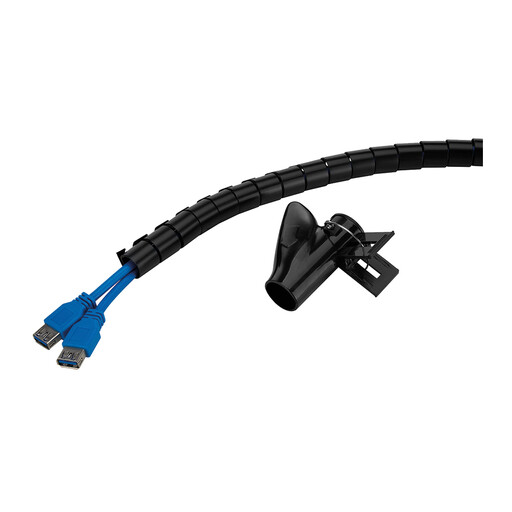
Why it suits this profile: For a simple home office with just a few cables, this sleeve provides a compact solution without complicated installation.
The Ø20 mm diameter and stated capacity of one to four cables make its intended use clearer than with a sleeve without defined dimensions.
200 cm length, can be cut to size and supplied with a cable guide.
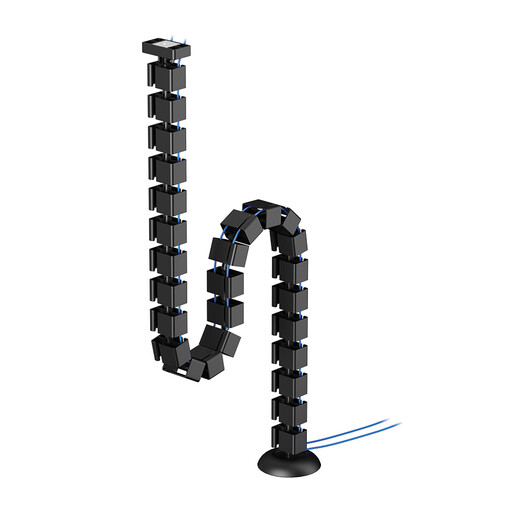
Why it suits this profile: Suitable for a permanent home office or workplace where a neat finish is important, but drilling is not desirable.
The magnetic mounting avoids screw holes. Its modular design allows you to match the length more closely to your desk setup.
27 flexible segments, two cable channels and a length of 130 cm.
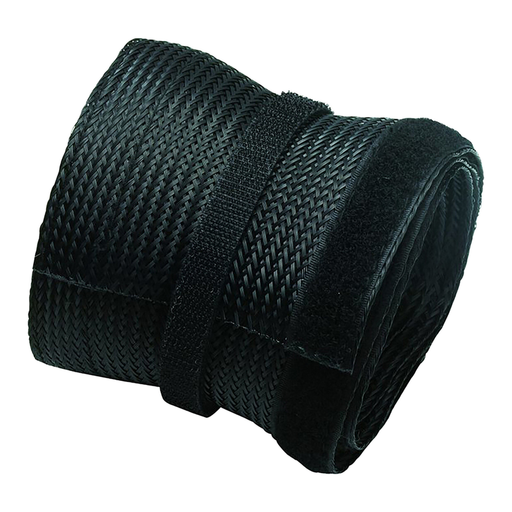
Why it suits this profile: A logical choice for gamers, AV installers and workstations with numerous cables leading to monitors, speakers or other equipment.
The product description states that it has room for up to ten cables and a hook-and-loop fastening. This makes it easier to add or remove cables later.
2-metre length, flexible design and suitable for larger cable bundles.
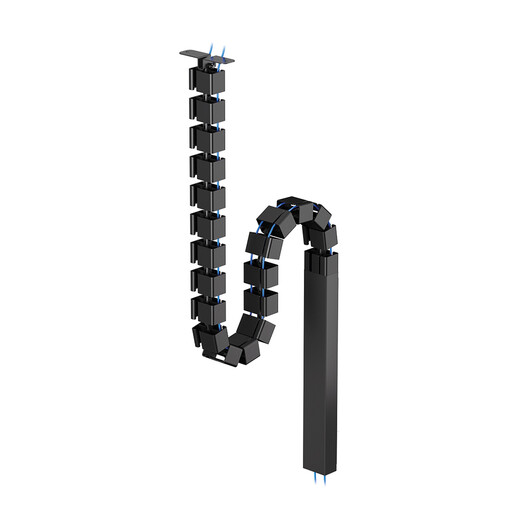
Why it suits this profile: For a desk that stays in the same place and where secure, permanent mounting is more important than a tool-free installation.
The screw-mounted design is clearly stated. Check the surface and position beforehand so that the cable spine is not attached in an unsuitable location.
27 flexible segments, two cable channels and a stated length of 128.7 cm.
Cable management does not prevent theft. If a laptop is used in a shared office, exhibition stand or public workspace, a laptop cable lock can provide an additional security measure. According to the product description, the Dell 461-AAEU has a 1.8-metre cable, a combination lock with four rotating dials and two anchors for Kensington and Noble security slots. Before buying, check that your laptop’s connection is compatible. Only use the lock for its intended purpose; it is not a cable for lifting or carrying.
We’ve put together a complete, up-to-date list of products that fully meet these strict selection criteria and the applicable European safety regulations.
Start by grouping cables by device. Then use a cable tray under the desktop for horizontal cables and a cable spine or cable sock for the vertical route to the floor. Choose the mounting method based on your desk: magnetic or clamp-on if you do not want to drill, or screw mounting for a permanent installation.
Its lifespan depends on the material, installation and load. Check regularly that fixings are still secure and that cables are not rubbing or bending sharply. Products with a modular design can often be adjusted more easily when your workstation changes. The stated warranty varies by model and is shown with the product details.
No. A cable tray, cable spine, cable sleeve or cable sock does not use electricity itself. However, a poorly arranged bundle can put cables under tension or prevent heat from escaping properly. Therefore, only use undamaged cables and avoid overfilled bundles.
