
Vandaag of morgen in huis

Kwaliteit gegarandeerd

Welkomstaanbiedingen ontgrendelen: GRATIS bezorging | Tot 80% korting | Gratis 30 dagen JoyPlus-proefperiode
Download de app
A desk may seem simple to choose until you actually start using it. A desktop that is too small, wobbly legs or cables getting in the way can make working and studying unnecessarily difficult every day. Marketing terms such as “ergonomic”, “extra sturdy” and “quietly adjustable” only mean something when they are backed up by specific details.
Pay particular attention to these three common pitfalls:
First, measure the area where the desk will go. Also allow space for an office chair, freedom of movement and access to power sockets.
Do not just look at the external dimensions. Also check whether the legs, cable ports and storage sections restrict legroom.
A standard desk usually has a fixed height. This can work perfectly well if the height suits your office chair and your height. A height-adjustable desk offers greater flexibility because you can adapt the working height.
For an electric model, check:
According to the product information, the JOYFURNOS models mentioned have a maximum static load of 70 kg. This is a product specification, not a guarantee that every setup will remain completely wobble-free in all circumstances. The surface, assembly and distribution of the weight also play a part.
Also check whether the desk is suitable for indoor use and how the electrical components should be protected from liquids.
A desktop made from chipboard with a metal frame is common across many models. Pay attention to the stated board quality, the frame construction and the adjustable feet. These feet are particularly useful on a floor that is not completely level.
A desk with cable management is practical when you use a monitor, laptop, charger or lamp. Cable holes, a hook or a storage compartment can help guide cables from the desktop to the power socket. However, check where the cable openings are located and whether they line up with your equipment.
Simple assembly is convenient, but make sure you allow enough time. Check all connections after assembly and do not use the desk above its stated load capacity.
The recommendations below are based on the stated dimensions, materials, features and product information. This makes it easier to match a model to your own space and way of working.
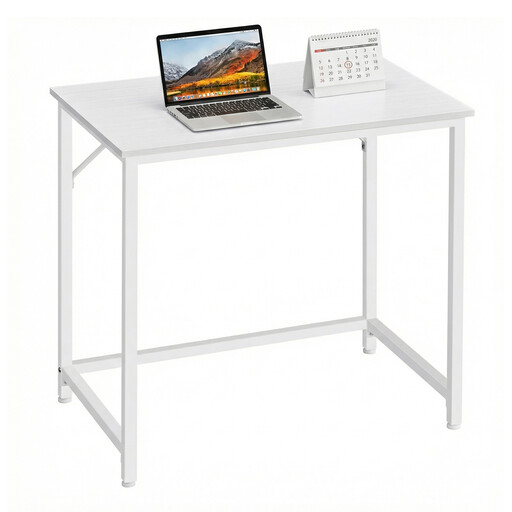
Why it suits this profile: The compact size is suitable for a laptop, books or a simple gaming setup in a small room.
The dimensions and maximum static load of 50 kg are clearly stated, allowing you to assess in advance whether the desktop is suitable for your equipment.
80 x 50 cm, white design, adjustable feet and a reinforced frame according to the product information.
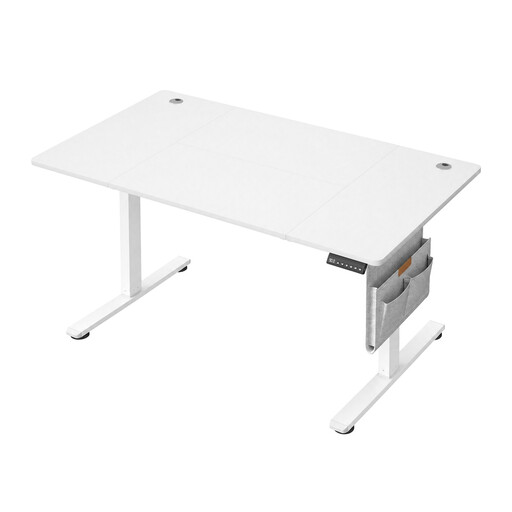
Why it suits this profile: The spacious desktop accommodates several screens, accessories and documents, while allowing you to alternate between sitting and standing.
According to the product specifications, the height ranges from 72 to 120 cm and the controller has four memory positions. Two cable holes are also listed.
160 x 70 cm, memory function, USB-C connection, cable management and a maximum static load of 70 kg.

Why it suits this profile: The L-shaped design provides two work surfaces and extra storage for documents, accessories and smaller items.
The storage is clearly described: four drawers and an open shelf with two levels. According to the product information, the drawers can be fitted on the left or right.
Dimensions: 150 x 110 x 75 cm, reversible L-shaped design, four drawers, two open shelves and adjustable feet.
We have put together a complete, up-to-date list of products that fully meet these strict selection criteria and the applicable European safety regulations.
A desk of around 120 x 60 cm may be sufficient for a laptop and one screen. If you use several monitors or often work with documents, look for a width of 140 to 160 cm. Always measure the available wall space and legroom before ordering.
An electric desk uses power when you adjust the height and while it is in standby mode. Exact consumption depends on the motor and how often you change the height. The product information for the model does not always include complete energy consumption figures in kilowatt-hours. Therefore, check the technical data if energy costs are important to you.
Its lifespan depends on the material, assembly, load and everyday use. A metal frame, secure connections and adjustable feet can contribute to a reliable construction. Do not place more weight on it than the stated maximum load, and regularly check after assembly that the screws are still tight. With an electric model, it is also advisable not to operate the motor continuously for longer than stated in the instructions.
