
Vandaag of morgen in huis

Kwaliteit gegarandeerd

Welkomstaanbiedingen ontgrendelen: GRATIS bezorging | Tot 80% korting | Gratis 30 dagen JoyPlus-proefperiode
Download de app
A desk may seem simple to choose, until you have to deal with a wobbly desktop, insufficient legroom or awkward cable arrangements every day. Home workers, students, gamers and families often look for one table that can serve several purposes. However, a computer desk, gaming desk, home office desk and study desk differ in important ways.
Pay particular attention to these three common pitfalls:
First measure the available space and compare it with the product dimensions. Pay attention to width, depth and height. A depth of around 50 cm is suitable for compact working or studying. For a monitor, keyboard and mouse, 60 cm or more generally provides greater freedom of movement.
If you are looking for a large desk for several screens, a printer or documents, consider a width of 140 to 160 cm. Also check the legroom: a wide desktop is of little use if the legs or a storage unit get in the way.
A sturdy desk usually consists of a sufficiently thick desktop and a frame that does not twist easily. Chipboard is a commonly used material and can be suitable for everyday use, but it is not the same as solid wood. Therefore, pay attention to:
A stated load capacity is not permission to place heavy equipment anywhere you like. Distribute the weight and follow the manufacturer's assembly and safety instructions.
A desk with storage can be useful if you want to keep books, accessories or a computer tower within easy reach. A desk with a monitor stand allows you to position the screen higher and store accessories beneath the raised section. However, check that the stand is wide enough for your monitor.
For gamers, a desk with LED lighting or a headset hook may be appealing. Also look at cable management, USB connections, power sockets and the maximum load of a CPU stand. LED lighting and electrical connections require extra care: keep liquids away from electronic components and unplug the desk before cleaning.

Why it suits this profile: This compact desk, measuring 80 x 50 x 76 cm, fits in a bedroom, student room or small home workspace. The combination of brown and black complements a modern interior.
The dimensions, materials and maximum static load of 50 kg are clearly stated. Adjustable feet help on an uneven floor.
Steel frame, compact work surface and assembly with labelled components according to the product description.

Why it suits this profile: The 160 x 80 cm desktop provides room for several screens, a printer, writing or a shared workspace. The vintage brown and black finish suits a modern office.
According to the product information, the wide legs, additional steel supports and adjustable foot pads are designed to provide extra stability. The stated load capacity is 400 kg; always use the instructions supplied.
160 x 80 cm of workspace, metal frame and a stated product weight of 26 kg.
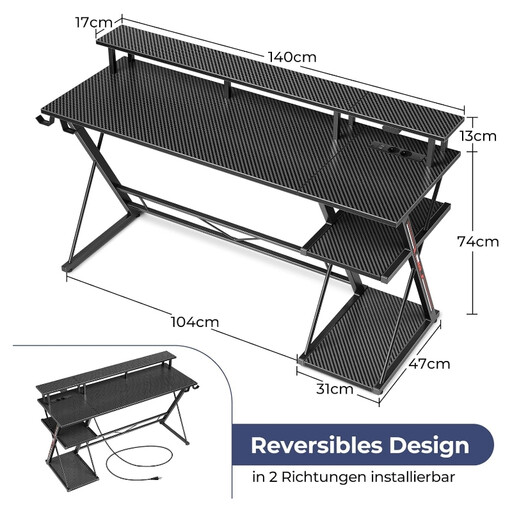
Why it suits this profile: This 140 cm gaming desk combines a carbon-look desktop with a monitor stand, headset hook, CPU stand and integrated RGB LED lighting.
The product information explicitly states that the desktop is made from chipboard and metal, not solid wood. This avoids creating the wrong expectations about the material.
Two power sockets, two USB ports, adjustable CPU stand and app-controlled RGB LED lighting according to the product description.
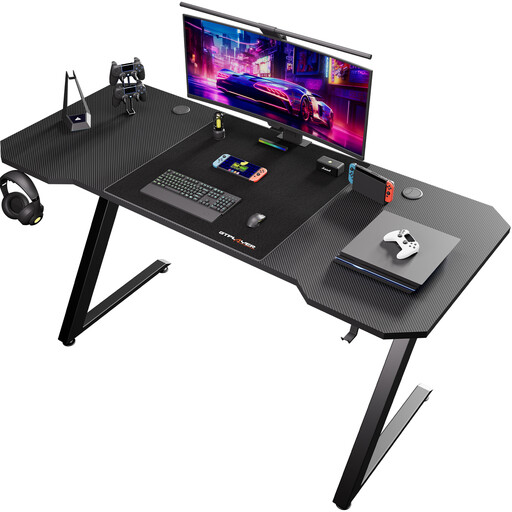
Why it suits this profile: The 120 x 60 cm size offers a practical middle ground for a gaming PC, monitor and accessories without taking over an entire room.
The dimensions and the inclusion of a headset hook are clearly stated in the product information. Check in advance whether a depth of 60 cm is sufficient for your monitor and peripherals.
120 x 60 cm size, carbon fibre-look surface and an integrated hook for a gaming headset.
We have put together a complete, up-to-date list of products that fully meet these strict selection criteria and the applicable European safety regulations.
Use this quick checklist before placing your order:
A compact desk may be sufficient for a laptop and basic accessories. If you work with a monitor, keyboard, documents and printer, you will generally benefit from a depth of at least 60 cm and a width of around 120 cm. Always measure the space before ordering.
Check whether the desk has adjustable feet and place it on a level surface. Tighten all connections according to the assembly instructions. A metal frame and additional supports can contribute to stability, but the overall sturdiness also depends on correct assembly and the floor.
Its lifespan depends on the material, load, moisture, assembly and everyday use. A chipboard desktop should be protected from moisture and must not be loaded beyond its stated capacity. Clean the surface with a soft cloth and do not use harsh products that could damage the finish or electronic components.
