
Vandaag of morgen in huis

Kwaliteit gegarandeerd

Welkomstaanbiedingen ontgrendelen: GRATIS bezorging | Tot 80% korting | Gratis 30 dagen JoyPlus-proefperiode
Download de app
A desk may seem straightforward, but the wrong choice often only becomes apparent after a few weeks. A tabletop that is too small leaves no room for a monitor, laptop and documents. An unstable frame makes typing and gaming uncomfortable. And a desk with extensive storage can take up too much floor space in a small bedroom.
As a Joybuy Product Recommendation Officer, I filter product information according to verifiable criteria such as dimensions, materials, load capacity and adjustability. This helps you compare a computer desk, study desk or home office desk based on practical features rather than attention-grabbing marketing claims.
A modern or industrial-style desk may complement your interior perfectly, but its appearance says little about stability. Always check the tabletop material, frame construction and whether adjustable feet are included. A metal frame with levelling feet can help when your floor is not completely even, but it cannot compensate for incorrect assembly.
The external dimensions do not always indicate how much usable space you actually have. With a corner desk, you also need to consider the position of drawers, shelves, skirting boards and power sockets. An L-shaped desk measuring 150 x 110 cm requires a different layout than a straight 160 x 80 cm tabletop.
Measure the following in advance:
A stated load capacity is usually a maximum static load. This does not automatically mean that you should safely place heavy equipment on the desk if you regularly move it around. Distribute monitors, speakers and computers as evenly as possible. Always follow the assembly instructions and do not exceed the product specifications.
For a compact workspace, a tabletop of approximately 80 x 50 cm is suitable for basic use with a single laptop or small monitor. For a more comprehensive computer desk, greater depth is more practical, keeping your monitor at a comfortable distance from the edge. A 140 x 60 cm tabletop provides more room for a monitor, keyboard and accessories.
A standard desk height is often around 75 cm. If you want to alternate between sitting and standing, consider an height-adjustable desk. According to the product description, the Ochama model in this selection adjusts electrically from 72 to 120 cm. It features four memory settings and a maximum static load capacity of 70 kg. The product information also states that the model includes a USB-C port and cable management. Before buying, check that the available height range suits your chair and body height.
Pay attention to the difference between particleboard, solid wood and metal. Particleboard combined with a steel frame can offer a practical balance between weight, price and sturdiness. However, quality also depends on the tabletop thickness, joints and assembly.
A stable desk should preferably have:
According to the product description, the LANTINE Desk measuring 160 x 80 cm has a powder-coated steel frame, two additional steel supports and adjustable feet. The product listing states a maximum capacity of 400 kg. Treat this as a product specification provided by the seller and use the desk in accordance with the assembly and safety instructions.
A desk with drawers is useful for documents, cables and small accessories. A desk with shelves keeps frequently used items within reach, although open compartments can also look untidy more quickly. With a corner desk, a reversible layout is important: check whether the drawers can be installed on both the left and right sides.
For a bedroom, a compact writing desk is often sufficient. For a home office with a printer, additional monitor and storage folders, a larger tabletop or L-shaped layout may be more efficient.
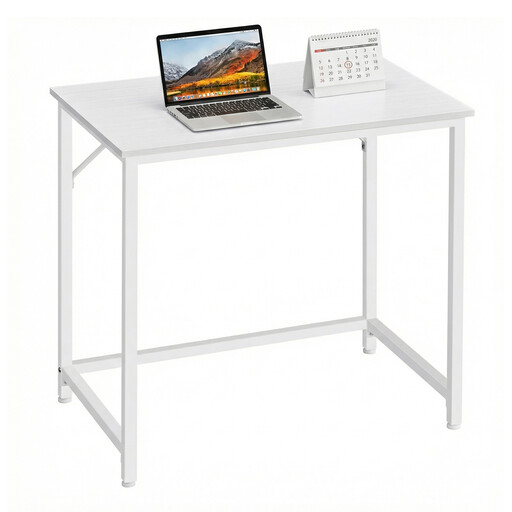
Why it suits this profile: A compact choice for students, school pupils or anyone looking for a bedroom desk. Its dimensions take up relatively little space and are suitable for working, studying or basic computer use.
The product information specifies adjustable feet and a reinforced frame. The stated dimensions and maximum static load of 50 kg make the intended limits clear.
80 x 50 x 75.5 cm, steel frame, particleboard and adjustable feet. Available in white for a calm, modern interior.

Why it suits this profile: A spacious option for remote workers, professionals and gamers with multiple screens. The straight tabletop accommodates monitors, a laptop, documents and accessories.
The stated tabletop size of 160 x 80 cm makes the available workspace easy to verify. The metal frame and adjustable feet address the most common stability concerns.
Spacious work surface, steel frame, additional supports and a stated static capacity of 400 kg according to the product listing.

Why it suits this profile: Ideal for remote workers who regularly switch between sitting and standing, or anyone looking for a flexible desk shared by multiple users. The memory settings are particularly convenient for everyday use.
The product description specifies an adjustment range of 72 to 120 cm, four memory settings and a maximum static load of 70 kg. The electrical safety instructions must be followed carefully.
Electric height adjustment, USB-C port, cable management and a steel frame. According to the product information, the overheating protection temporarily stops operation after prolonged continuous adjustment.
Browse a current selection of products and compare dimensions, storage space and layout before making a purchase.
Before assembly, check that all parts and fasteners are included. Loosely tighten the screws first and align the frame before fully tightening everything. Place the desk on a level surface and use the adjustable feet only for minor corrections.
With an electrically adjustable desk, cables must not become trapped. Keep liquids away from the adapter and controls. According to the Ochama model’s product information, it is not intended for outdoor use, and you should maintain sufficient clearance from the wall while adjusting the height.
Clean the desktop with a slightly damp cloth and avoid harsh cleaning products. After a few weeks, check that the screw connections are still tight, particularly if the desk is used every day or moved frequently.
For a laptop and basic work, 80 x 50 cm may be sufficient. For one or more monitors, a deeper tabletop of around 60 to 80 cm is generally more practical. Always measure the available room width and leave enough space for your chair and cables.
That depends on the two sides of the L-shaped design. A corner desk can make use of an otherwise unused corner, but it often takes up more width and depth than a straight desk. Also check which side the drawers or shelves will be installed on.
Its lifespan depends on the materials, assembly, load and maintenance. A steel frame and properly secured connections can contribute to stability, but the desk should be used within its stated maximum load. Before buying, check the product warranty, parts information and return terms.
