
Vandaag of morgen in huis

Kwaliteit gegarandeerd

Welkomstaanbiedingen ontgrendelen: GRATIS bezorging | Tot 80% korting | Gratis 30 dagen JoyPlus-proefperiode
Download de app
A desk may seem simple to choose, until you have to deal with wobbly legs, a worktop that is too small or cables that are constantly in the way. Home workers, students, gamers and office professionals also have different requirements. A compact desk fits into a student bedroom, while a large electric sit-stand desk provides more space for multiple screens.
Marketing copy often focuses on appearance and extra features. That is why you should pay particular attention to the specifications you notice every day: dimensions, load capacity, height range, frame construction and cable management options.
A desk measuring 160 cm wide may seem practical, but a wide worktop can become uncomfortable if the frame does not provide enough support. Look for a steel frame, additional crossbars and adjustable feet. The latter are useful when the floor is not completely level.
Treat the stated load capacity as a technical limit, not a target load. A monitor arm, computer tower, printer and speakers all contribute to the total weight.
An height-adjustable desk is only practical if it can move freely. Check that the cables have enough slack and that the worktop will not hit a wall, windowsill or cupboard while being adjusted.
For the electric models in this selection, the product information also states that overheating protection is provided during prolonged, continuous adjustment. According to the product description, you should then wait 18 minutes before using the desk again. Always read the instructions before use and keep electrical components away from liquids.
A desk with a memory function can be useful when several people share the same workspace or when you regularly alternate between sitting and standing. A desk with a USB-C port can help keep your workspace tidy, but it does not automatically replace a full charger or extension lead. Check the charging capacity and compatibility of your devices.
Cable management also deserves attention. A cable grommet, storage pouch or hook can help, but check that these components are suitable for your keyboard, monitor and power cables.
Choosing a 120 x 60 cm desk makes sense if you use one monitor, a laptop and basic accessories. This size takes up relatively little space and works well in a bedroom, home office or student room.
For two screens, a printer or plenty of writing space, a 160 x 70 cm desk or 160 x 80 cm desk gives you more freedom of movement. Measure not only the available wall width, but also the space needed for your chair and any cables at the back.
A small computer desk of approximately 80 x 50 cm may be suitable for a laptop, paperwork or occasional gaming. For an extensive gaming setup, a 120 x 60 cm worktop is more practical.
An electric sit-stand desk in this selection has a height range of approximately 72 to 120 cm. This range may suit different working positions, but the correct setting depends on your height, chair and monitor height. Adjust the screen so that you do not have to lean forwards constantly.
Also check the maximum static load. Several of the adjustable models below have a maximum load of 70 kg. This includes all equipment placed on the worktop. One traditional desk in the selection has a lower maximum load of 50 kg. This may be sufficient for a laptop or single screen, but less suitable for heavy equipment.
A sturdy desk with a steel frame provides a solid base, but the connections and assembly are equally important. Tighten screws evenly and check after a few weeks that the joints are still secure. Adjustable feet can compensate for small uneven areas in the floor, but they are not a solution for a significantly uneven surface.

Why it suits this profile: The compact size is suitable for a small room, laptop work, studying or a simple home workspace.
The specifications mention adjustable feet, allowing small uneven areas in the floor to be corrected. The maximum static load is 50 kg.
80 x 50 x 76 cm, steel frame, adjustable feet and a stated load capacity of 50 kg.

Why it suits this profile: The spacious worktop is ideal for a permanent workstation with multiple screens, a printer, documents or a large monitor setup.
The construction features a powder-coated steel frame, two additional supports, a triangular connection and adjustable feet.
160 x 80 cm worktop, 5 x 5 cm frame and a maximum capacity of up to 400 kg, according to the product information.
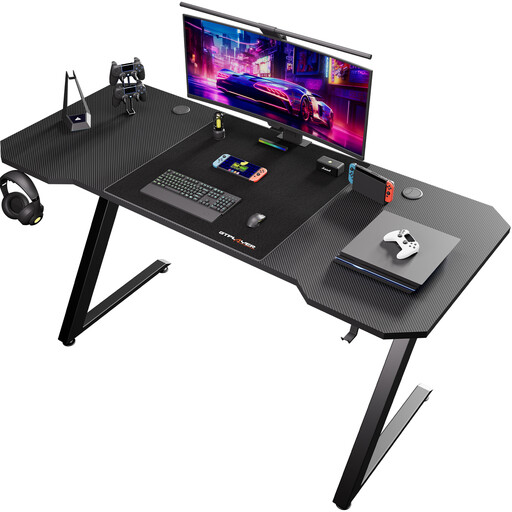
Why it suits this profile: This gaming desk is designed for a compact PC setup and, according to the product name, includes a headphone hook.
The dimensions are clearly stated: 120 x 60 cm. This allows you to check whether there is enough room for your monitor, keyboard and mouse.
Carbon-effect worktop, compact size and a headphone hook, according to the product information.

Why it suits this profile: The generous worktop and electric height adjustment are well suited to long periods of home working, studying or a workstation with multiple devices.
The model features a steel frame, memory function, cable holes, storage compartment, hook and USB-C connection. The static load capacity is 70 kg.
Dimensions of 160 x 70 cm, height range of 72–120 cm, memory function and USB-C port according to the product description.
We have put together a complete, up-to-date list of products that fully meet these strict selection criteria and the applicable European safety regulations.
A 120 x 60 cm desk provides space for a laptop or one monitor and is generally easier to position than a 160 cm model. Also measure the space needed for your chair and the walking route around the desk.
Power consumption depends on the motor power, frequency of use and standby mode. A motor usually only runs while the desk is being adjusted. Check the technical information and switch the desk off when this is possible according to the instructions.
Its lifespan depends on the load, assembly, floor and everyday use. A steel frame, correct assembly and staying within the stated maximum load can help limit wear. With an electric model, the moving parts and cables must also remain clear of obstacles.
