
Vandaag of morgen in huis

Kwaliteit gegarandeerd

Welkomstaanbiedingen ontgrendelen: GRATIS bezorging | Tot 80% korting | Gratis 30 dagen JoyPlus-proefperiode
Download de app
A desk may seem simple to choose, until you discover how much models can differ in size, stability and controls. A compact computer desk can be ideal for a student room, while a home office desk for two screens needs more depth and load capacity. If you mainly want to work standing up, an adjustable-height desk or electric desk is likely to be a better choice.
When comparing desks, don't just look at the colour or discount. The following pitfalls are common:
Choose the size based on what will actually be placed on the desk.
As well as the dimensions, check the height. A fixed desk is usually around 75 cm high. A sit-stand desk, for example, may be adjustable from approximately 72 to 120 cm. Check that this range suits your height and chair.
Most models in this selection combine chipboard with a steel frame. Chipboard is practical and relatively lightweight, but protect the desktop from moisture and prolonged pressure on one small area. A steel frame can provide extra strength, while adjustable feet are helpful if the floor is not completely level.
Pay attention to the difference between static load capacity and everyday use. A stated capacity of 50 or 70 kg is a product specification for the total static load. Add together the weight of monitors, computer, speakers and other items, and allow for movement while working or gaming. Do not exceed the limit.
For a gaming desk, extra accessories such as a headphone hook, monitor stand or CPU holder can be useful. However, check whether these components are included and how much space they take up.
An electric desk uses a motor, controller and adapter. A memory function can save your preferred sitting heights, so you do not have to find them again each time. A desk with a USB-C port can be useful for charging compatible devices, but check the charging capacity stated in the product information.
Cable management prevents cables from hanging over the edge or becoming trapped. Look for cable grommets, organisers, hooks and the distance to the socket. With electric models, you should also:
The product descriptions for various JOYFURNOS and Ochama models mention a safety feature that temporarily activates after prolonged, continuous adjustment. Treat this as a usage limitation to bear in mind, not as a reason to place unlimited strain on the motor.

Why it suits this profile: The compact 80 x 50 cm size fits in a student room, bedroom or small work nook. The desk is suitable for work, study or a basic gaming setup.
The dimensions and maximum static load of 50 kg are clearly stated. Adjustable feet help compensate for minor unevenness in the floor.
Compact size, steel frame and adjustable feet. According to the product description, the assembly components are labelled.

Why it suits this profile: This 160 x 70 cm desk offers room for multiple screens and accessories. The sit-stand function, memory controls and USB-C port are well suited to a comprehensive home office.
The product information states an adjustment range of 72 to 120 cm, a static load capacity of 70 kg and two cable grommets. This makes important purchasing information easy to check.
Spacious desktop, memory function, USB-C connection, cable management and three hooks. The colour is brown-black.
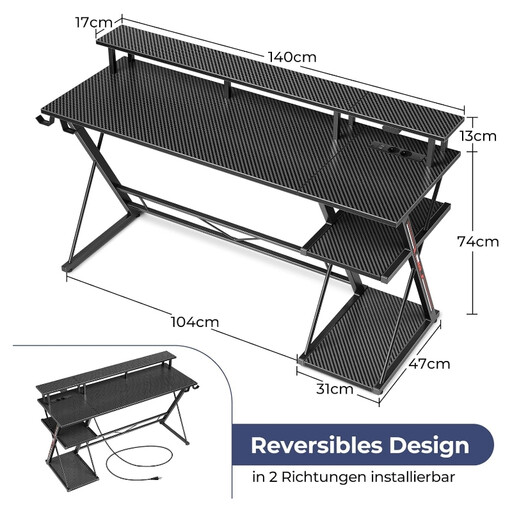
Why it suits this profile: This gaming desk is designed for a fixed PC setup with a monitor stand, headphone hook, CPU stand and integrated RGB lighting.
The description specifies the materials: a metal frame and chipboard. It also includes warnings about load capacity, a level surface and liquids near electronic components.
RGB LED lighting with app control, two sockets, two USB ports, monitor stand, headphone hook and adjustable CPU stand.
Place the desk on a level, stable floor and check after assembly that all screws are securely tightened. Use adjustable feet to reduce wobbling, but do not try to compensate for major unevenness in the floor with them. Position an electric desk with plenty of free space around the desktop, so that it does not rub against a wall, windowsill or cabinet while being adjusted.
Only secure the cables permanently after testing the highest and lowest positions. This prevents an adapter or monitor cable from becoming taut. On a black desk, dust and light scratches are more noticeable; on a brown-black desk, cables and accessories may blend in more visually. The colour is mainly a style choice, while the dimensions and construction determine everyday usability.
We have put together a complete, up-to-date list of products that fully meet these strict selection criteria and the applicable European safety regulations.
A fixed desk is often approximately 75 cm high. The right height depends on your height, chair and screen position. Your forearms should be able to rest comfortably on the desktop. With an adjustable-height desk, you can set the height more precisely and alternate between sitting and standing.
Its lifespan depends on the material, assembly, load and maintenance. A steel frame and securely attached desktop can support daily use, but moisture, overloading and frequent moving can accelerate wear. Regularly check the screws, cables and adjustable feet.
An electric desk mainly uses electricity while it is being adjusted. Exact consumption depends on the motor, frequency of use and standby function. A controller with an energy-saving mode can limit consumption when the desk is not being adjusted. Unplug it when it will not be used for an extended period, if this is appropriate according to the instructions.
