What should you look for when choosing?
Start with portability, the screen and the ports you need for your changing workspaces. Only factor in local GIS processing if you actually use that software on your laptop.
| What to consider |
What should you check? |
Who does this matter most to? |
| Portability and power |
Check the weight of the exact configuration, the charger included and the supported charging connection. |
If I often move between workspaces, I want a laptop that’s easy to carry and charge; this is the top priority for around 38% of consumers who value portability most. |
| Map readability |
Compare the diagonal measurement, resolution and any anti-glare features of the screen variant you’re ordering; also check whether an external monitor is available at your workspace. |
When I need to assess map details and report text clearly, the screen is my main consideration; around 31% of consumers put readability first. |
| Local GIS software |
First note the application and version. Then compare the operating system and relevant hardware with the official requirements for that software. |
If I want to process GIS projects locally rather than just view the results, the configuration needs to suit my software; this is the top priority for around 16% of consumers. |
| Workspace and data protection |
Check which monitors, keyboards and connections are available at your workspaces. If you handle personal data, ask about your organisation’s security policy. |
I want a laptop that suits my workspaces and the way my organisation handles data; this is the top priority for around 15% of consumers. |
Joybuy laptops for reports and maps
These Joybuy picks are intended for viewing and editing reports and maps in different locations. If you want to process GIS projects locally, check your software requirements separately.
 No image available
HP OmniBook 3 AI PC 14-ht0013nd, 8 GB RAM, 512 GB SSD
An option to compare if you want to view reports and maps on a 14-inch screen and need ports for different workspaces.
14-inch IPS screen with 1920 × 1200 pixels; Windows 11 Home; Intel Core 3 304; 8 GB RAM and 512 GB SSD; USB-C, USB-A and HDMI.
View at Joybuy
 No image available
HP OmniBook 3 14-hy0058ndx, 8 GB RAM, 512 GB SSD
This configuration could suit you if you want to carry a 14-inch laptop and the listed ports meet your needs at your workspaces.
14-inch IPS screen with 1920 × 1200 pixels; Windows 11 Home; AMD Ryzen 5 7520U; 8 GB RAM and 512 GB SSD; USB-C with Power Delivery, USB-A and HDMI; stated weight approx. 1.42 kg.
The product description states that no charger is included. Bear this in mind when checking your charging options.
View at Joybuy
 No image available
MSI Modern 14 F1MG-867NL, 16 GB RAM, 512 GB SSD
One to compare if you often move between workspaces and need an anti-glare screen and the listed ports.
14-inch Full HD IPS-level screen; Windows 11 Home; Intel Core 7 150U; 16 GB DDR4 and 512 GB SSD; USB-C with Power Delivery and HDMI; stated weight 1.40 kg.
View at Joybuy
 No image available
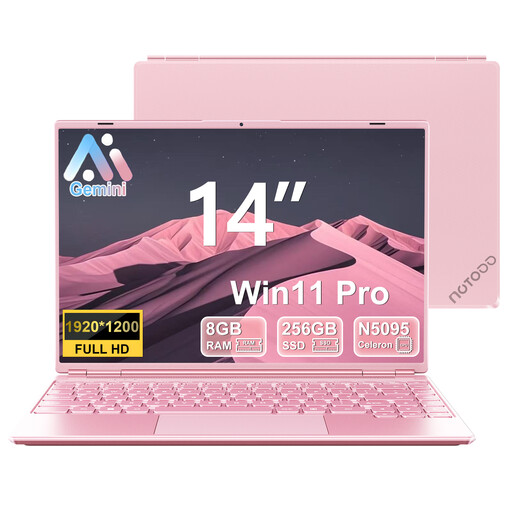
NOTODD 14-inch laptop, Celeron N5095, 8 GB RAM, 256 GB SSD
An option to compare for web browsing, documents and viewing research maps.
14-inch screen with 1920 × 1200 pixels; Windows 11; quad-core Celeron N5095, stated speed up to 2.9 GHz; 8 GB RAM and 256 GB SSD.
View at Joybuy
 No image available
Apple MacBook Air 13-inch M5, 24 GB RAM, 1 TB SSD
This configuration is worth comparing if you mainly view reports and maps and want a compact macOS laptop for use in different locations.
13.6-inch screen with 2560 × 1664 pixels; 24 GB memory and 1 TB SSD; two Thunderbolt 4 ports; stated weight 1.23 kg and MagSafe charging.
For local use of ArcGIS Pro 3.7, macOS isn’t a direct substitute for Windows under the applicable system requirements.
View at Joybuy
Frequently asked questions
Do I need a dedicated graphics card for delta research?
Not just to read reports and maps. If you process GIS projects locally, compare the operating system and full configuration with the requirements for the application and version you use; Esri publishes the requirements for ArcGIS Pro 3.7.
What should I do if I work at my laptop for long periods?
For employees who spend more than two hours a day working with a screen, Arboportaal describes requirements under which the screen and keyboard must not be attached to each other. Check whether your workspace allows you to set up a separate screen or keyboard; this requirement doesn’t automatically apply to every buyer.
Can I expect the stated battery life when working with maps?
You can’t infer that from a battery-life figure for a different usage scenario. Apple gives separate maximum figures for video streaming and wireless web browsing on the MacBook Air M5; compare those test activities with your own work and check how you can charge the laptop while you’re out and about.
Will any USB-C charger work, and is one always included?
No. A USB-C port alone doesn’t tell you whether a charger is included with the configuration or whether it meets the charging requirements. The European Commission states that, since 28 April 2026, EU rules for a common charging solution also apply to laptops; also check the required charging power and what comes with the model you choose.
Do I need to consider data security when working with research files?
If your organisation processes personal data, appropriate security measures are required. The Dutch Data Protection Authority lists access controls, updates, backups and encryption among the possible measures; what’s appropriate depends on the processing and your organisation’s policy.


