
Vandaag of morgen in huis

Kwaliteit gegarandeerd

Welkomstaanbiedingen ontgrendelen: GRATIS bezorging | Tot 80% korting | Gratis 30 dagen JoyPlus-proefperiode
Download de app
Choosing a monitor for working from home or the office can seem straightforward on paper. However, marketing terms such as “eye comfort”, “USB-C” and “120 Hz” may not tell the whole story. The Dell UltraSharp U2724DE monitor is aimed at business professionals, home workers and content creators looking for a 27-inch QHD monitor with a wide range of connections. But is it right for your laptop, desk and working style?
Before you buy, pay particular attention to three things: what the USB-C and Thunderbolt connections can actually do, the ergonomic adjustments available, and the difference between resolution and panel technology.
A USB-C port can combine video, data and power, but charging capacity varies between models. The Dell U2724DE is listed as having Thunderbolt 4, and its product specifications state that USB-C delivers 15 watts. That’s different from a monitor that can fully charge a business laptop through a single cable.
So check:
A 120 Hz monitor displays movement more smoothly than a standard 60 Hz model, but that doesn’t tell you how sharp text will look or how much workspace you’ll have. The Dell UltraSharp U2724DE combines 120 Hz with 2560 x 1440 pixels. On a 27-inch screen, that offers a practical balance between desk space and detail.
A 27-inch Full HD monitor has the same physical dimensions, but fewer pixels. For spreadsheets, side-by-side windows and detailed interfaces, QHD can be more comfortable to work with.
According to its product description, the U2724DE comes with Enhanced ComfortView Plus, an ambient light sensor and a five-star TÜV Rheinland eye comfort certification. These are product specifications and certification claims; they’re not a medical guarantee and don’t replace good working habits.
Adjust the brightness to suit the room, avoid placing the screen directly opposite a window and take regular breaks. An ergonomic monitor can only help if you set the height, viewing distance and angle correctly.
The Dell UltraSharp U2724DE is a 27-inch QHD monitor with a resolution of 2560 x 1440 pixels, a 16:9 aspect ratio and a 178-degree viewing angle. QHD gives you more workspace than Full HD without making text and interface elements extremely small at a normal desk distance.
For example, you can position a browser, document and messaging app side by side when multitasking. If you mainly work with very wide timelines or several large spreadsheets, an ultrawide monitor may be more practical.
The screen uses IPS Black technology. According to the stated product specifications, it has a static contrast ratio of 2,000:1. This can produce deeper blacks than many conventional IPS panels. The monitor also offers 10-bit colour and a stated response time of 5 milliseconds in Fast mode.
For image editing, it’s also worth checking which colour profiles your software and computer use. A monitor with a wide colour gamut doesn’t replace colour management or calibration.
According to the product information, the Dell U2724DE has Thunderbolt 4, HDMI, DisplayPort, USB-C, several USB ports and an RJ45 network port. The built-in USB hub lets you connect a keyboard, mouse or other peripherals in one central place.
The Auto KVM feature is particularly useful if you work with two computers. Check the manual and required cable connections in advance, as not all laptops support the same features via Thunderbolt or USB-C.
The stand supports height adjustment, tilt, swivel and a 90-degree pivot. The monitor is also compatible with a VESA 100 x 100 mm mount. This makes it suitable as an ergonomic monitor for an adjustable desk or monitor arm.
Always check the weight limit when using a monitor arm. The stated product weight with the stand is approximately 6.98 kg.
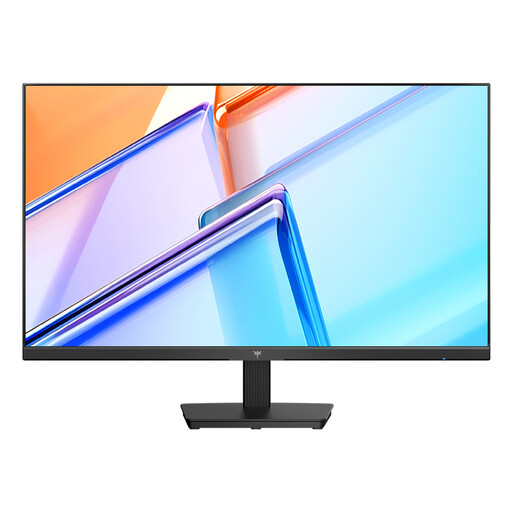
Why it suits this profile: A 27-inch QHD model with 120 Hz is a sensible starting point for office work, study and everyday computing if you don’t need Thunderbolt 4.
The key display specifications are clear: QHD resolution and 120 Hz. You don’t automatically pay for business docking features you may not use.
27 inches, 2560 x 1440 pixels, an IPS panel according to the product listing, and HDMI and DisplayPort connections.
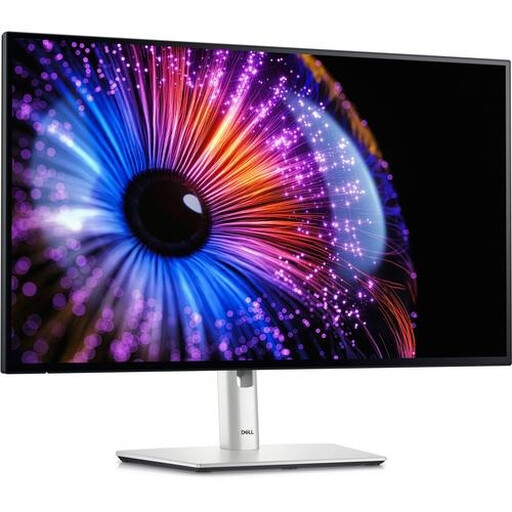
Why it suits this profile: Designed for professionals who want to combine QHD, IPS Black, ergonomic features, a USB hub and Thunderbolt 4 in one business setup.
The connections are specified rather than simply described as “USB-C”. However, check compatibility and note the stated USB-C power output of just 15 watts.
2560 x 1440 pixels, IPS Black, 120 Hz, Thunderbolt 4, RJ45, Auto KVM and an adjustable stand.
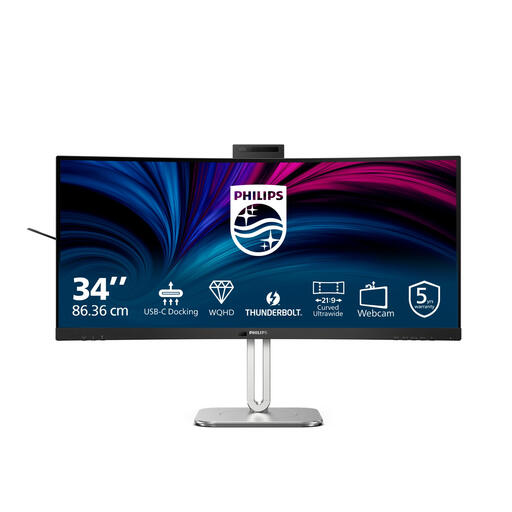
Why it suits this profile: For multitaskers who value extra horizontal space, a built-in webcam and video conferencing features more than a compact 27-inch screen.
The wide 21:9 aspect ratio gives you extra workspace without needing two separate screens. Check beforehand that your desk is wide enough.
34 inches, 3440 x 1440 pixels, 120 Hz, Thunderbolt 4, Smart KVM, webcam and USB Power Delivery according to the product information.
We’ve put together a complete, up-to-date list of products that meet these strict selection criteria and the applicable European safety regulations.
That depends on your laptop’s connections. The monitor supports Thunderbolt 4, USB-C, HDMI and DisplayPort. Check whether your laptop can output video via USB-C or Thunderbolt. If you’re unsure, use DisplayPort or HDMI for the picture and a separate cable for peripherals.
Its lifespan depends on usage, heat, brightness settings and the surrounding conditions. Use the supplied or approved cables, keep the ventilation openings clear and clean the screen with a soft, dry cloth. The stated manufacturer’s warranty for this model is two years; your statutory consumer rights may also apply.
A higher refresh rate can affect power consumption, depending on brightness, connected equipment and operating mode. The Dell U2724DE’s product specifications state a typical power consumption of approximately 24.4 watts and standby consumption of 0.5 watts. Your actual costs will depend on your electricity tariff and how many hours you use it.
