If you regularly scan piles of loose delivery notes, a scanner with a document feeder is likely to suit the way you work. Check whether you need double-sided scanning and whether your paper is suitable for the feeder. A flatbed scanner is an alternative for individual, creased or delicate documents. If you have a small workspace, also consider how much room the scanner needs while in use and how easily you can find your files later.
Which scanners suit different users?
For scanning piles of delivery notes
Do you regularly receive several loose delivery notes and want to avoid placing each sheet on the scanner separately? Compare the document feeder, supported paper types and double-sided scanning options. PrintAbout describes a document feeder as a way to process multiple pages in sequence; Brother lists a 20-sheet feeder for the ADS-1300.
For scanning paper with care
If you mainly scan individual, creased or delicate papers, a flatbed scanner may suit your need to place each document on the glass separately. Check that the scanning area is large enough; Canon specifies an A4 scanning area for the CanoScan LiDE 400.
For limited desk space
Want to use your scanner in a small hobby room and find delivery notes easily later? Consider not only where the device will sit, but also how much space the feeder or lid needs while scanning, as well as the software available. Epson lists a U-turn path for the ES-C320W; Epson ScanSmart supports OCR to searchable PDFs.
What should you consider when choosing?
Flatbed scanner
Best for: individual documents that you would rather not feed through rollers.
Bear in mind: you have to place each sheet on the glass separately.
USB document feeder
Best for: stacks of suitable loose sheets that you scan using a computer.
Bear in mind: check that your paper type is suitable and that your computer has the required port.
Wi-Fi document feeder
Best for: a hobby room where placement and your preferred software workflow are important.
Bear in mind: check the scanning path, software and paper feed for your documents.
First, decide whether you mainly want to process stacks or handle delicate sheets with care. Then check the file types, workspace and connection you need.
| What to consider |
What to look for |
Who this matters to |
| Processing stacks |
Check the feeder capacity and supported paper types; also consider whether you need double-sided scanning. |
If I want to process several suitable delivery notes in a row, I’ll focus on the feeder and scanning both sides of the paper. Around 29% of consumers give stack processing top priority. |
| Delicate paper |
Check the condition and size of the delivery notes, then compare them with the scanning area or feed path. |
If I have creased or delicate sheets that I’d rather not feed through rollers, I want to be able to place them individually. Around 21% of consumers prioritise careful scanning. |
| Easy-to-find files |
Check whether the software for the exact model supports OCR and searchable PDFs, and works with your computer. |
If I want to search for an order number later, a scanned file with searchable text is useful. Around 21% of consumers make it their top priority to be able to find digital files easily. |
| Space and connection |
Measure the space available while the scanner is in use and check whether you need USB, Wi-Fi or power from a computer. |
In a small hobby room, I want to know whether the scanner will fit with paper loaded or the lid open. Around 29% of consumers prioritise the workspace available to them. |
Common mistakes when choosing
-
Assuming a high dpi value means text will be searchable
Scanning resolution and text recognition are different features. A scan saved as an image won’t automatically be searchable by, for example, an order number.
Check whether the software for your model supports OCR to searchable PDFs. Check any important recognised details.
-
Feeding every delivery note through the scanner automatically
A feeder scanner isn’t necessarily suitable for thick or delicate paper; the feed path you choose matters.
Sort out unusual or delicate sheets beforehand, and compare a flatbed scanner or a suitable straight-through feed.
-
Comparing only the dimensions when the scanner is stored away
The feeder, output tray or access to a flatbed lid can all affect how practical the scanner is in your workspace.
Measure the space available while you’re scanning and check the connection and power supply in advance.
-
Confusing an extended warranty with your statutory rights
An extended warranty does not replace your statutory rights. The Rijksoverheid explains that an additional warranty comes on top of the statutory guarantee.
Read the terms of any extended warranty and compare them with your existing rights before deciding.
Brands to compare
Brother
The ADS-1300 makes Brother worth considering if you’re looking for a compact feeder scanner for loose delivery notes.
- Brother lists a 20-sheet feeder, double-sided scanning and USB-C power for this model.
- Brother lists a mains adaptor as a separate accessory; check which power supply you’ll need for your set-up.
Canon
The CanoScan LiDE 400 makes Canon worth considering if you want to place individual papers on a flatbed.
- Canon specifies an A4 scanning area, USB power and a Z-lid for this model.
- With a flatbed, you have to place each document on the scanner by hand. Check that the scanning area is large enough for your biggest delivery note.
Epson
The ES-C320W makes Epson worth considering if you want a Wi-Fi feed path and a software workflow for digital archiving.
- Epson lists a U-turn path and a straight-through feed for this model. Epson ScanSmart supports OCR to searchable PDFs and is compatible with the ES-C320W.
- Check which paper path suits your documents and whether the software you want works with your computer.
Joybuy scanners for delivery notes
These Joybuy product picks are document scanners for loose delivery notes, including models with automatic feeders and handheld scanners.
 No image available
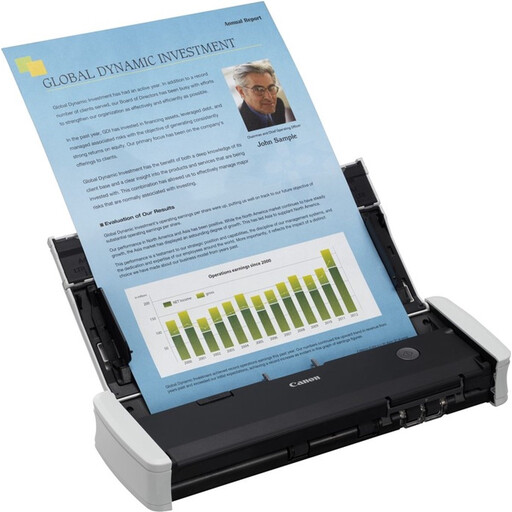
Canon imageFORMULA R10
Suitable for scanning stacks of loose delivery notes using a computer.
A 20-sheet automatic feeder and double-sided scanning are listed, along with a USB connection and CaptureOnTouch Lite software.
View at Joybuy
 No image available
Epson ES-C320W
Suited to a small workspace where Wi-Fi and a U-turn path are useful.
Wi-Fi, double-sided scanning and a U-turn path are listed. Epson ScanSmart supports OCR to searchable PDFs and is compatible with this model.
View at Joybuy
 No image available
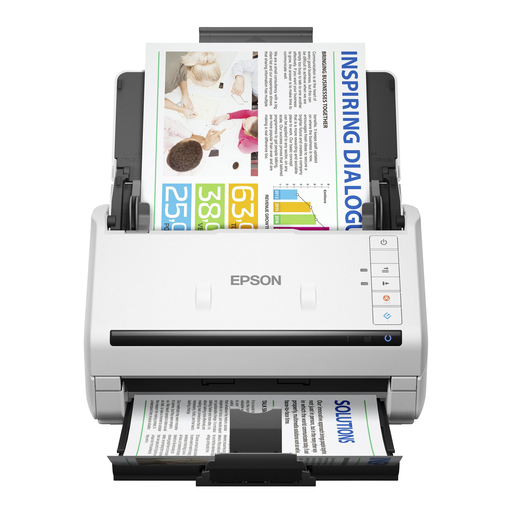
Epson DS-770 II
Suitable for processing stacks of delivery notes using a computer.
The description lists a 100-sheet automatic feeder, double-sided scanning in a single pass and a slow mode for delicate documents. USB 3.0 and Epson Scan 2.0 are also listed.
View at Joybuy
 No image available
Epson WorkForce DS-70
A handheld model for scanning documents up to A4 in a compact workspace.
USB power from a computer is listed. The product description mentions software for searchable PDFs.
View at Joybuy
 No image available
Epson WorkForce DS-80W
Suited to anyone considering a compact handheld scanner with Wi-Fi or a USB connection.
Wi-Fi, a battery and a USB connection to a computer are listed. The description mentions an automatic feed mode and OCR software for searchable PDFs.
View at Joybuy
Frequently asked questions
Do I need a flatbed or an automatic feeder for loose delivery notes?
A flatbed is suited to individual or delicate papers that you’d rather not feed through a scanner. If you regularly scan stacks of suitable sheets, compare the feeder capacity and double-sided scanning options. Also check that your paper is suitable for the feeder you choose.
How can I make scanned delivery notes searchable?
You’ll need OCR software that recognises text in scans and can save it, for example, as a searchable PDF. Epson lists this feature for ScanSmart and names the ES-C320W as compatible; check any important recognised order numbers and amounts.
What should I check when setting up and maintaining a scanner?
Before buying, check the connection and software requirements for your computer. Brother lists USB-C power for the ADS-1300, while Canon provides model-specific drivers and manuals. Consult the manual for your exact model for cleaning instructions and help with feed problems, and remove any fasteners before loading paper.
What returns and warranty rights apply to an online purchase in the Netherlands?
For eligible distance purchases from a business, you usually have a 14-day cooling-off period, according to the Rijksoverheid. There is no fixed term for the statutory guarantee in the Netherlands: the product must do what you can reasonably expect it to. An additional warranty does not replace this right.
Can I scan delivery notes containing personal data at home?
According to the Autoriteit Persoonsgegevens, processing carried out solely for personal or household use falls outside the GDPR. This exemption does not necessarily apply to business use or public sharing. If your scans contain other people’s details, consider how you store and share them.


